| ID |
Date |
Author |
Subject |
|
Draft
|
Fri Sep 3 14:06:39 2021 |
Alex M | Plots for 9/3/21 Collaboration Meeting |
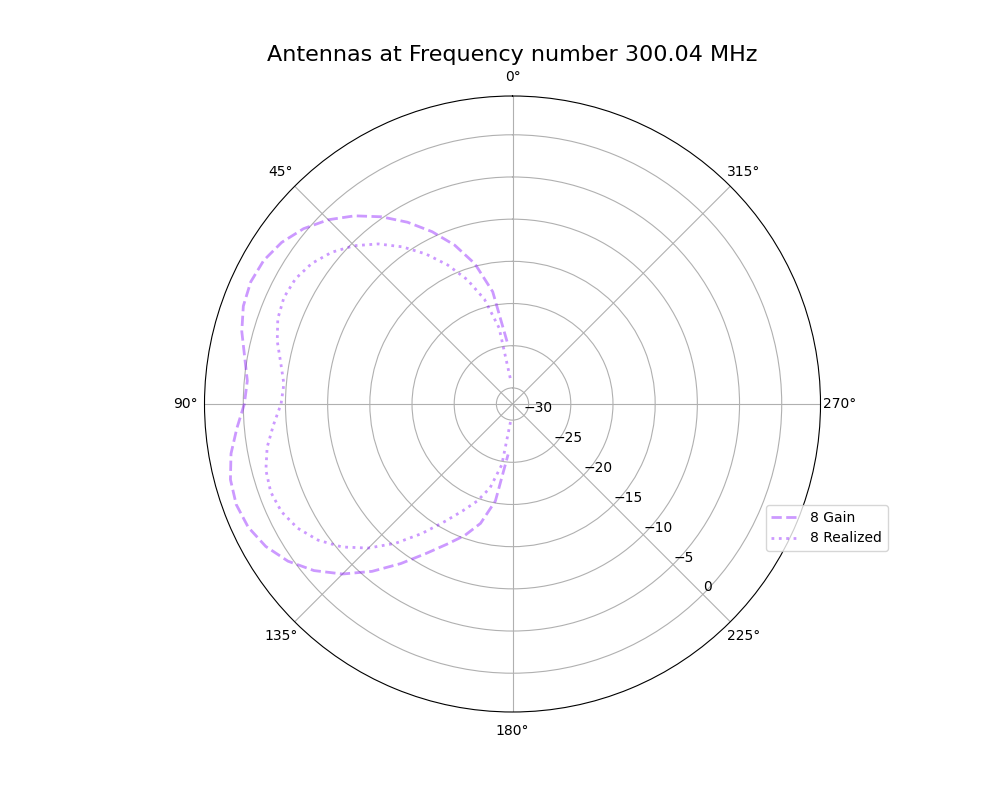
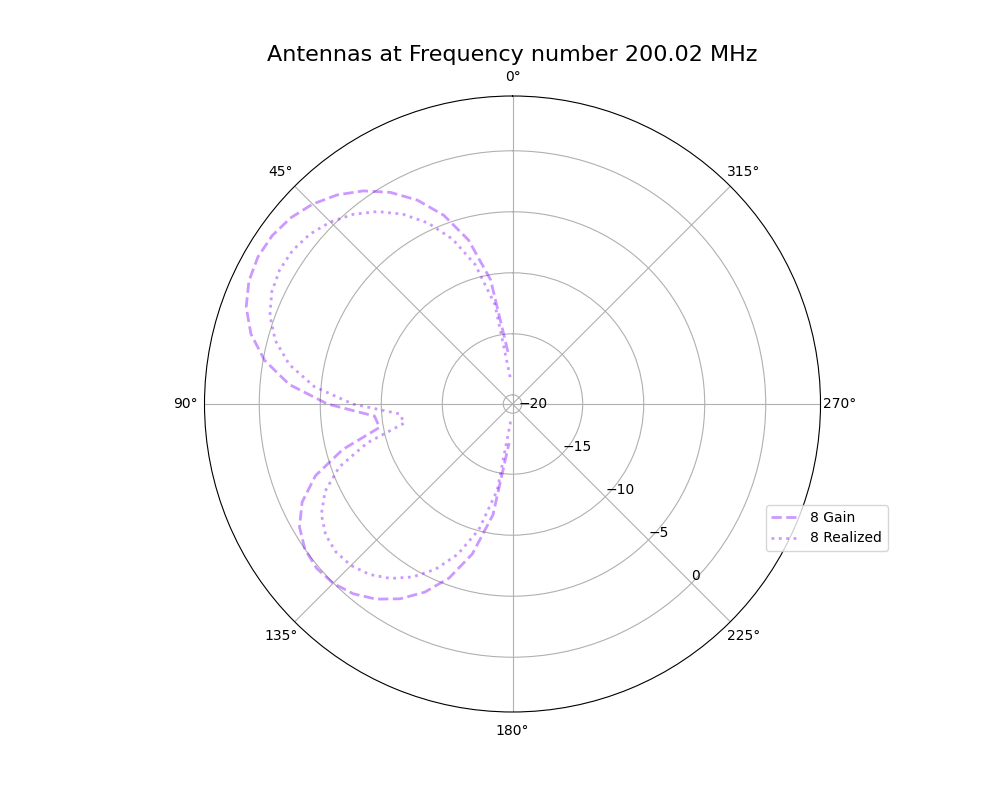
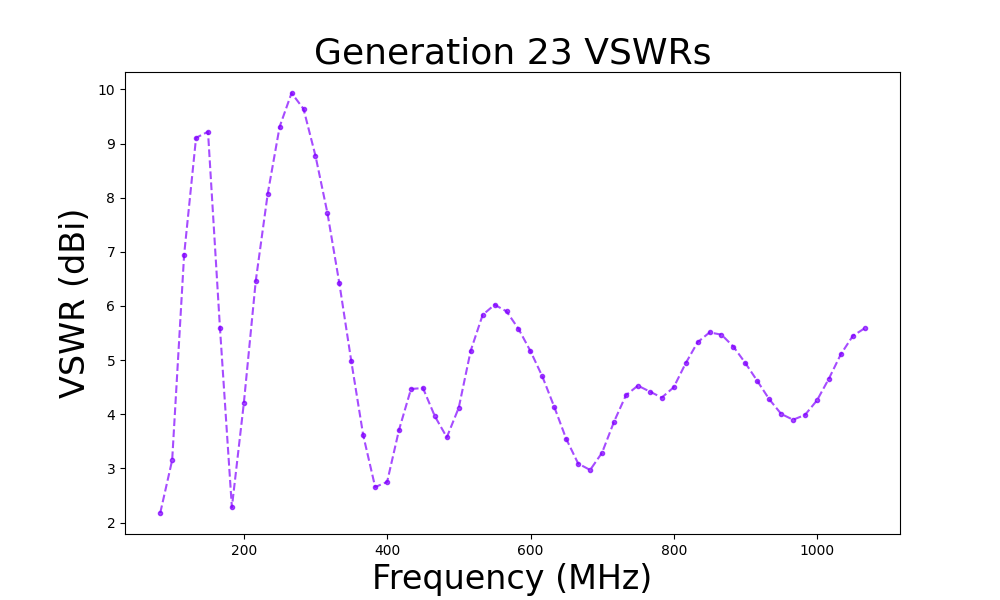
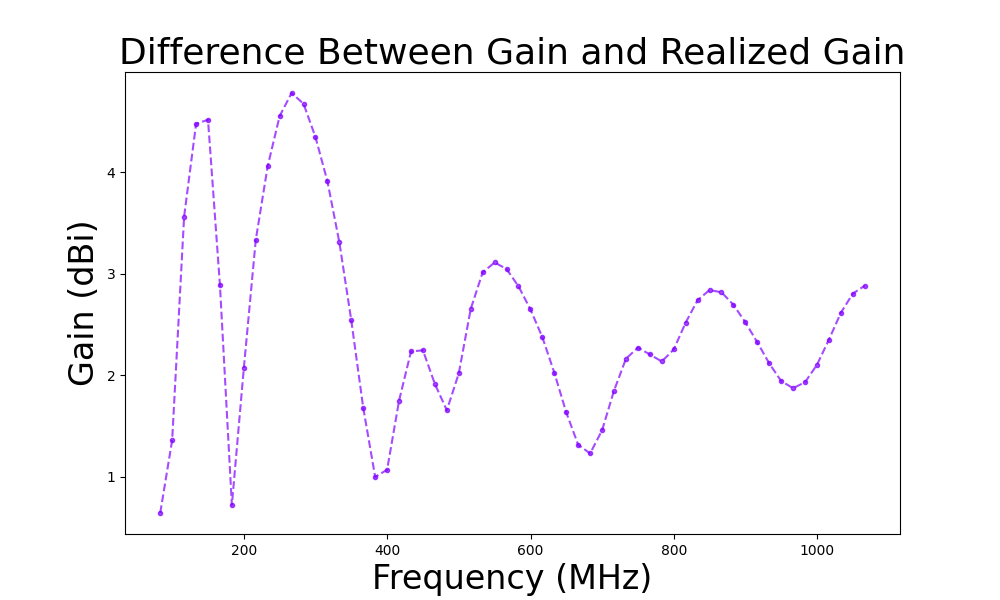
Here are plots I made for the meeting on 9/3/21. These plots represent a comparison of the gain and realized gain for the 23rd generation of the run being discussed in the upcoming paper. Here is a list of the plots
- Gain vs realized gain
- Polar plots of the best individual from generation 23
- S11/VSWR plots
- Shows the S11/VSWR over the bandwidth for the best individual
|
|
136
|
Fri Sep 3 14:28:55 2021 |
Alex M | Plots for 9/3/21 Collaboration Meeting |
This ELOG post contains plots I made this week for comparing the antennas as they were evolved in the run being discussed in the upcoming paper with those same antennas when using realized gain instead of gain. These plots are preliminary, in that they should be edited before being placed in a paper (for example, VSWR is not in dBi).
Plots:
- Gain vs Realized gain
- Polar plot showing the gain and realized gain of the best individual from the run in the paper
- VSWR/S11
- The VSWR of the best individual in the run over the frequency bandwidth
- Gain differences
- The difference between the gain and the realized gain for the best individual over the frequency bandwidth
|
| Attachment 1: polar_plot_300.04.png
|
 |
| Attachment 2: polar_plot_200.02.png
|
 |
| Attachment 3: VSWR_plot_1811.png
|
 |
| Attachment 4: mean_gain_difference_1811.png
|
 |
|
137
|
Wed Sep 8 16:36:33 2021 |
Alex M | MODE Workshop Presentation |
We presented at a workshop put on by the MODE collaboration. MODE is a collaboration dedicated to applying Automatic Differentiation to detector design. Here's the website: https://mode-collaboration.github.io/#:~:text=MODE%20(for%20Machine%2Dlearning%20Optimized,in%20space%2C%20and%20in%20nuclear
|
| Attachment 1: GENETIS_MODE_Presentation.pptx
|
|
148
|
Fri Mar 25 17:14:01 2022 |
Alex M | Antenna Minimum Length Investigation |
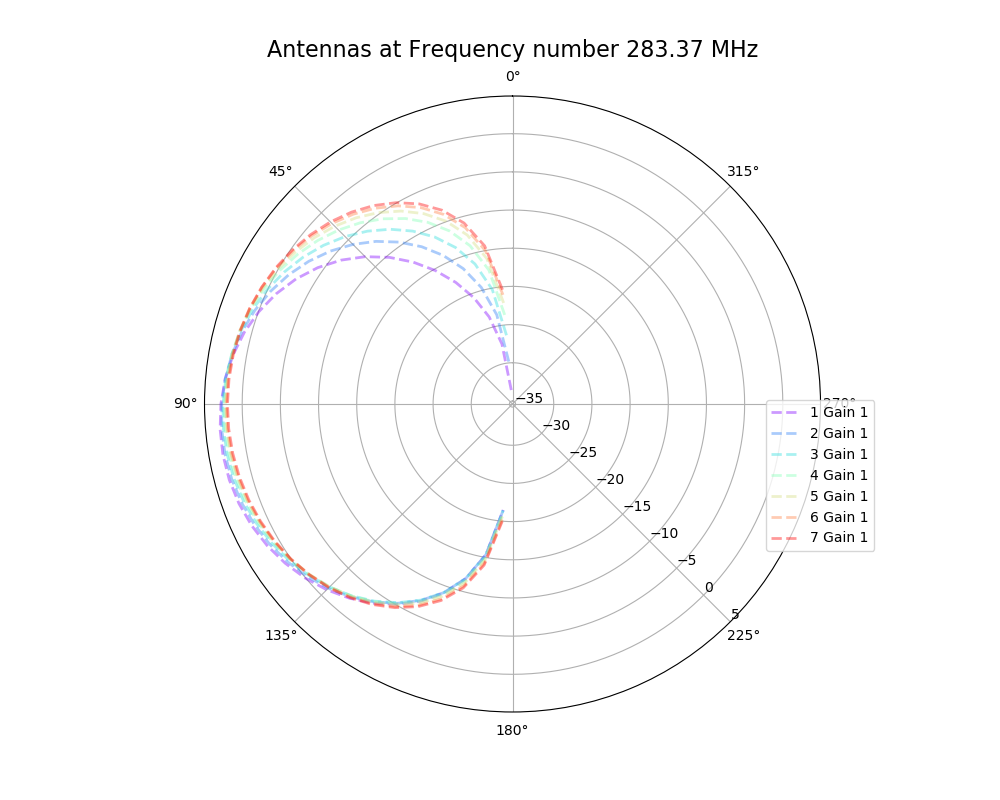
The reviewer of the paper we are trying to publish (as well as other external colleagues we showed the paper to) asked about our minimum length we implemented in the loop. Currently, we cut off the length at a minimum of 37.5 cm for each cone (minimum of 75 cm for the full cone). There is an ELOG post from Amy that presented the reasoning for this ( http://radiorm.physics.ohio-state.edu/elog/GENETIS/81 ). We initially thought that we needed a minimum because the antennas were evolving to be small (around and lower than the minimum). We thought that XFdtd was being inaccurate at lengths lower than 37.5 cm, so we set that as a minimum. To see if we can replicate any strange behavior from XFdtd, I simulated antennas at and below our minimum length and generated plots of their antennas responses. The genes are listed below, corresponding to the patterns in the plot. The results do not look unusual (that is, not dissimilar to the other bicones we have generated, including the ARA bicone) and seem to show an improved sensitivity in the upward direction for shorter bicones. The equation we used to arrive at this minimum (f = c/(4L)) might be indicative of a maximum length rather than a minimum.
| Inner radius |
Length |
Quadratic |
Linear |
2.4892,37.5,-0.00142604,0.032832
4.64522,37.5,0.00153863,-0.14004
2.4892,34.5,-0.00142604,0.032832
4.64522,34.5,0.00153863,-0.14004
2.4892,31.5,-0.00142604,0.032832
4.64522,31.5,0.00153863,-0.14004
2.4892,27.5,-0.00142604,0.032832
4.64522,27.5,0.00153863,-0.14004
2.4892,23.5,-0.00142604,0.032832
4.64522,23.5,0.00153863,-0.14004
2.4892,19.5,-0.00142604,0.032832
4.64522,19.5,0.00153863,-0.14004
2.4892,15.5,-0.00142604,0.032832
4.64522,15.5,0.00153863,-0.14004
|
| Attachment 1: polar_plot_283.37.png
|
 |
|
149
|
Fri Mar 25 17:32:25 2022 |
Alex M | XFdtd Step Size Investigation |
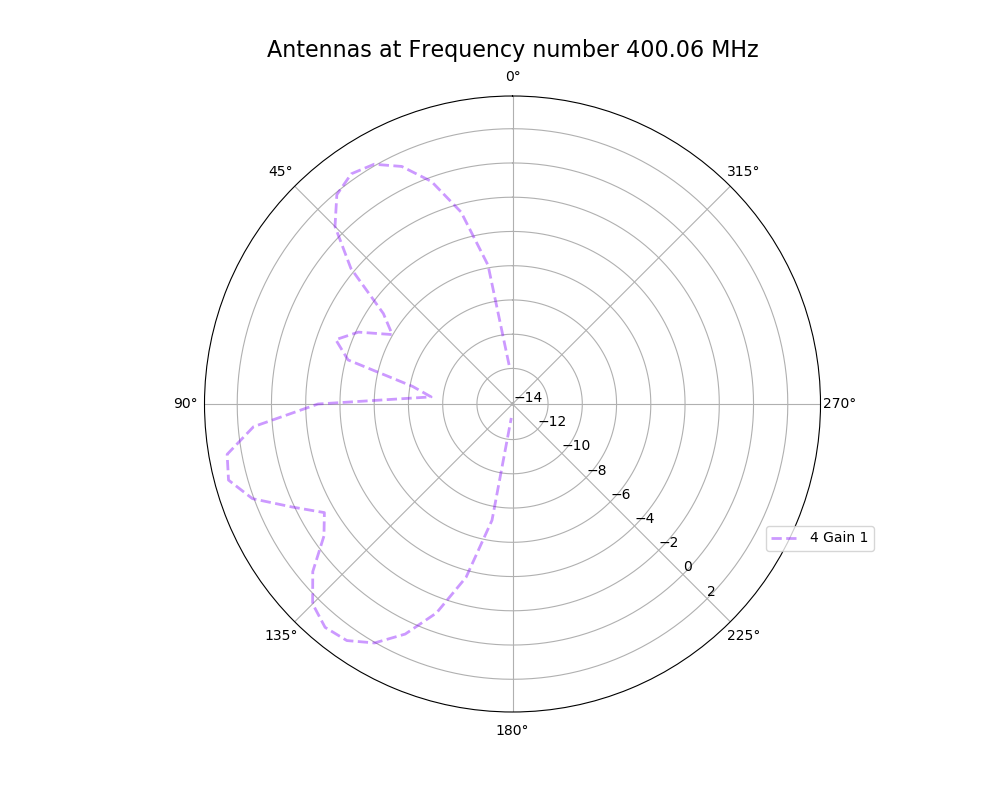
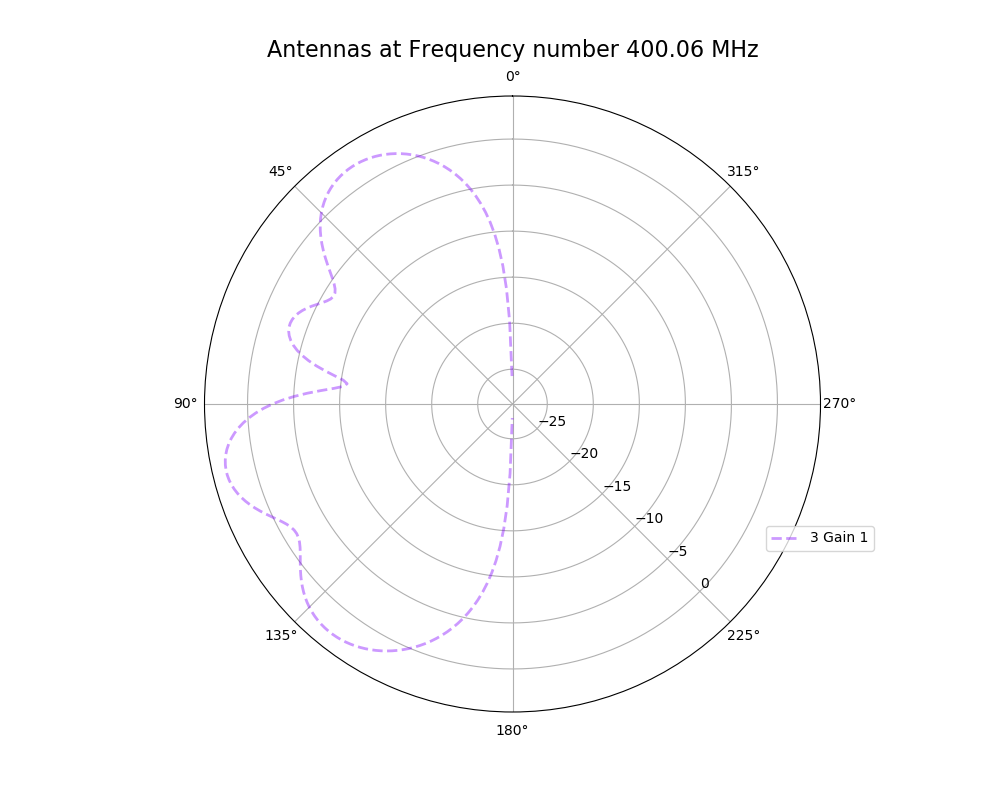
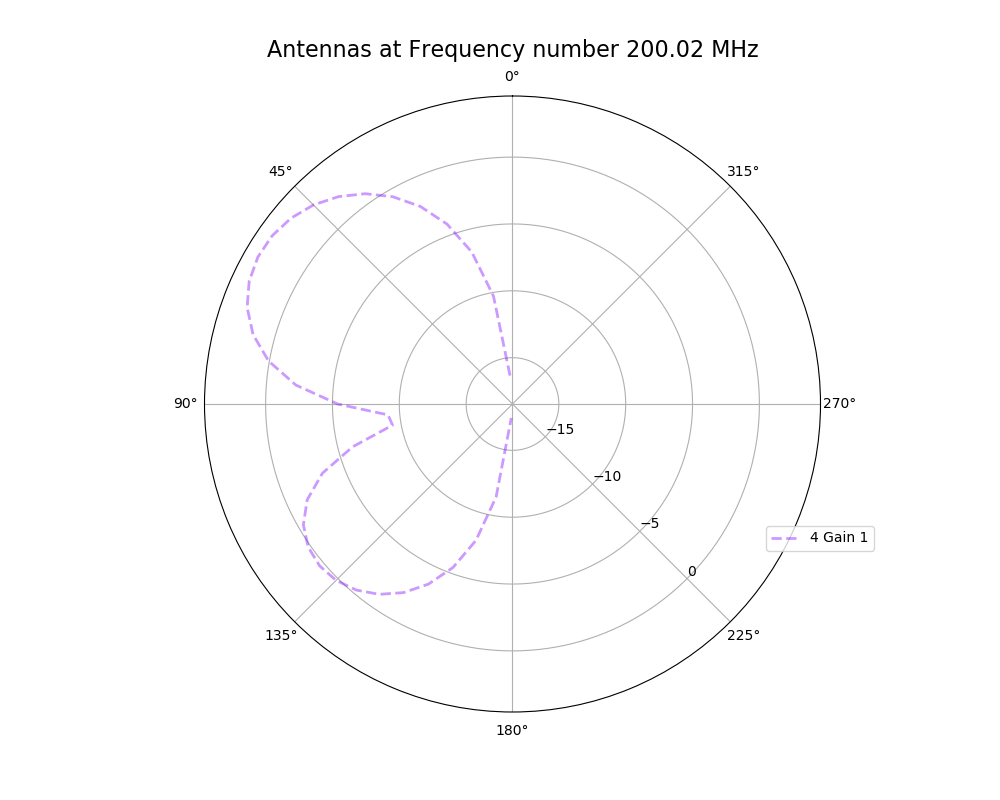
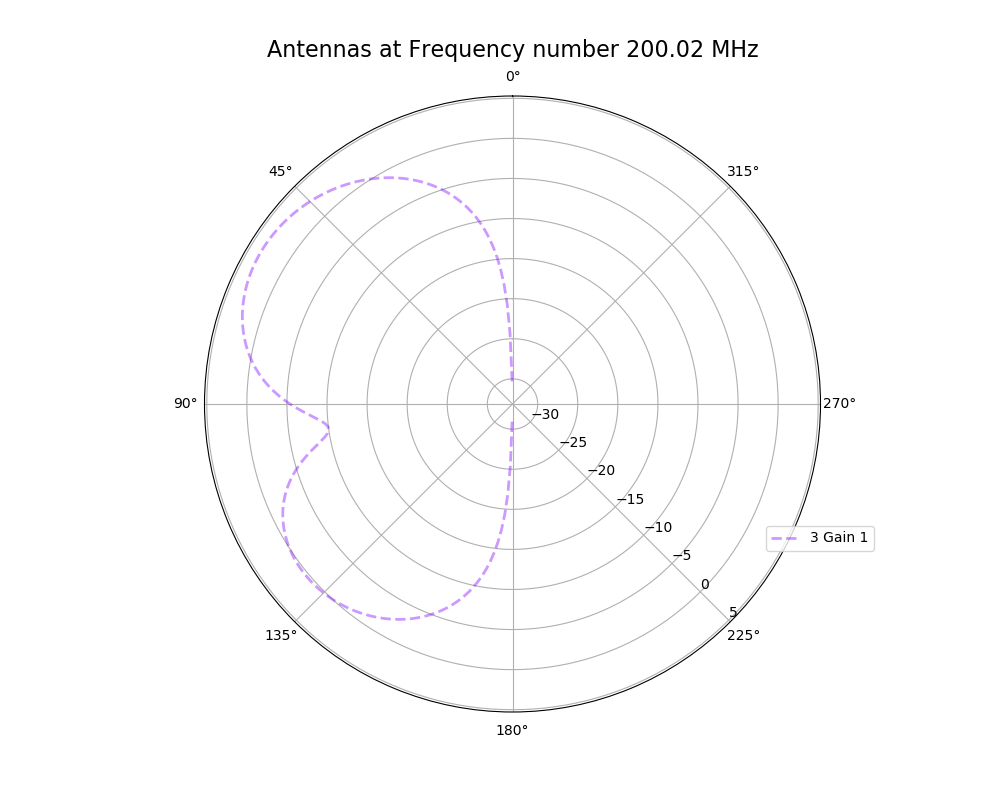
The reviewer for the paper we recently submitted mentioned that our step sizes at which we are measuring the gain in XFdtd may be too large. They pointed out that there appear to be "lobes" at 400 MHz. I ran the antenna we presented in the paper through XFdtd using a step size of 5 degrees (what we've been doing) and a step size of 1 degree (the reveiwer's recommendation). Attached are antenna responses for these two different step sizes at 200 MHz and 400 MHz. Qualitatively, there are noticeable differences in the "jaggedness" of the 400 MHz plot and how extreme the minima and maxima appear, but the basic shape is preserved. We can try to do a more quantitative analysis (ex: run these through AraSim), but doing so may be more time intensive than necessary considering that AraSim may require 5 degree steps and that adding these images to an appendix may be sufficient anyway. |
| Attachment 1: polar_plot_400.06_step_5.png
|
 |
| Attachment 2: polar_plot_400.06_step_1.png
|
 |
| Attachment 3: polar_plot_200.02_step_5.png
|
 |
| Attachment 4: polar_plot_200.02_step_1.png
|
 |
|
152
|
Fri Apr 8 16:07:22 2022 |
Alex M | Identical Asymmetric Lowered Length Minimum Run |
We are trying to do a short run of the asymmetric bicone so that we can see how it tries to evolve the antenna when the minimum length is lowered from 37.5 cm to 10 cm. Currently, there is a problem with the loop in the asymmetric version. Attached is the run detail file. |
| Attachment 1: run_details.txt
|
####### VARIABLES: LINES TO CHECK OVER WHEN STARTING A NEW RUN ###############################################################################################
RunName='2022_04_07_Identical_Asym'	## This is the name of the run. You need to make a unique name each time you run.
TotalGens=100			## number of generations (after initial) to run through
NPOP=50				## number of individuals per generation; please keep this value below 99
Seeds=10			## This is how many AraSim jobs will run for each individual## the number frequencies being iterated over in XF (Currectly only affects the output.xmacro loop)
FREQ=60				## the number frequencies being iterated over in XF (Currectly only affects the output.xmacro loop)
NNT=30000			## Number of Neutrinos Thrown in AraSim
exp=18				## exponent of the energy for the neutrinos in AraSim
ScaleFactor=1.0			## ScaleFactor used when punishing fitness scores of antennae larger than the drilling holes
GeoFactor=1			## This is the number by which we are scaling DOWN our antennas. This is passed to many files
num_keys=4			## how many XF keys we are letting this run use
database_flag=0			## 0 if not using the database, 1 if using the database
				## These next 3 define the symmetry of the cones.
RADIUS=1			## If 1, radius is asymmetric. If 0, radius is symmetric
LENGTH=1			## If 1, length is asymmetric. If 0, length is symmetric
ANGLE=1				## If 1, angle is asymmetric. If 0, angle is symmetric
CURVED=0			## If 1, evolve curved sides. If 0, sides are straight
A=1				## If 1, A is asymmetric
B=1				## If 1, B is asymmetric
SEPARATION=0    		## If 1, separation evolves. If 0, separation is constant
NSECTIONS=2 			## The number of chromosomes
DEBUG_MODE=0			## 1 for testing (ex: send specific seeds), 0 for real runs
				## These next variables are the values passed to the GA
REPRODUCTION=3			## Number (not fraction!) of individuals formed through reproduction
CROSSOVER=36			## Number (not fraction!) of individuals formed through crossover
MUTATION=1			## Probability of mutation (divided by 100)
SIGMA=5				## Standard deviation for the mutation operation (divided by 100)
ROULETTE=2			## Percent of individuals selected through roulette (divided by 10)
TOURNAMENT=8			## Percent of individuals selected through tournament (divided by 10)
RANK=0				## Percent of individuals selected through rank (divided by 10)
ELITE=0				## Elite function on/off (1/0)

#####################################################################################################################################################
|
|
154
|
Fri May 20 14:26:39 2022 |
Alex M | GA Papers |
I'm making this entry so that I can record some interesting papers we find on genetic algorithms. Feel free to update this list with links to papers and maybe make a description of what was interesting/of note in the paper.
|
|
157
|
Mon Jun 6 14:19:59 2022 |
Alex M | Important Runs (2) |
This is a duplicate post of a previous post from the end of 2020 where I listed the important runs with some of their details in a table (as below). I am extending this table to include the important runs that have been conducted since this post. This includes the run used for the paper as well as the curved run done earlier this year.
In order to access the data for these runs, you can find them by going to this directory: /fs/ess/PAS1960/BiconeEvolutionOSC/BiconeEvolution/current_antenna_evo_build/XF_Loop/Evolutionary_Loop/Run_Outputs
Some of these runs can also be accessed in the old project space directory, though they should all be contained in the above directory. Here's the path if interested:
The runs are contained in directories available in the above path. Use caution when listing files in some of these directories--some contain many files (primarily the .uan files -- more recent runs are better organized), which means it may take a long time to list files/directories.
| Name |
Description |
Symmetry |
NPOP |
Generations |
Roulette/Tourney/Rank |
Crossover |
Reproduction |
Mutation |
Injection |
Penalty |
Neutrinos |
|
| Machtay_20200824_Real_Run |
First real run with significant amounts of data after the summer improvements.______________________________________
|
Symmetric |
10 |
15 |
100% Roulette |
100% |
0% |
- |
100% |
Yes |
100k |
|
| Machtay_20200827_Asym_Length_Run |
First asymmetric length run after summer improvements. |
Asymmetric length |
10 |
17 |
100% Roulette |
100% |
0% |
- |
100% |
Yes |
100k |
|
| Machtay_20200831_Asym_Length_and_Angle |
Asymmetric length and angle run after summer improvements. |
Asymmetric length and angle |
10 |
42 |
100% Roulette |
100% |
0% |
- |
100% |
Yes |
150k |
|
| Machtay_20200911_Symmetric |
Longer symmetric run with fewer neutrinos. |
Symmetric |
10 |
35 |
100% Roulette |
100% |
0% |
- |
100% |
Yes |
30k |
|
| Machtay_20200914_Asymmetric_50_Individuals |
Longer asymmetric run with fewer neutrinos. |
Asymmetric (all dimensions) |
50 |
26 |
100% Roulette |
100% |
0% |
- |
100% |
Yes |
30k |
|
| Machtay_20201016_Symmetric_Improved_GA |
First run using improvements to GA based on Ryan's paperclip/fast loop analysis. |
Symmetric |
50 |
10 |
50/50/0 |
75% |
10% |
- |
15% |
Yes |
30k |
|
| Machtay_20201023_300K_Nus_50_Individuals |
Started with all identical individuals to demonstrate evolution; replaced penalty with hard cutoff. Increased Nus for higher fitness score precision. |
Asymmetric (all dimensions |
50 |
25 |
50/50/0 |
75% |
10% |
- |
15% |
No |
300k |
|
| AraSim_Polarity_Fix_2021_03_19 |
Run used in the paper. In this run, we fixed an error that had been noticed by Brian and Jorge in AraSim. The error involved the polarity of the signals in Report.cc (hence the name of this run). |
Asymmetric(all dimensions) |
50 |
31 |
80/20/0 |
72% |
6% |
- |
22% |
No |
300k |
|
| 2022_02_08_Rank_Test |
This was the first long run done using a new gene for the curvature of the cones. We recast the side lengths to be described by the coefficients of a quadratic polynomial, rather than by the opening angle. This also used rank selection instead of roulette.
Additionally, mutation has been changed here so as to apply small perturbations to existing genes rather than regenerating those genes altogether. This only applies to individuals created by crossover. The mutation column indicates the probability of mutating a gene and the standard deviation of the gaussian that determines the change (in terms of % of the original value).
|
Asymmetric, Quadratic |
50 |
50 |
0/90/10 |
72% |
6% |
1%, 5% |
22% |
No |
300k |
|
| 2022_04_14_Identical_Asym_Lower_Min |
This run used the asymmetric GA to see if by lowering the minimum length (down to 10 cm instead of 37.5) the GA would try to run away to ever smaller lengths. |
Asymmetric |
50 |
6 |
2/8/0 |
72% |
6% |
- |
22% |
No |
300k |
|
|
|
158
|
Tue Jun 7 11:01:59 2022 |
Alex M | Run Details: 2022_02_08_Rank_Test |
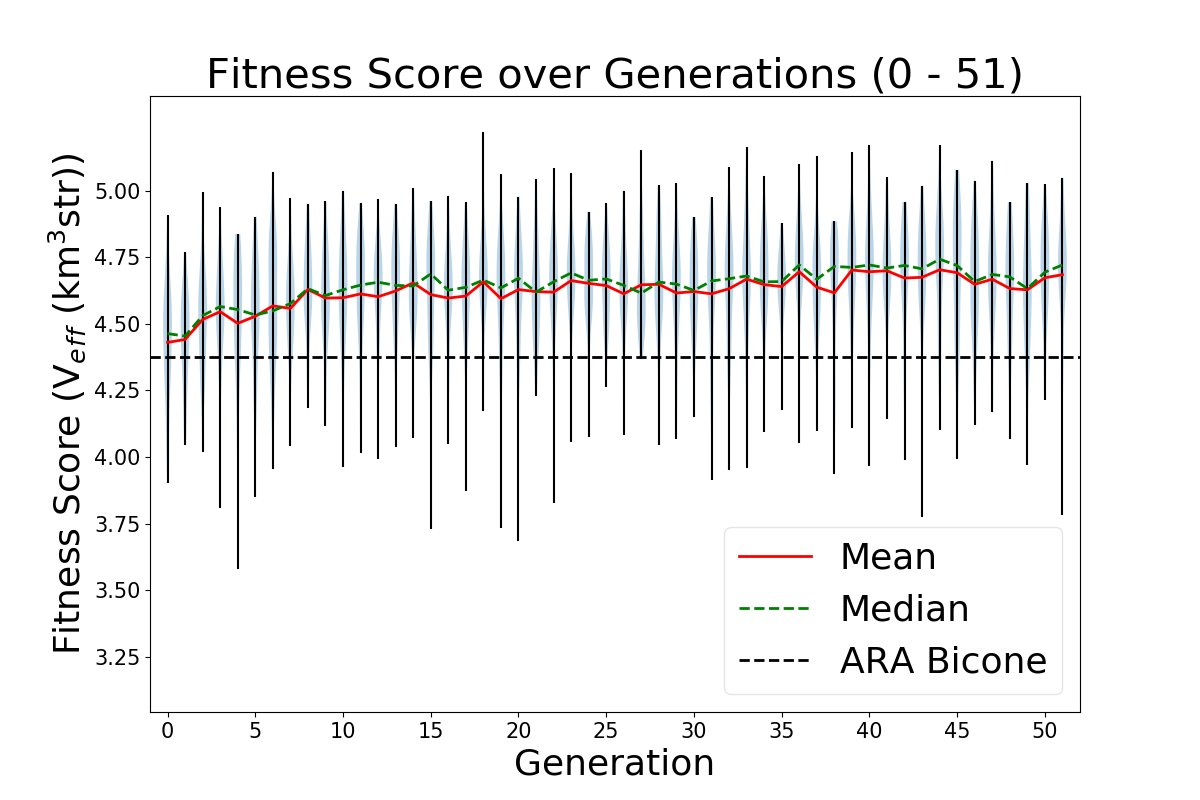
This run was started on February 2, 2022. It is a full run of 50 generations with 50 individuals per generation using the quadratic version of the loop. This means that each individual is defined by 8 genes (length, inner radius, linear coefficient, and quadratic coefficient for each cone). Attached is the txt file run_details.txt that is automatically generated when the loop is run. Each individual was run for 300,000 neutrinos.
This run used the usual ratio of generative operators: 72% crossover, 22% immigration, and 6% reproduction. It also used the proper mutation function: 1% of genes created through crossover were mutated by adding a number chosen from a Gaussian distribution centered at 0 with a width of 5% of the gene's value (MUTATION WAS NOT USED BUT WAS AVAILABLE).
This run was the first full run in which the rank selection operator was used. The ratio of selection operators was: 0% roulette, 10% tournament, 90% rank, 0% elite.
This run used the script fitness_check.py to average the scores of identical individuals that appeared across multiple generations. This gives us a more accurate measure of those individuals' scores. It may also explain why this run appears so flat (on the violin plot): fluctuations in the scores should die down as repeated individuals have more accurate scores, and newly generated individuals that perform highly regress to their mean (actual) score when they are reproduced/recreated through crossover. This has led us to question our GA parameters, as Audrey and Autumn demonstrated that roughly 1/4 individuals in the run are repeat individuals. |
| Attachment 1: run_details.txt
|
####### VARIABLES: LINES TO CHECK OVER WHEN STARTING A NEW RUN ###############################################################################################
RunName='2022_02_08_Rank_Test'	## This is the name of the run. You need to make a unique name each time you run.
TotalGens=100			## number of generations (after initial) to run through
NPOP=50				## number of individuals per generation; please keep this value below 99
Seeds=10			## This is how many AraSim jobs will run for each individual## the number frequencies being iterated over in XF (Currectly only affects the output.xmacro loop)
FREQ=60				## the number frequencies being iterated over in XF (Currectly only affects the output.xmacro loop)
NNT=30000			## Number of Neutrinos Thrown in AraSim
exp=18				## exponent of the energy for the neutrinos in AraSim
ScaleFactor=1.0			## ScaleFactor used when punishing fitness scores of antennae larger than the drilling holes
GeoFactor=1			## This is the number by which we are scaling DOWN our antennas. This is passed to many files
num_keys=4			## how many XF keys we are letting this run use
database_flag=0			## 0 if not using the database, 1 if using the database
				## These next 3 define the symmetry of the cones.
RADIUS=1			## If 1, radius is asymmetric. If 0, radius is symmetric
LENGTH=1			## If 1, length is asymmetric. If 0, length is symmetric
ANGLE=1				## If 1, angle is asymmetric. If 0, angle is symmetric
CURVED=1			## If 1, evolve curved sides. If 0, sides are straight
A=1				## If 1, A is asymmetric
B=1				## If 1, B is asymmetric
SEPARATION=0    		## If 1, separation evolves. If 0, separation is constant
NSECTIONS=2 			## The number of chromosomes
DEBUG_MODE=0			## 1 for testing (ex: send specific seeds), 0 for real runs
				## These next variables are the values passed to the GA
REPRODUCTION=3			## Number (not fraction!) of individuals formed through reproduction
CROSSOVER=36			## Number (not fraction!) of individuals formed through crossover
MUTATION=1			## Probability of mutation (divided by 100)
SIGMA=5				## Standard deviation for the mutation operation (divided by 100)
ROULETTE=0			## Percent of individuals selected through roulette (divided by 10)
TOURNAMENT=1			## Percent of individuals selected through tournament (divided by 10)
RANK=9				## Percent of individuals selected through rank (divided by 10)
ELITE=0				## Elite function on/off (1/0)

#####################################################################################################################################################
|
| Attachment 2: Violin_Plot.png
|
 |
|
159
|
Tue Jun 7 11:29:48 2022 |
Alex M | Run Details: AraSim_Polarity_Fix_2021_03_19 |
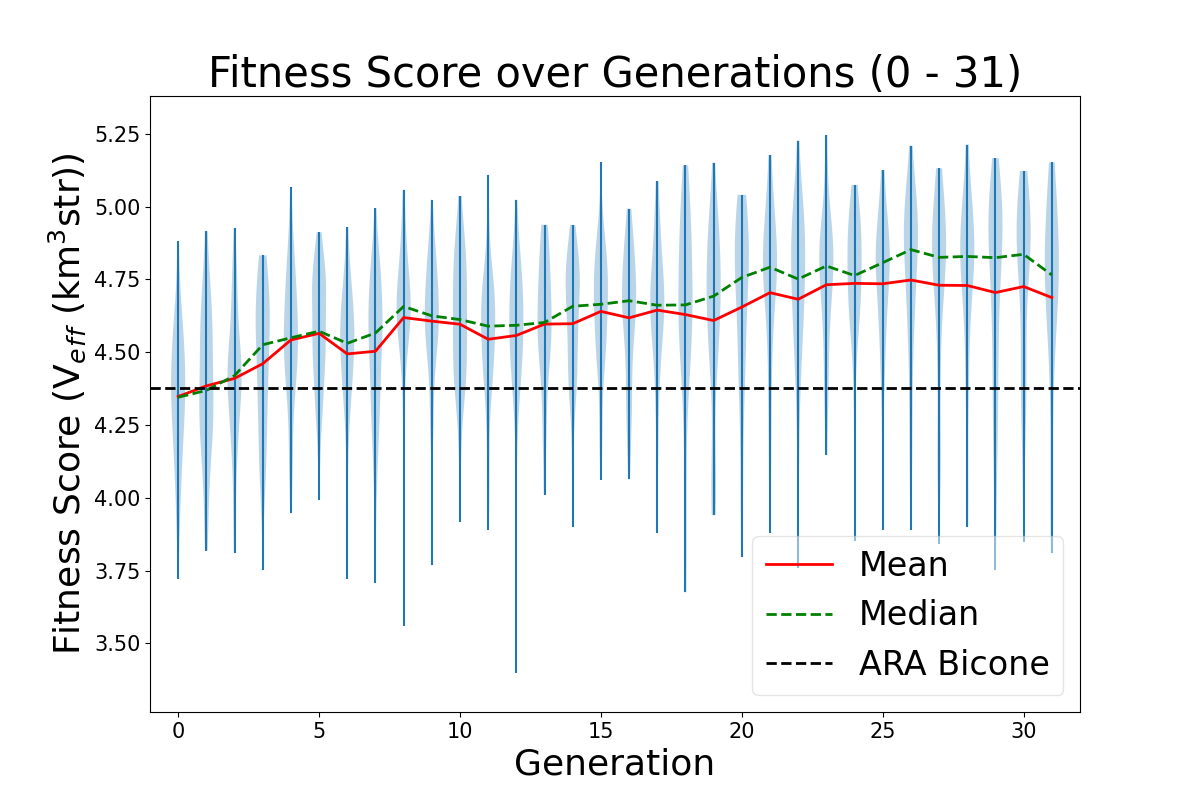
This is the run that is discussed in the GENETIS paper submitted to Physical Review D in December of 2021. It was conducted beginning on March 19, 2021. The preprint can be found here. It ran for 31 generations with 50 individuals per generation. Each individual was run through AraSim for 300,000 neutrinos.
The ratio of generative operators was: 72% crossover, 22% immigration, 6% reproduction.
The ratio of selection operators was: 80% roulette, 20% tournament, 0% rank.
The highest scoring individual had a fitness score of 5.24. However, when it was rerun with many more neutrinos (3*10^7), it had a score of 4.90, an 11% improvement over the ARA bicone.
This run was conducted before the introduction of the automatic run_details.txt generator. Instead, there is a file called Run_Notes.txt (attached) which details some of the errors that were encountered. These errors were remedied during runs by removing the offending AraOut file (which had too high of a fitness score due to a weight being calculated to be greater than 1, which shouldn't be possible) and have since been prevented by modifying the data file AraSim uses to calculate the weights. |
| Attachment 1: Run_Notes.txt
|
//Notes for AraSim_Polarity_Fix_2020_03_19 run

3/27/21: We ran into a rare error we see where AraSim gives an absurd weight (>>1) to a passed event. We reverted the state and replaced the effective volume in that file (AraOut_6_3_8.txt) with the average from the other AraOut files for that individual. DO NOT USE AraOut_6_3_8.txt WHEN ANALYZING ARASIM DATA.

5/9/21: We ran into the same error as above. We reverted the state and replaced the effective volume in the file (AraOut_23_7_7.txt). DO NOT USE AraOut_23_7_7.txt WHEN ANALYZING ARASIM DATA.

5/11/21: We ran into the same error. We are reverting the state and replacing the file (AraOut_25_10_6.txt). DO NOT USE AraOut_25_10_6.txt WHEN ANALYZING ARASIM DATA.
|
| Attachment 2: Violin_Plot_super_big.png
|
 |
|
160
|
Tue Jun 7 12:20:23 2022 |
Alex M | Run Details: 2022_04_14_Identical_Asym_Lower_Min |
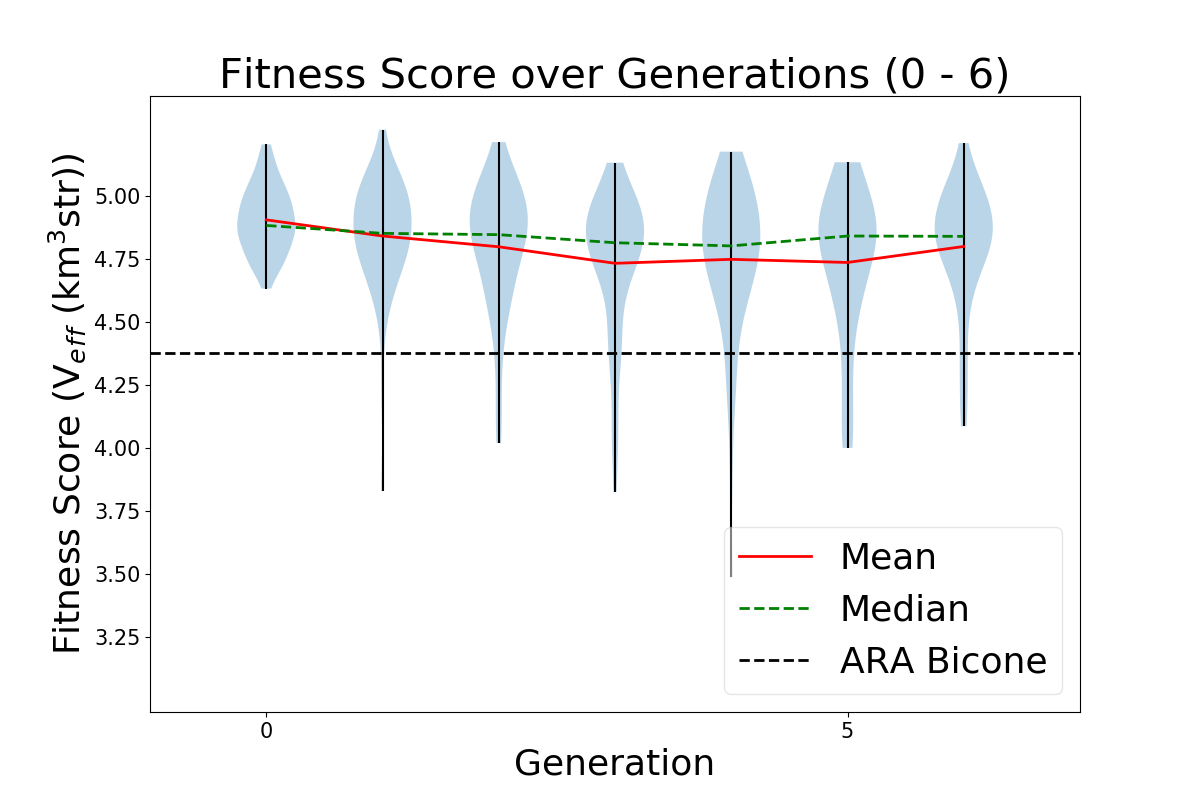
This run was a short run (stopped due to resource limits) that was conducted to test the minimum length constraint that had been applied in the past. Previously, the minimum length was set to be 37.5 cm for each cone; in this run, it was lowered to 10 cm. It ran for 60 generations with 50 individuals per generation, each evaluated with 300,000 neutrinos. To compare to the paper run, this run was performed using the asymmetric algorithm, meaning each individual had 6 genes (length, inner radius, and opening angle for each cone). The initial generation began with identical individuals, with genes matching the genes of the best performing individual mentioned in the GENETIS paper.
The ratio of generative operators is as follows: 72% crossover, 22% immigration, 6% reproduction. Mutation was also used, with 1% of genes produced by crossover mutated by adding a number chosen from a Gaussian centered at 0 with a width of 5% of the gene's value.
The ratio of selection operators was: 20% roulette, 80% tournament, 0% rank, 0% elite.
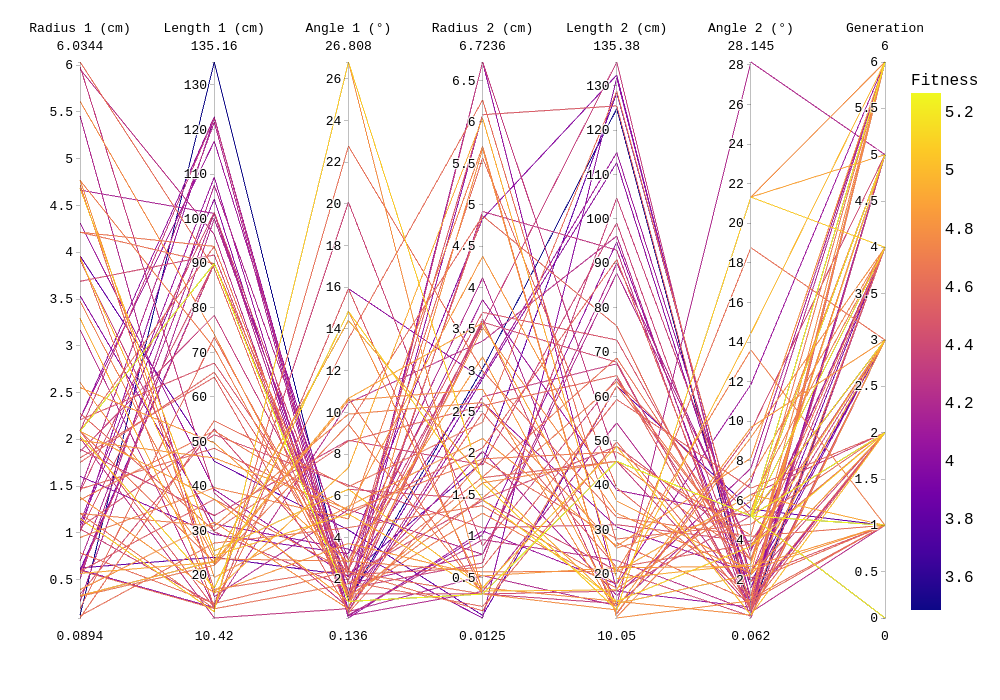
Attached are the run details, violin plot, and "rainbow" plot. |
| Attachment 1: run_details.txt
|
####### VARIABLES: LINES TO CHECK OVER WHEN STARTING A NEW RUN ###############################################################################################
RunName='2022_04_14_Identical_Asym_Lower_Min'	## This is the name of the run. You need to make a unique name each time you run.
TotalGens=100			## number of generations (after initial) to run through
NPOP=50				## number of individuals per generation; please keep this value below 99
Seeds=10			## This is how many AraSim jobs will run for each individual## the number frequencies being iterated over in XF (Currectly only affects the output.xmacro loop)
FREQ=60				## the number frequencies being iterated over in XF (Currectly only affects the output.xmacro loop)
NNT=30000			## Number of Neutrinos Thrown in AraSim
exp=18				## exponent of the energy for the neutrinos in AraSim
ScaleFactor=1.0			## ScaleFactor used when punishing fitness scores of antennae larger than the drilling holes
GeoFactor=1			## This is the number by which we are scaling DOWN our antennas. This is passed to many files
num_keys=4			## how many XF keys we are letting this run use
database_flag=0			## 0 if not using the database, 1 if using the database
				## These next 3 define the symmetry of the cones.
RADIUS=1			## If 1, radius is asymmetric. If 0, radius is symmetric
LENGTH=1			## If 1, length is asymmetric. If 0, length is symmetric
ANGLE=1				## If 1, angle is asymmetric. If 0, angle is symmetric
CURVED=0			## If 1, evolve curved sides. If 0, sides are straight
A=1				## If 1, A is asymmetric
B=1				## If 1, B is asymmetric
SEPARATION=0    		## If 1, separation evolves. If 0, separation is constant
NSECTIONS=2 			## The number of chromosomes
DEBUG_MODE=0			## 1 for testing (ex: send specific seeds), 0 for real runs
				## These next variables are the values passed to the GA
REPRODUCTION=3			## Number (not fraction!) of individuals formed through reproduction
CROSSOVER=36			## Number (not fraction!) of individuals formed through crossover
MUTATION=1			## Probability of mutation (divided by 100)
SIGMA=5				## Standard deviation for the mutation operation (divided by 100)
ROULETTE=2			## Percent of individuals selected through roulette (divided by 10)
TOURNAMENT=8			## Percent of individuals selected through tournament (divided by 10)
RANK=0				## Percent of individuals selected through rank (divided by 10)
ELITE=0				## Elite function on/off (1/0)

#####################################################################################################################################################
|
| Attachment 2: Violin_Plot.png
|
 |
| Attachment 3: 2022_04_14_Identical_Asym_Lower_Min_Rainbow.png
|
 |
|
163
|
Tue Jun 21 12:02:23 2022 |
Alex M | Run Details: Machtay_20201023_300K_Nus_50_Individuals |
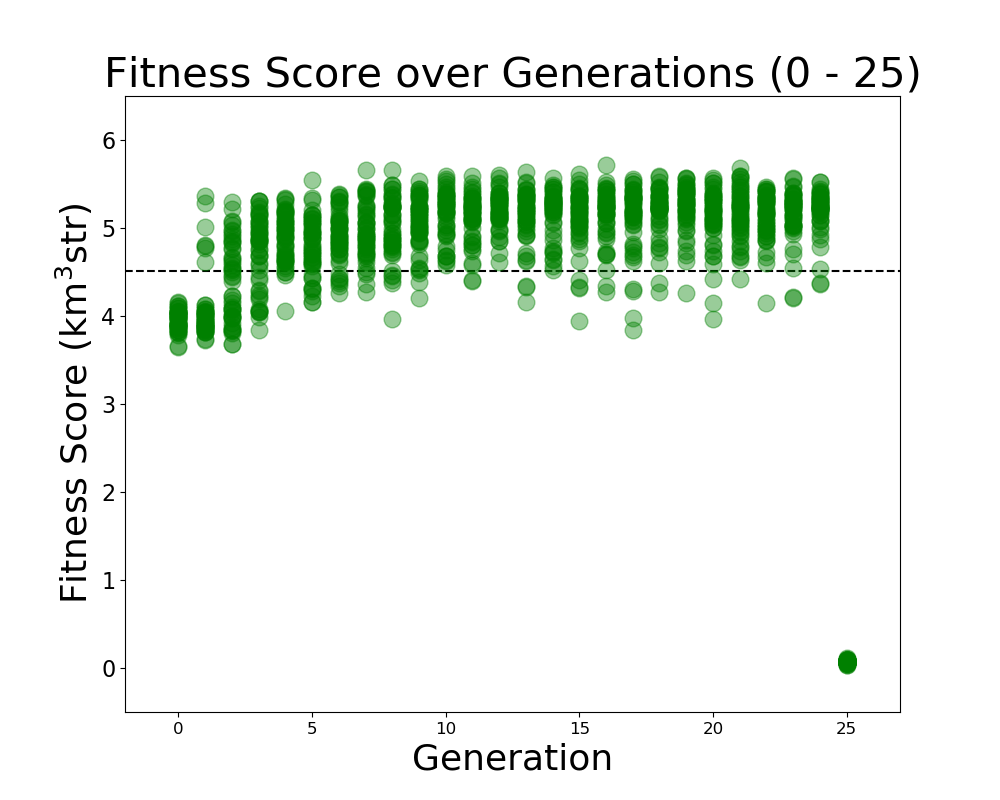
This run was started on 10/23/2020. The purpose was to attempt to demonstrate evolution by beginning from 50 identical individuals in the initial generation (which had previously produced a low score).
This run was the first time we removed the penalty on fitness scores for antennas which exceeded the borehole radius. It was also the first time we increased the number of neutrinos thrown up to 300,000. 50 fully asymmetric individuals were evolved over 25 generations.
There was a 50/50 split for roulette/tournament selection and 75%/10%/15% for crossover/reproduction/immigration. While the evolution was somewhat flat, we do believe we demonstrated evolution because the average score rose as the run evolved.
(Note that the final generation was interrupted but the plot was still made, hence the drop to 0 for all scores on the plot) |
| Attachment 1: Fitness_Scores_RG.png
|
 |
|
164
|
Tue Jun 21 12:15:18 2022 |
Alex M | Run Details: Machtay_20200824_Real_Run |
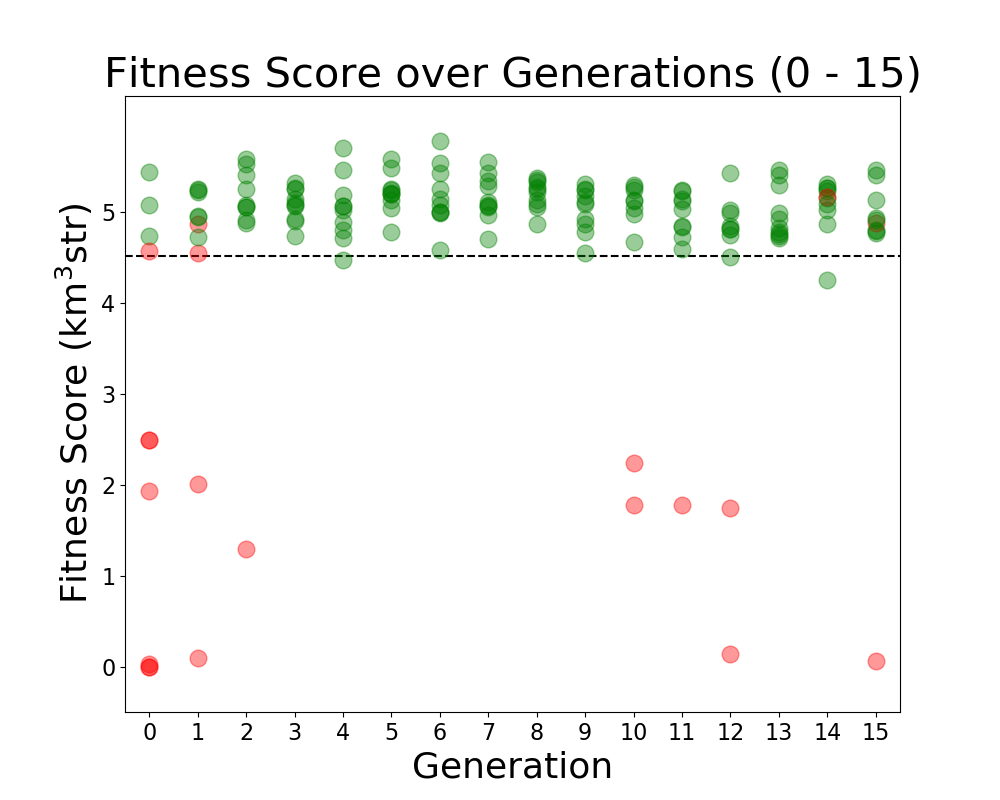
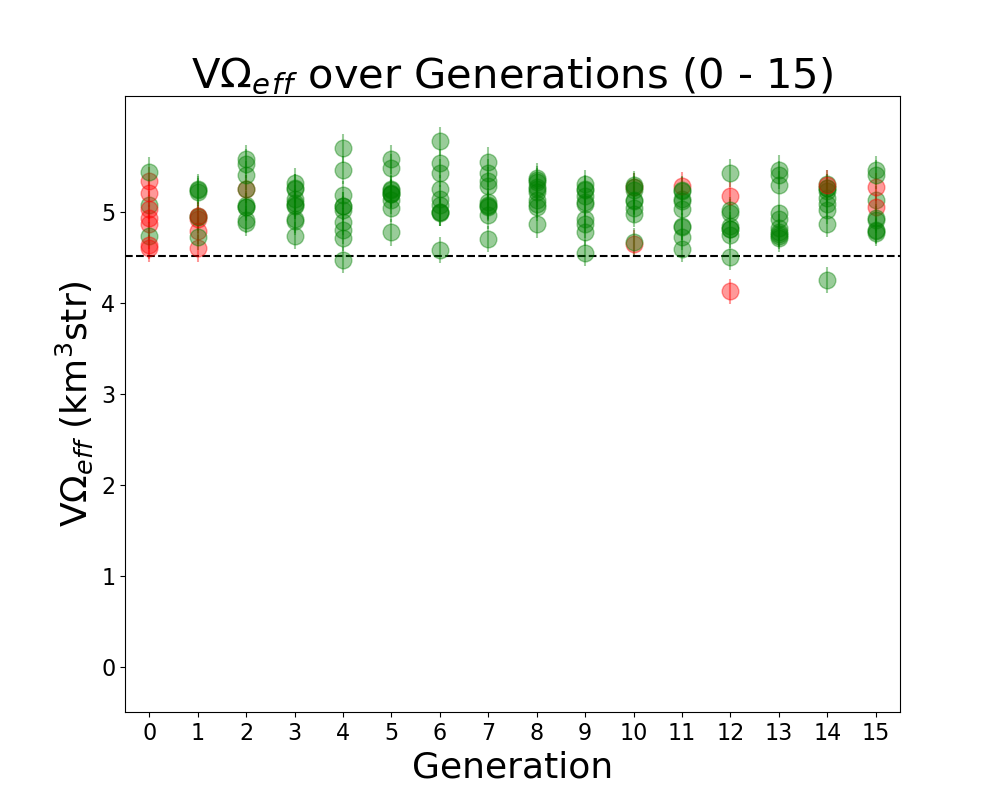
This is considered to be the first run of "good" data. Prior to this run, we ran with few neutrinos and had errors which needed to be resolved in AraSim and with the way we handled XFdtd's simulation results being passed to AraSim. Those were resolved in the summer before this run.
This was a symmetric run of 10 individuals over 15 generations using 100,000 neutrinos per individual. This preceded the substantial modifications made by Ryan to the GA. All individuals were formed through crossover, but there was a probability of 40% for genes to be mutated. In this case, mutation was a complete change to the gene, though it was based on the average value of that gene in the generation. There was no reproduction or mutation. All individuals were selected through roulette.
Green individuals indicate that there was no penalty applied, while red individuals had a penalty factor multiplied by their effective volumes. The penalty was of the form exp(-(R-7.5)^2), where R is the outer radius, in cm, of the bicone. |
| Attachment 1: Fitness_Scores_RG.png
|
 |
| Attachment 2: Veffectives_RG.png
|
 |
|
165
|
Tue Jun 21 12:22:02 2022 |
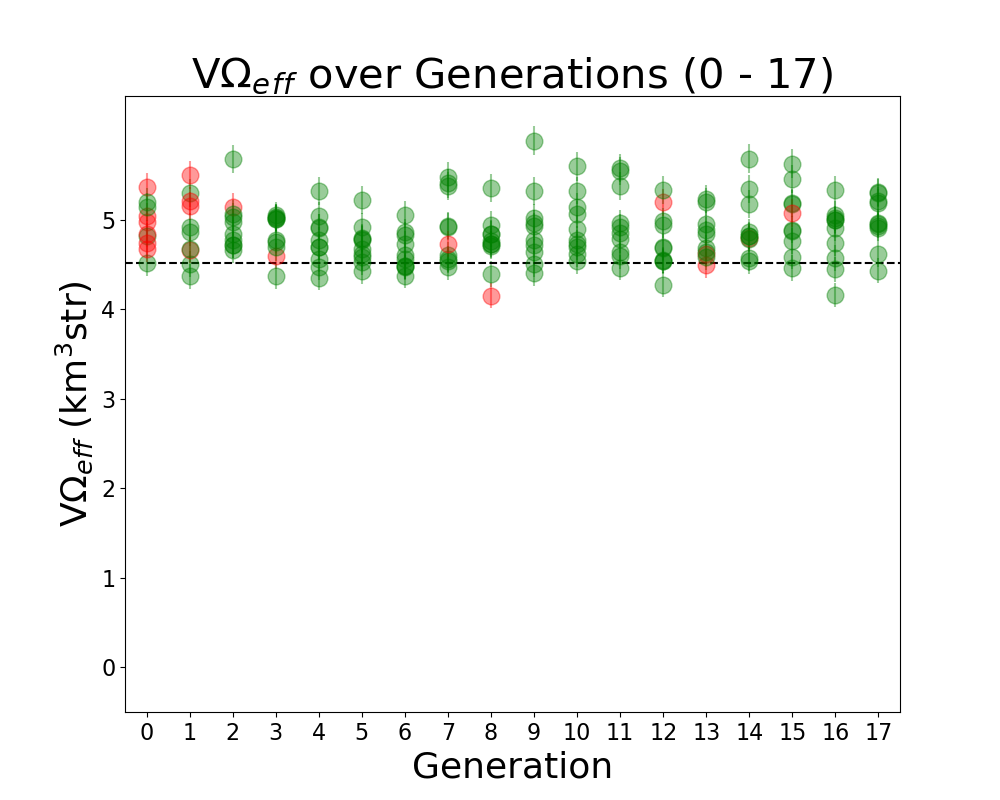
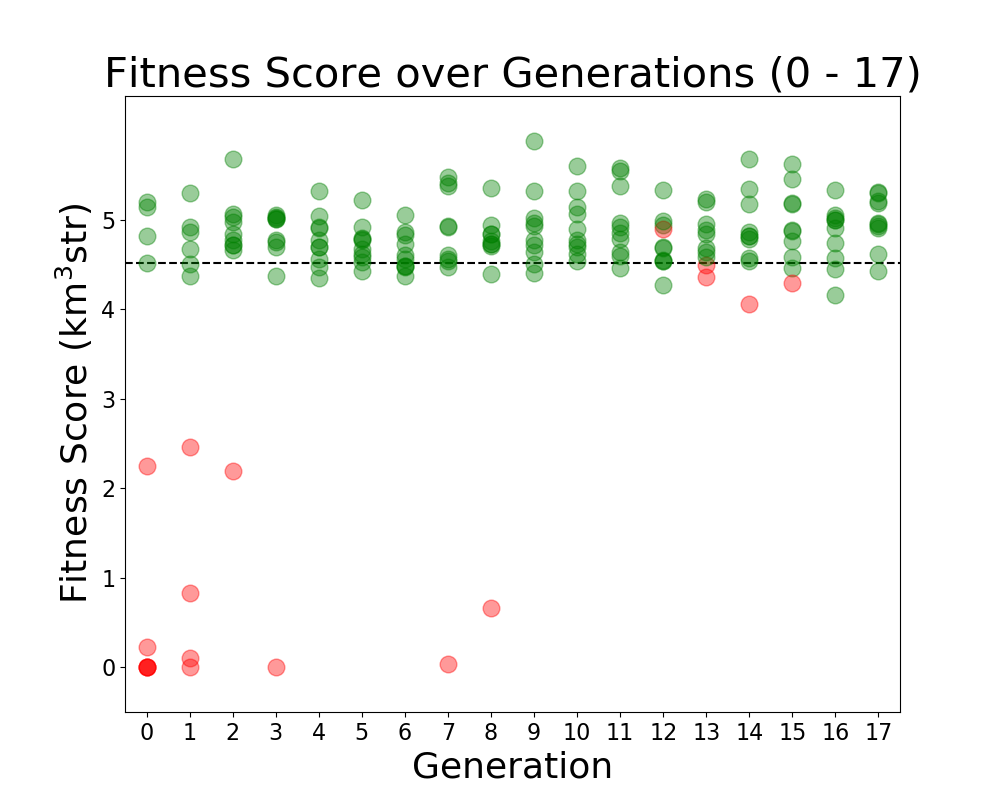
Alex M | Run Details: Machtay_20200827_Asym_Length_Run |
This run followed the first symmetric run. It had an asymmetric length, but the opening angle and inner radius were kept symmetric.
10 individuals were evolved over 17 generations using 100,000 neutrinos. All selection was done through roulette, and all individuals were formed through crossover and the old mutation method (where individual genes had a 40% to be mutated, and mutated genes were chosen from a gaussian based on the mean and standard deviation of that gene's value in the generation). |
| Attachment 1: Veffectives_RG.png
|
 |
| Attachment 2: Fitness_Scores_RG.png
|
 |
|
167
|
Tue Jun 28 11:35:15 2022 |
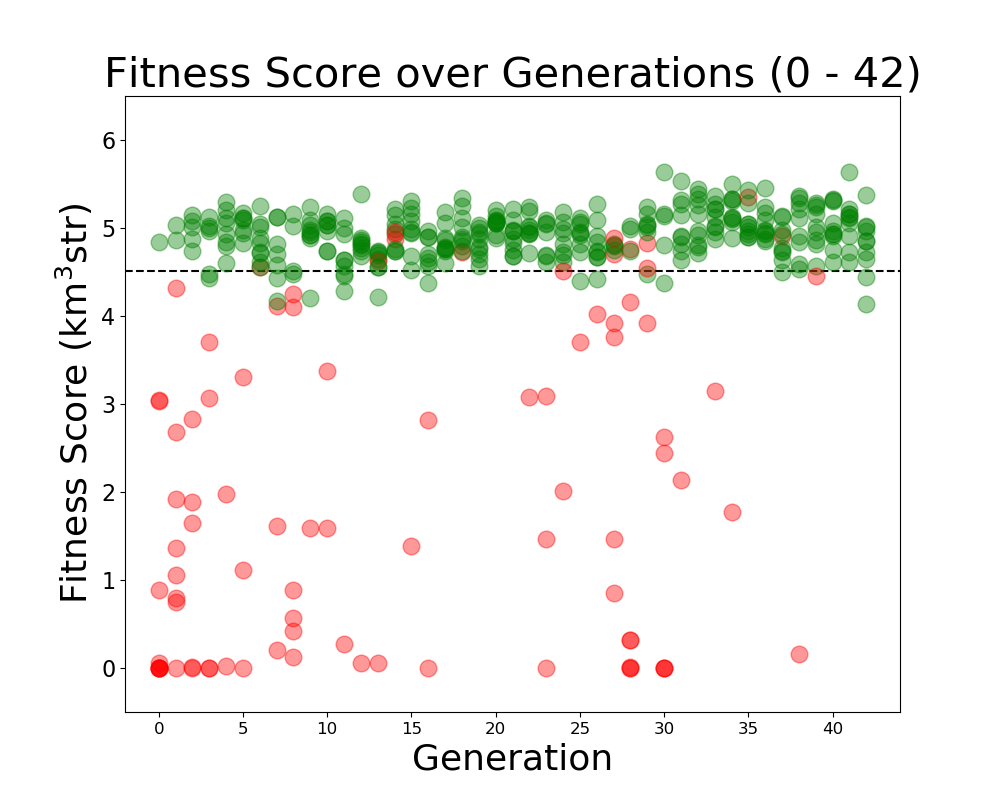
Alex M | Run Details: Machtay_20200831_Asym_Length_and_Angle |
This run was conducted beginning on August 31, 2020.
Both the angle and length were asymmetric for the two cones. It was run with 10 individuals over 42 generations using 150,000 neutrinos. A penalty was still implemented on bicones exceeding the borehole width.
As this was before the substantial rewrite of the genetic algorithm, 100% of selection was done using roulette. Genes had a 40% chance to "mutate," which was done by selecting a new value from a guassian, with a mean and sigma equal to the mean and standard deviation of that gene's value in that generation.
|
| Attachment 1: Fitness_Scores_RG.png
|
 |
|
Draft
|
Tue Jun 28 11:40:32 2022 |
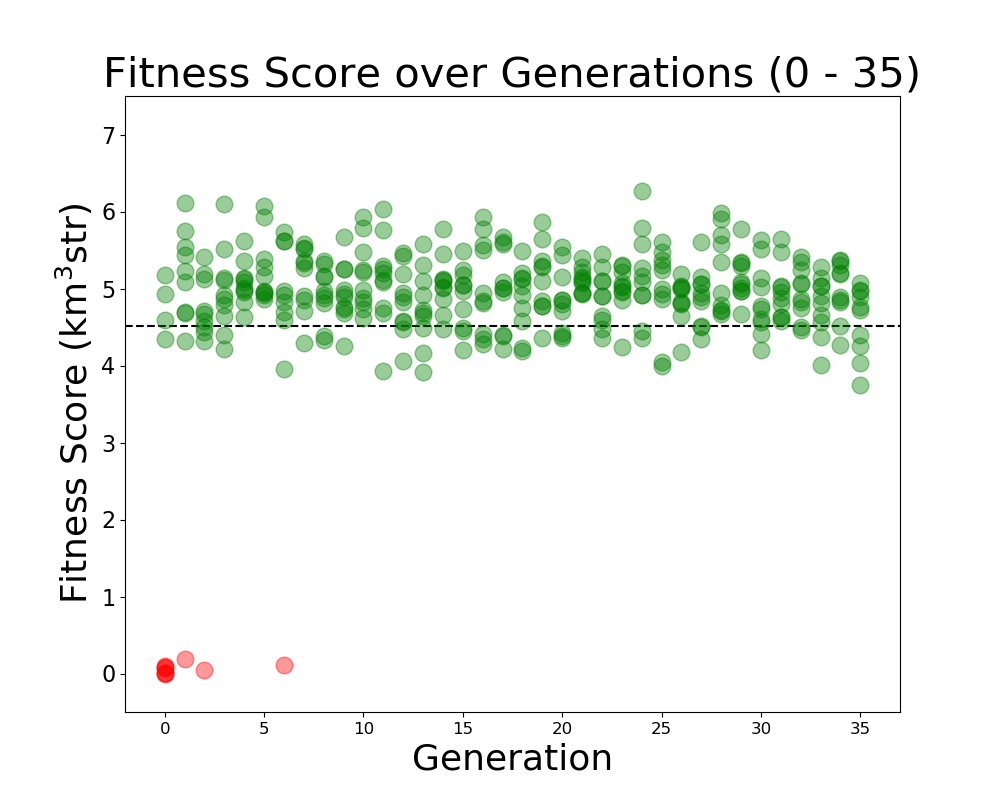
Alex M | Run Details: Machtay_20200911_Symmetric |
This was a symmetric run that began on 9/11/2020. This run used fewer neutrinos to determine how significant the number would be on the performance of the evolution. 30,000 neutrinos were used per individual.
10 individuals were evolved over 35 generations, using 100% roulette selection and the old mutation algorithm, where genes had a 40% chance of mutating. Mutations changed the gene by reselecting the value from a guassian with a mean and sigma equalt to the mean and sigma of that gene's value in the generation.
|
| Attachment 1: Fitness_Scores_RG.png
|
 |
|
174
|
Fri Jul 15 18:33:20 2022 |
Alex M | Run Details: 2022_07_15_Latest_Greatest |
We have started a new run. Here is the directory: /fs/ess/PAS1960/BiconeEvolutionOSC/BiconeEvolution/current_antenna_evo_build/XF_Loop/Evolutionary_Loop/Run_Outputs/2022_07_15_Latest_Greatest
This run is a substantial overhaul. It is a curved run using the latest parameters from Ryan's optimization loop. Here is a list of important changes:
- The newest version of AraSim has been implemented.
- The minimum length has been decreased to 10 cm per side.
- The GA is recording the parents and operators used to generate individuals.
- The number of individuals has been increased to 100 per generation.
- The number of neutrinos per individual has been increased to 600k.
This run may take longer than previous runs due to the increased number of individuals. There may need to be modifications made to resolve or work around AraSim errors that delay the loop (due to the auto-resubmit function). Find the details of the run attached. |
| Attachment 1: run_details.txt
|
####### VARIABLES: LINES TO CHECK OVER WHEN STARTING A NEW RUN ###############################################################################################
RunName='2022_07_15_Latest_Greatest'	## This is the name of the run. You need to make a unique name each time you run.
TotalGens=100			## number of generations (after initial) to run through
NPOP=100				## number of individuals per generation; please keep this value below 99
Seeds=5			## This is how many AraSim jobs will run for each individual## the number frequencies being iterated over in XF (Currectly only affects the output.xmacro loop)
FREQ=60				## the number frequencies being iterated over in XF (Currectly only affects the output.xmacro loop)
NNT=120000			## Number of Neutrinos Thrown in AraSim
exp=18				## exponent of the energy for the neutrinos in AraSim
ScaleFactor=1.0			## ScaleFactor used when punishing fitness scores of antennae larger than the drilling holes
GeoFactor=1			## This is the number by which we are scaling DOWN our antennas. This is passed to many files
num_keys=4			## how many XF keys we are letting this run use
database_flag=0			## 0 if not using the database, 1 if using the database
				## These next 3 define the symmetry of the cones.
RADIUS=1			## If 1, radius is asymmetric. If 0, radius is symmetric
LENGTH=1			## If 1, length is asymmetric. If 0, length is symmetric
ANGLE=1				## If 1, angle is asymmetric. If 0, angle is symmetric
CURVED=1			## If 1, evolve curved sides. If 0, sides are straight
A=1				## If 1, A is asymmetric
B=1				## If 1, B is asymmetric
SEPARATION=0    		## If 1, separation evolves. If 0, separation is constant
NSECTIONS=2 			## The number of chromosomes
DEBUG_MODE=0			## 1 for testing (ex: send specific seeds), 0 for real runs
				## These next variables are the values passed to the GA
REPRODUCTION=12			## Number (not fraction!) of individuals formed through reproduction
CROSSOVER=76			## Number (not fraction!) of individuals formed through crossover
MUTATION=10			## Probability of mutation (divided by 100)
SIGMA=5				## Standard deviation for the mutation operation (divided by 100)
ROULETTE=2			## Percent of individuals selected through roulette (divided by 10)
TOURNAMENT=2			## Percent of individuals selected through tournament (divided by 10)
RANK=6				## Percent of individuals selected through rank (divided by 10)
ELITE=0				## Elite function on/off (1/0)

#####################################################################################################################################################
|
|
186
|
Mon Nov 28 10:44:27 2022 |
Alex M | Run Details Latest_Greatest_2022_11_26 |
Here are the changes that have been made in this (and the preceding) run relative to what we have been doing before.
- The newest version of AraSim has been implemented.
- This was done because AraSim has gone through significant changes since 2019 that make it more accurate and makes it run faster.
- The minimum length has been decreased to 10 cm per side.
- This was done because we previously tested shorter lengths for a response to the reviewer when we submitting the paper to Phys Rev D. Previously, we thought that going below 37.5 cm would lead to unreliable results, but we are reassured that that is not the case now.
- The GA is recording the parents and operators used to generate individuals.
- This should allow us to look back and make a "history" of the evolution by seeing where genes come from in each generation.
- The number of individuals has been increased to 100 per generation.
- Ryan demonstrated that a higher number of individuals does lead to a substantial improvement in the speed at which the evolution converges.
- We previously thought that it did not make a big difference. However, that was done by measuring the average maximum fitness score. If we measure how many generations it takes for the evolution to reach a benchmark score, we find that more individuals helps significantly.
- The number of neutrinos per individual has been increased to 600k.
- This was done to make the fitness scores more precise. At 300k neutrinos, we expect an error of around 0.2. This will cut things down closer to 0.1, which may help us decrease the number of outlier measurements without increasing run time too much because of the AraSim speed up.
This run may take longer than previous runs due to the increased number of individuals. There may need to be modifications made to resolve or work around AraSim errors that delay the loop (due to the auto-resubmit function). Find the details of the run attached. |
| Attachment 1: run_details_2022_11_26.txt
|
####### VARIABLES: LINES TO CHECK OVER WHEN STARTING A NEW RUN ###############################################################################################
RunName='2022_11_26_Latest_Greatest'	## This is the name of the run. You need to make a unique name each time you run.
TotalGens=100			## number of generations (after initial) to run through
NPOP=100				## number of individuals per generation; please keep this value below 99
Seeds=5			## This is how many AraSim jobs will run for each individual## the number frequencies being iterated over in XF (Currectly only affects the output.xmacro loop)
FREQ=60				## the number frequencies being iterated over in XF (Currectly only affects the output.xmacro loop)
NNT=120000			## Number of Neutrinos Thrown in AraSim
exp=18				## exponent of the energy for the neutrinos in AraSim
ScaleFactor=1.0			## ScaleFactor used when punishing fitness scores of antennae larger than the drilling holes
GeoFactor=1			## This is the number by which we are scaling DOWN our antennas. This is passed to many files
num_keys=4			## how many XF keys we are letting this run use
database_flag=0			## 0 if not using the database, 1 if using the database
				## These next 3 define the symmetry of the cones.
RADIUS=1			## If 1, radius is asymmetric. If 0, radius is symmetric
LENGTH=1			## If 1, length is asymmetric. If 0, length is symmetric
ANGLE=1				## If 1, angle is asymmetric. If 0, angle is symmetric
CURVED=1			## If 1, evolve curved sides. If 0, sides are straight
A=1				## If 1, A is asymmetric
B=1				## If 1, B is asymmetric
SEPARATION=0    		## If 1, separation evolves. If 0, separation is constant
NSECTIONS=2 			## The number of chromosomes
DEBUG_MODE=0			## 1 for testing (ex: send specific seeds), 0 for real runs
				## These next variables are the values passed to the GA
REPRODUCTION=0			## Number (not fraction!) of individuals formed through reproduction
CROSSOVER=96			## Number (not fraction!) of individuals formed through crossover
MUTATION=4			## Probability of mutation (divided by 100)
SIGMA=6				## Standard deviation for the mutation operation (divided by 100)
ROULETTE=2			## Percent of individuals selected through roulette (divided by 10)
TOURNAMENT=2			## Percent of individuals selected through tournament (divided by 10)
RANK=6				## Percent of individuals selected through rank (divided by 10)
ELITE=0				## Elite function on/off (1/0)

#####################################################################################################################################################
|
|
188
|
Fri Dec 30 01:16:52 2022 |
Alex M | Run Details: 2022_12_29 |
We began a new run of the curved sided GA. Previously, we conducted a run just like this in July of 2022 (titled 2022_07_15_Latest_Greatest). In that run, we made substantial updates to the loop, including using the latest version of AraSim. However, we discovered after the run (which had a very flat fitness score growth curve) that we had not modified AraSim to take in gainfiles appropriately (so it was just evaluating the ARA bicone repeatedly). We've fixed this issue and a few more (see the github repository for the issues that exist and have been resolved) and are redoing this run. The run details will look much the same as that one and are visible in the attached file. Here is the location of the directory where the data for this run will be stored: /fs/ess/PAS1960/BiconeEvolutionOSC/BiconeEvolution/current_antenna_evo_build/XF_Loop/Evolutionary_Loop/Run_Outputs/2022_12_29
For a list of changes made in this run compared to previous ones, see this ELOG post on the previous run: http://radiorm.physics.ohio-state.edu/elog/GENETIS/186 |
| Attachment 1: run_details.txt
|
####### VARIABLES: LINES TO CHECK OVER WHEN STARTING A NEW RUN ###############################################################################################
RunName='2022_12_29'	## This is the name of the run. You need to make a unique name each time you run.
TotalGens=100			## number of generations (after initial) to run through
NPOP=100				## number of individuals per generation; please keep this value below 99
Seeds=5			## This is how many AraSim jobs will run for each individual## the number frequencies being iterated over in XF (Currectly only affects the output.xmacro loop)
FREQ=60				## the number frequencies being iterated over in XF (Currectly only affects the output.xmacro loop)
NNT=60000			## Number of Neutrinos Thrown in AraSim
exp=18				## exponent of the energy for the neutrinos in AraSim
ScaleFactor=1.0			## ScaleFactor used when punishing fitness scores of antennae larger than the drilling holes
GeoFactor=1			## This is the number by which we are scaling DOWN our antennas. This is passed to many files
num_keys=4			## how many XF keys we are letting this run use
database_flag=0			## 0 if not using the database, 1 if using the database
				## These next 3 define the symmetry of the cones.
RADIUS=1			## If 1, radius is asymmetric. If 0, radius is symmetric
LENGTH=1			## If 1, length is asymmetric. If 0, length is symmetric
ANGLE=1				## If 1, angle is asymmetric. If 0, angle is symmetric
CURVED=1			## If 1, evolve curved sides. If 0, sides are straight
A=1				## If 1, A is asymmetric
B=1				## If 1, B is asymmetric
SEPARATION=0    		## If 1, separation evolves. If 0, separation is constant
NSECTIONS=2 			## The number of chromosomes
DEBUG_MODE=0			## 1 for testing (ex: send specific seeds), 0 for real runs
				## These next variables are the values passed to the GA
REPRODUCTION=0			## Number (not fraction!) of individuals formed through reproduction
CROSSOVER=96			## Number (not fraction!) of individuals formed through crossover
MUTATION=25			## Probability of mutation (divided by 100)
SIGMA=6				## Standard deviation for the mutation operation (divided by 100)
ROULETTE=2			## Percent of individuals selected through roulette (divided by 10)
TOURNAMENT=2			## Percent of individuals selected through tournament (divided by 10)
RANK=6				## Percent of individuals selected through rank (divided by 10)
ELITE=0				## Elite function on/off (1/0)

#####################################################################################################################################################
|
|
190
|
Tue Jan 31 15:31:29 2023 |
Alex M | ARA Bicone Responses |
Here we will record where we obtained the ARA bicone antenna response files we use as our baselines. We want to record where we found them/who gave them to us and how they were generated (either through simulation or from actual tests). |