| ID |
Date |
Author |
Subject |
|
Draft
|
Fri Jul 8 13:34:08 2022 |
Ryan Debolt | Multigenerational Narrative draft 2 | |
|
Draft
|
Thu Jun 30 13:04:48 2022 |
Ryan Debolt | Multigenerational Narrative draft 2 | This is a multigenerational tracing of our second-best individual's parents and children:
The second-best individual in this evolution was Bicone 22 from generation 40. This individual is, in fact, a fascinating case as we shall see. But to start the story of this individual we will go back to generation 38 in order to demonstrate some of the peculiarities.
In generation 38 there were two bicones of no renown, Bicone 11 and Bicone 17. Bicone 11 was a fairly average individual that was ranked 23rd with a fitness score of 4.72016. Its DNA was {*6.16084, ***79.663, 0.0015434, -0.107765} for side one , and {0.308809, 39.6742, -0.0084247, 0.40629} for side two. One day, by chance it met Bicone 17, another average bicone ranked 24th with a score of 4.71877 and DNA {**2.32499, 79.663, -0.00224948, 0.192602} for side one, and {0.308809, 39.6742, -0.0084247, 0.40629} for side two. These two individuals eventually became the parents of two antennas: Bicone 16 and Bicone 17 of generation 39.
Bicone 16 eventually grew to have been ranked 3rd in fitness score of 4.95323. It’s DNA ended up being a complete balance of its parents sharing side one with Bicone 38.11{2.32499, 79.663, -0.00224948, 0.192602} and side two with bicone 38.17 {0.308809, 39.6742, -0.0084247, 0.40629}. Bicone 16 was an individual with high aspirations and hoped to be reproduced. But alas, it was not meant to be. But bicone 16 came upon some amazing luck, it was selected with itself for crossover. This meant that bicone 16 was able to provide two identical surrogates to survive into the next generation. This is where this Bicone fulfilled its full potential.
The twin bicones were named Bicone 22 and Bicone 23 in generation 40. Being clones, they shared all their DNA with Bicone 39.16. However, due to some circumstances, they had slightly different fitness scores. Bicone 23 managed a very respectable 5.0117 fitness score and was ranked 2nd in the generation. But not to be outdone Bicone 22 managed to score a 5.17014 and ended up being the second-best performing individual of all time. Being so successful, the two bicones ended up producing 8 children between the two groups.
Bicone 23 was the first to crossover and had 2 children with its partner. These were Bicones 4 and 5. Bicone 4 was ranked 39th with a fitness score of 4.60251 and still shared the DNA of its second side with its grandparent Bicone 38.17 as well as most of its first side with Bicone 38.11 {2.32499, 79.663, -0.00213879, 0.192602} {0.308809, 39.9608, -0.0084247, 0.40629}. Bicone 5 on the other hand, was ranked 14th with a fitness score of 4.80535 and it still shared a lot of DNA with its grandparents {6.16084,53.0851,-0.00224948,0.0534469} {0.966617,39.6742,-0.0084247,0.40629}.
Bicone 22 had 6 children of its own with various other Bicones. These were; Bicone 8, ranked 11th with a fitness Score of 4.81784 and DNA {2.32499, 75.9855, -0.00224948, 0.192602} {0.966617, 39.6742, -0.00320023, 0.213833}; Bicone 9, ranked 7th with a fitness score of 4.88966 and DNA {6.10508, 79.663, -0.000594616, 0.0351901} {0.308809, 42.4246, -0.0084247, 0.40629}; Bicone 12, ranked 12th with a fitness score of 4.81705 and DNA {6.42695, 75.9855, 0.0015434, -0.107765} {0.308809, 39.6742, -0.00320023, 0.213833}; Bicone 13, ranked 2nd with a fitness score of 5.0344 and DNA {2.32499, 79.663, -0.00224948, 0.192602} {0.966617, 42.4246, -0.0084247, 0.40629}; Bicone 34 ranked 3rd with a fitness score of 4.99864 and DNA {0.66148, 73.5522, -0.000594616, 0.00582814} {0.966617, 39.6742, -0.0084247, 0.40629}; and finally Bicone 35, ranked 22nd with fitness score 4.74955 and DNA {2.32499, 79.663, -0.00224948, 0.192602} {0.308809, 42.4246, -0.0084247, 0.40629}
Bellow, I have attached the rainbow plot with the parameters occupied by individual 4 in gen 41 which was again ranked 39th in that generation. From this, we can see that while in its own generation it was a poor performer, overall it was upper middle of the pack. However, because of the density of other better performing antennas in this region, it is hard to distinguish which genes in this antenna are contributing the most to the drop in fitness score compared to its siblings and parents.
*Gene originating from Bicone 38.11
**Gene originating from Bicone 38.17
***Gene originating from Bicone 38.11 and 38.17 that is shared between the two. |
| Attachment 1: rainbow_plot_quadratic_rank_test_720_(drawn).png
| .png "rainbow_plot_quadratic_rank_test_720_(drawn).png") |
|
Draft
|
Tue Jun 28 13:27:13 2022 |
Dylan Wells | Changes needed for the matching circuit script |
-
Fix the functions for the SLPC, SCPL, and PLSC L networks (change the paramaters to match with the format of our data)
-
Write the PCSL function
-
Create a function to find the number of L networks necessary (N) given a source and load resistance as well as a frequency range.
-
Write a function to broadband match two impedances given a source, load, central frequency, and N. (return a list of capacitances and inductances for the L networks)
|
|
169
|
Tue Jun 28 12:49:53 2022 |
Dennis Calderon | Effective Volumes from AraSim: Curved Sides and Straight Sides (Paper Run) | Summary of results for 3million event simulations in AraSim with both GENETIS version and more recent {~11/2021) version.
Using errors for effective volume from the .out files.
Example shown below.
Radius: 3000 [m]
IceVolume : 8.4823e+10
test Veff(ice) : 6.50867e+09 m3sr, 6.50867 km3sr
test Veff(water eq.) : 5.96845e+09 m3sr, 5.96845 km3sr
And Veff(water eq.) error plus : 0.543588 and error minus : 0.543588
|
| Attachment 1: AraSim_Summary_Effective_Volumes.pdf
|
|
Draft
|
Tue Jun 28 11:40:32 2022 |
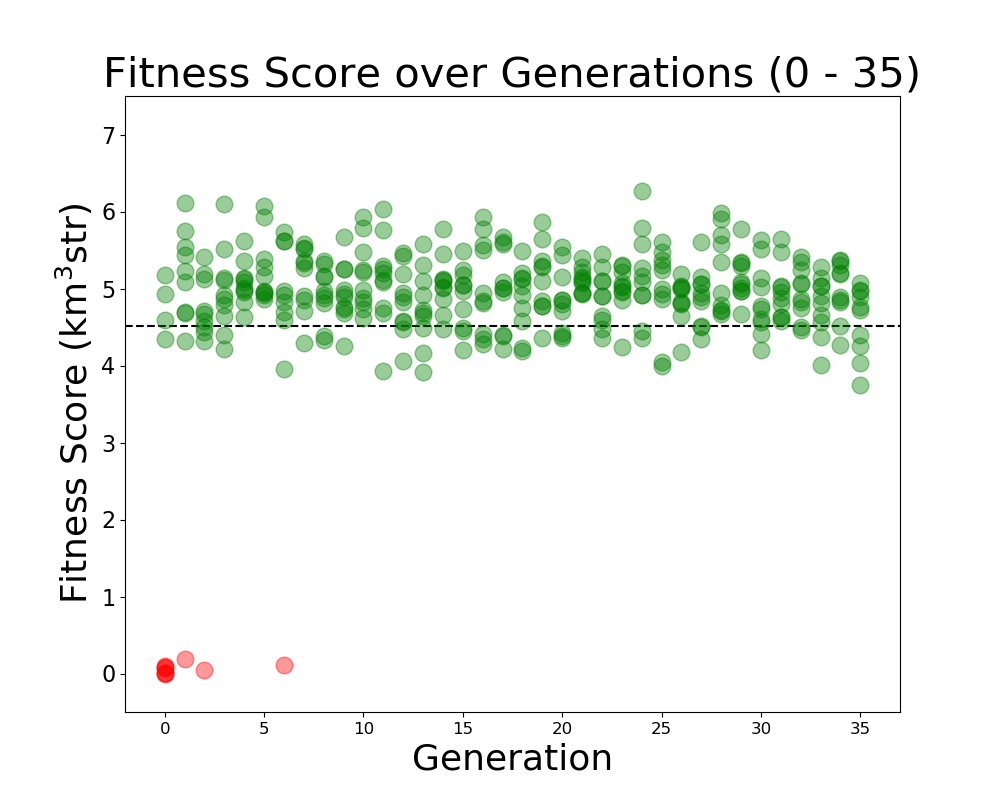
Alex M | Run Details: Machtay_20200911_Symmetric | This was a symmetric run that began on 9/11/2020. This run used fewer neutrinos to determine how significant the number would be on the performance of the evolution. 30,000 neutrinos were used per individual.
10 individuals were evolved over 35 generations, using 100% roulette selection and the old mutation algorithm, where genes had a 40% chance of mutating. Mutations changed the gene by reselecting the value from a guassian with a mean and sigma equalt to the mean and sigma of that gene's value in the generation.
|
| Attachment 1: Fitness_Scores_RG.png
|  |
|
167
|
Tue Jun 28 11:35:15 2022 |
Alex M | Run Details: Machtay_20200831_Asym_Length_and_Angle | This run was conducted beginning on August 31, 2020.
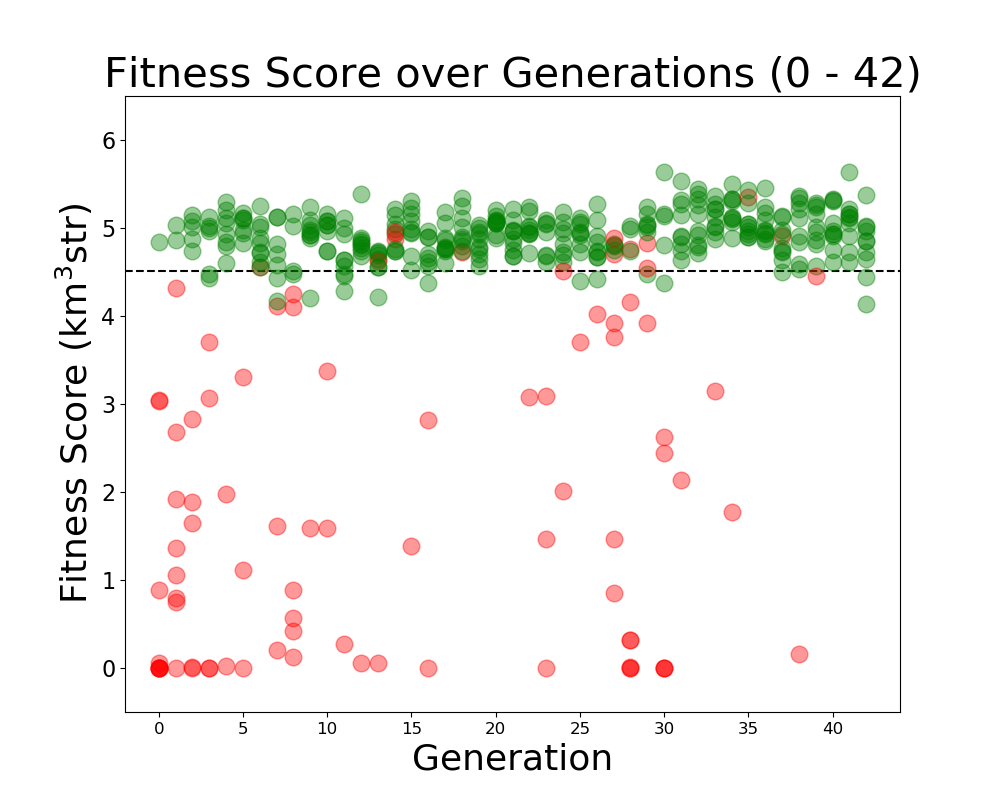
Both the angle and length were asymmetric for the two cones. It was run with 10 individuals over 42 generations using 150,000 neutrinos. A penalty was still implemented on bicones exceeding the borehole width.
As this was before the substantial rewrite of the genetic algorithm, 100% of selection was done using roulette. Genes had a 40% chance to "mutate," which was done by selecting a new value from a guassian, with a mean and sigma equal to the mean and standard deviation of that gene's value in that generation.
|
| Attachment 1: Fitness_Scores_RG.png
|  |
|
166
|
Tue Jun 21 13:20:41 2022 |
Ryan Debolt | Multigenerational Narrative draft | The story of individual 8 from generation 18. (draft)
Once, there was a curved bicone named individual 8 who was from generation 18. In many ways, it was similar to many other bicones but in fact, this individual was the best bicone that ever lived with a fitness score of 5.22097. It achieved this by having the following parameters; an inner radius of 6.31483, and 3.97024; lengths of 77.6017 and 40.9244; quadratic coefficients of, 0.00260615 and, -0.0103313; and finally, a linear coefficient of -0.197494 and
0.36119. Unfortunately, individual 8’s lineage ended with it as it never met that special someone (crossover) and didn't survive into the next generation (reproduction) despite having a 77.7% of doing at least one of these.
This bicone had a sibling with a fitness Score of 4.65861 and had the following parameters: 6.05614,79.663,-0.000353038,0.0331969 (side 1)
1.92878,37.9849,-0.00213265,0.156724 (side 2).
Unfortunately, this bicone also suffered the same fate as its sibling and failed to leave a lasting mark on this hypothetical world.
These two individuals had parents from generation 17 whose name’s were individuals 39 and individual 8. After having individuals 8 and 9 in generation 18, individuals 39 and 8 from generation had a nasty divorce (possibly leading to 8 and 9’s aversion to marriage) and remarried. In these marriages, they both produced two more children that would be our previous antenna’s step-siblings.
Antenna 8 from gen 17 married antenna 46 to produce antenna 20 with a fitness score of 4.57122, and antenna 21 with a fitness score of 4.71056. Individual 20 shared the same genes for the second set of linear and quadratic coefficients as its more successful step-sibling individual 8. 21 had no similarities to individual 8 but had 4 children in generation 19.
Antenna 39 from gen 17 married antenna 5 to produce antenna 28 with a fitness score of 4.71808 and antenna 29 with a fitness score of 4.90119. Antenna 28 shared had an identical side 1 to individual 8 and also shared the same inner radius and length on the second side, and had 2 children in generation 19. Individual 29 had no similarities to individual 8 but really got around and had 8 children with various partners in generation 19. |
|
165
|
Tue Jun 21 12:22:02 2022 |
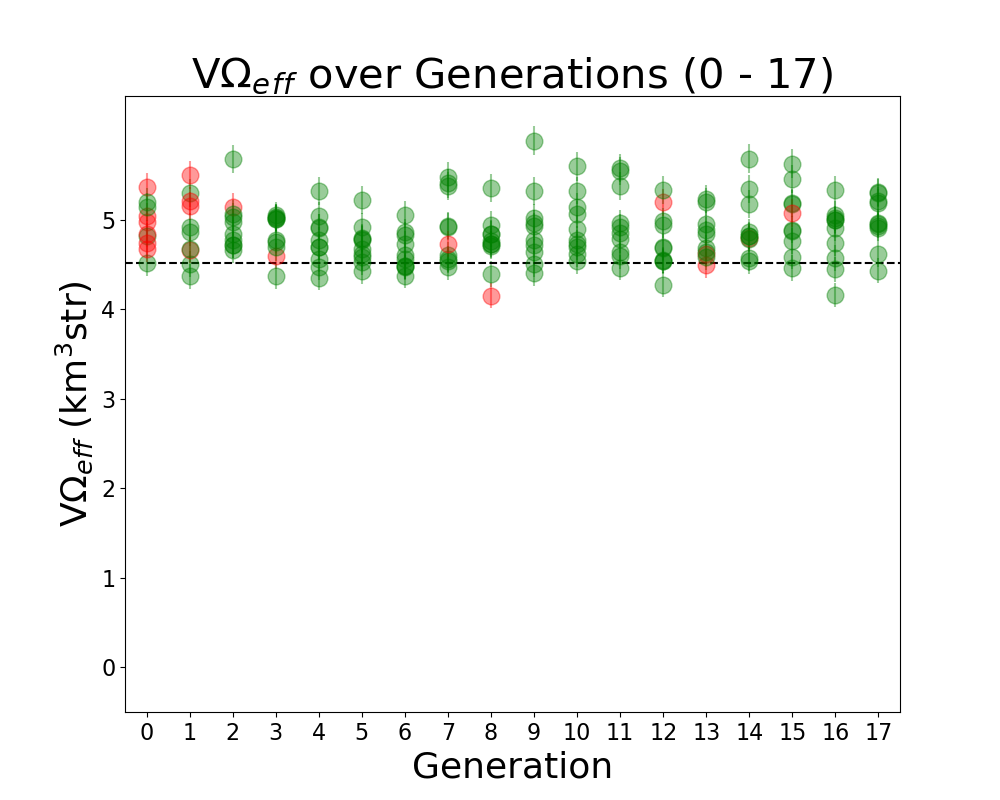
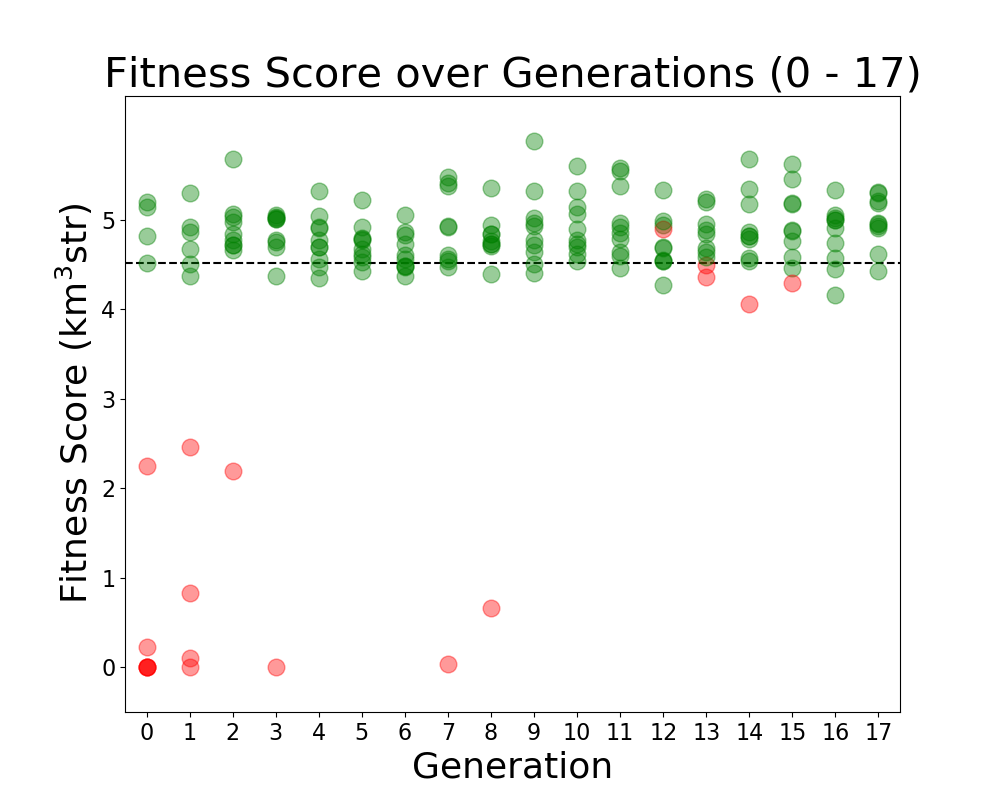
Alex M | Run Details: Machtay_20200827_Asym_Length_Run | This run followed the first symmetric run. It had an asymmetric length, but the opening angle and inner radius were kept symmetric.
10 individuals were evolved over 17 generations using 100,000 neutrinos. All selection was done through roulette, and all individuals were formed through crossover and the old mutation method (where individual genes had a 40% to be mutated, and mutated genes were chosen from a gaussian based on the mean and standard deviation of that gene's value in the generation). |
| Attachment 1: Veffectives_RG.png
|  |
| Attachment 2: Fitness_Scores_RG.png
|  |
|
164
|
Tue Jun 21 12:15:18 2022 |
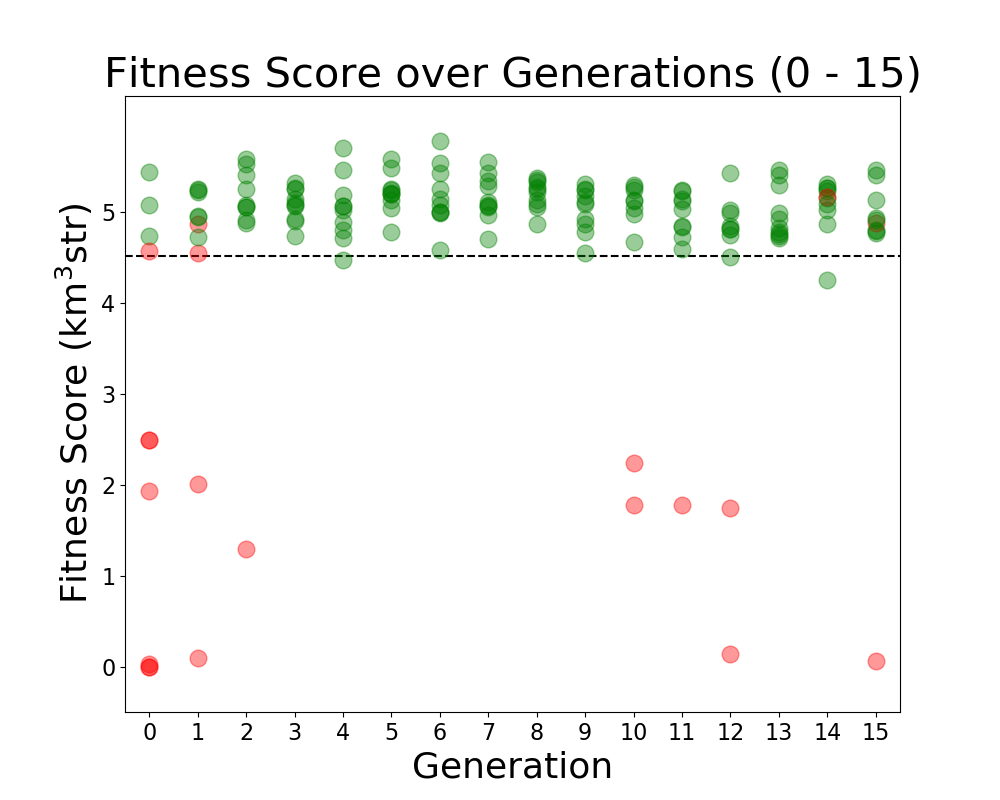
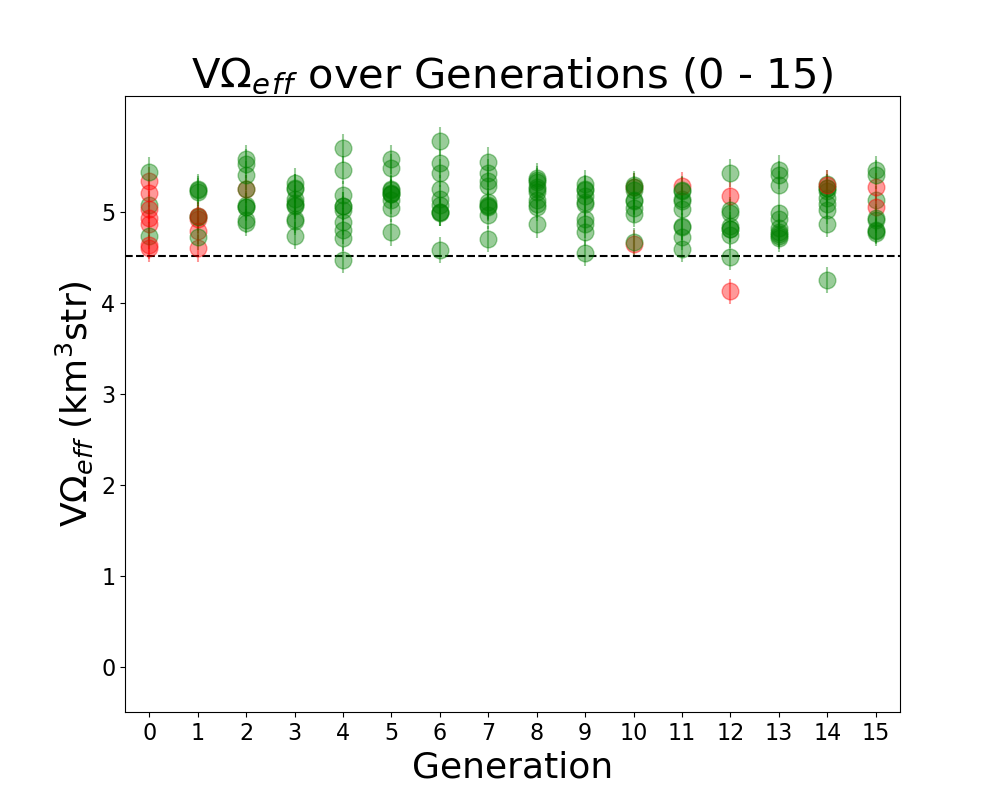
Alex M | Run Details: Machtay_20200824_Real_Run | This is considered to be the first run of "good" data. Prior to this run, we ran with few neutrinos and had errors which needed to be resolved in AraSim and with the way we handled XFdtd's simulation results being passed to AraSim. Those were resolved in the summer before this run.
This was a symmetric run of 10 individuals over 15 generations using 100,000 neutrinos per individual. This preceded the substantial modifications made by Ryan to the GA. All individuals were formed through crossover, but there was a probability of 40% for genes to be mutated. In this case, mutation was a complete change to the gene, though it was based on the average value of that gene in the generation. There was no reproduction or mutation. All individuals were selected through roulette.
Green individuals indicate that there was no penalty applied, while red individuals had a penalty factor multiplied by their effective volumes. The penalty was of the form exp(-(R-7.5)^2), where R is the outer radius, in cm, of the bicone. |
| Attachment 1: Fitness_Scores_RG.png
|  |
| Attachment 2: Veffectives_RG.png
|  |
|
163
|
Tue Jun 21 12:02:23 2022 |
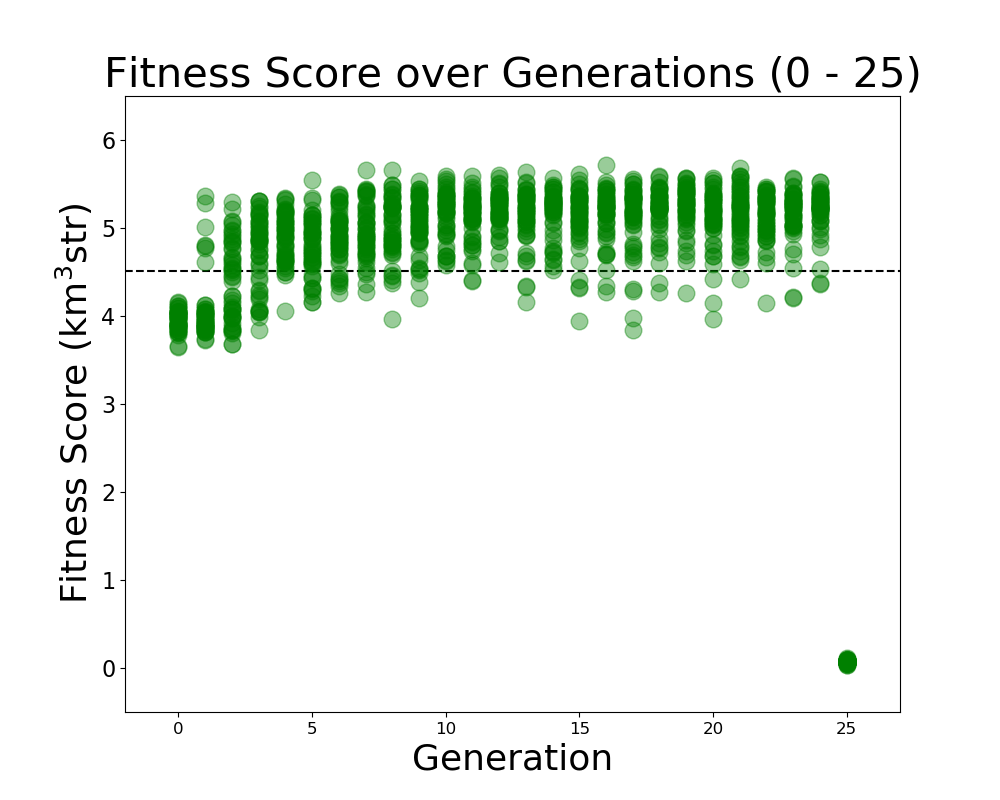
Alex M | Run Details: Machtay_20201023_300K_Nus_50_Individuals | This run was started on 10/23/2020. The purpose was to attempt to demonstrate evolution by beginning from 50 identical individuals in the initial generation (which had previously produced a low score).
This run was the first time we removed the penalty on fitness scores for antennas which exceeded the borehole radius. It was also the first time we increased the number of neutrinos thrown up to 300,000. 50 fully asymmetric individuals were evolved over 25 generations.
There was a 50/50 split for roulette/tournament selection and 75%/10%/15% for crossover/reproduction/immigration. While the evolution was somewhat flat, we do believe we demonstrated evolution because the average score rose as the run evolved.
(Note that the final generation was interrupted but the plot was still made, hence the drop to 0 for all scores on the plot) |
| Attachment 1: Fitness_Scores_RG.png
|  |
|
162
|
Wed Jun 8 14:45:52 2022 |
Alan S | XF Simulations | ARA bicone in ice | PowerPoint Slides | Beam patterns with ARA bicone contained in a cylinder of air surrounded by a shell of ice.
|
| Attachment 1: XF_ARA_bicone_in_ice_and_air_column.pptx
|
|
161
|
Tue Jun 7 14:14:21 2022 |
Dylan Wells | Matching Circuits Slides | Slides contatining my notes on matching circuits.
https://docs.google.com/presentation/d/1x25nhiqaW7LvPZ1pNZ5O4ZzsWZbtgqxBQ5haB9uWgQY/edit?usp=sharing |
|
160
|
Tue Jun 7 12:20:23 2022 |
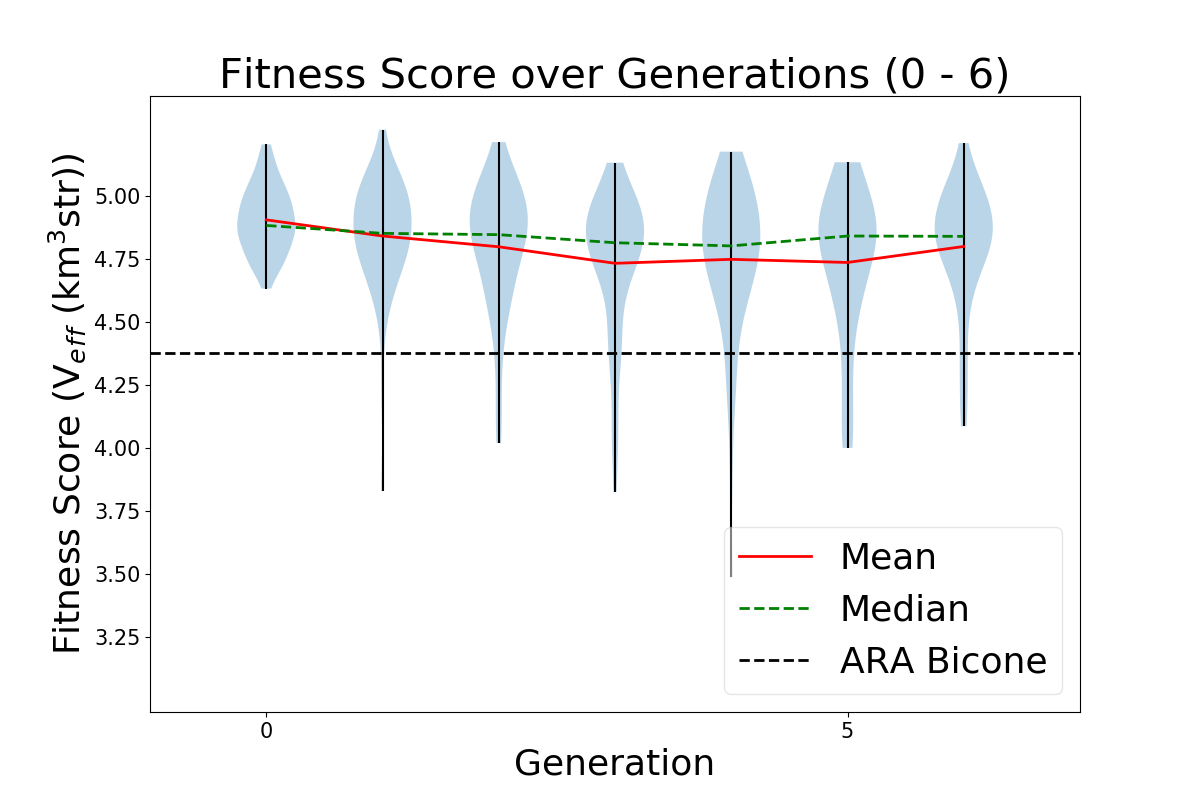
Alex M | Run Details: 2022_04_14_Identical_Asym_Lower_Min | This run was a short run (stopped due to resource limits) that was conducted to test the minimum length constraint that had been applied in the past. Previously, the minimum length was set to be 37.5 cm for each cone; in this run, it was lowered to 10 cm. It ran for 60 generations with 50 individuals per generation, each evaluated with 300,000 neutrinos. To compare to the paper run, this run was performed using the asymmetric algorithm, meaning each individual had 6 genes (length, inner radius, and opening angle for each cone). The initial generation began with identical individuals, with genes matching the genes of the best performing individual mentioned in the GENETIS paper.
The ratio of generative operators is as follows: 72% crossover, 22% immigration, 6% reproduction. Mutation was also used, with 1% of genes produced by crossover mutated by adding a number chosen from a Gaussian centered at 0 with a width of 5% of the gene's value.
The ratio of selection operators was: 20% roulette, 80% tournament, 0% rank, 0% elite.
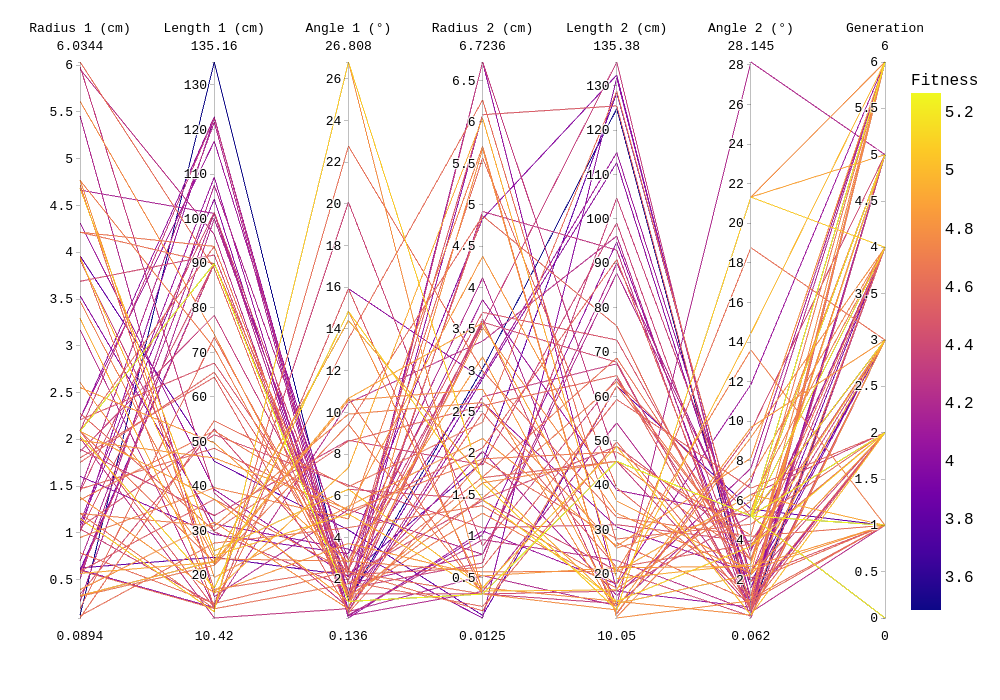
Attached are the run details, violin plot, and "rainbow" plot. |
| Attachment 1: run_details.txt
|
####### VARIABLES: LINES TO CHECK OVER WHEN STARTING A NEW RUN ###############################################################################################
RunName='2022_04_14_Identical_Asym_Lower_Min'	## This is the name of the run. You need to make a unique name each time you run.
TotalGens=100			## number of generations (after initial) to run through
NPOP=50				## number of individuals per generation; please keep this value below 99
Seeds=10			## This is how many AraSim jobs will run for each individual## the number frequencies being iterated over in XF (Currectly only affects the output.xmacro loop)
FREQ=60				## the number frequencies being iterated over in XF (Currectly only affects the output.xmacro loop)
NNT=30000			## Number of Neutrinos Thrown in AraSim
exp=18				## exponent of the energy for the neutrinos in AraSim
ScaleFactor=1.0			## ScaleFactor used when punishing fitness scores of antennae larger than the drilling holes
GeoFactor=1			## This is the number by which we are scaling DOWN our antennas. This is passed to many files
num_keys=4			## how many XF keys we are letting this run use
database_flag=0			## 0 if not using the database, 1 if using the database
				## These next 3 define the symmetry of the cones.
RADIUS=1			## If 1, radius is asymmetric. If 0, radius is symmetric
LENGTH=1			## If 1, length is asymmetric. If 0, length is symmetric
ANGLE=1				## If 1, angle is asymmetric. If 0, angle is symmetric
CURVED=0			## If 1, evolve curved sides. If 0, sides are straight
A=1				## If 1, A is asymmetric
B=1				## If 1, B is asymmetric
SEPARATION=0    		## If 1, separation evolves. If 0, separation is constant
NSECTIONS=2 			## The number of chromosomes
DEBUG_MODE=0			## 1 for testing (ex: send specific seeds), 0 for real runs
				## These next variables are the values passed to the GA
REPRODUCTION=3			## Number (not fraction!) of individuals formed through reproduction
CROSSOVER=36			## Number (not fraction!) of individuals formed through crossover
MUTATION=1			## Probability of mutation (divided by 100)
SIGMA=5				## Standard deviation for the mutation operation (divided by 100)
ROULETTE=2			## Percent of individuals selected through roulette (divided by 10)
TOURNAMENT=8			## Percent of individuals selected through tournament (divided by 10)
RANK=0				## Percent of individuals selected through rank (divided by 10)
ELITE=0				## Elite function on/off (1/0)

#####################################################################################################################################################
|
| Attachment 2: Violin_Plot.png
|  |
| Attachment 3: 2022_04_14_Identical_Asym_Lower_Min_Rainbow.png
|  |
|
159
|
Tue Jun 7 11:29:48 2022 |
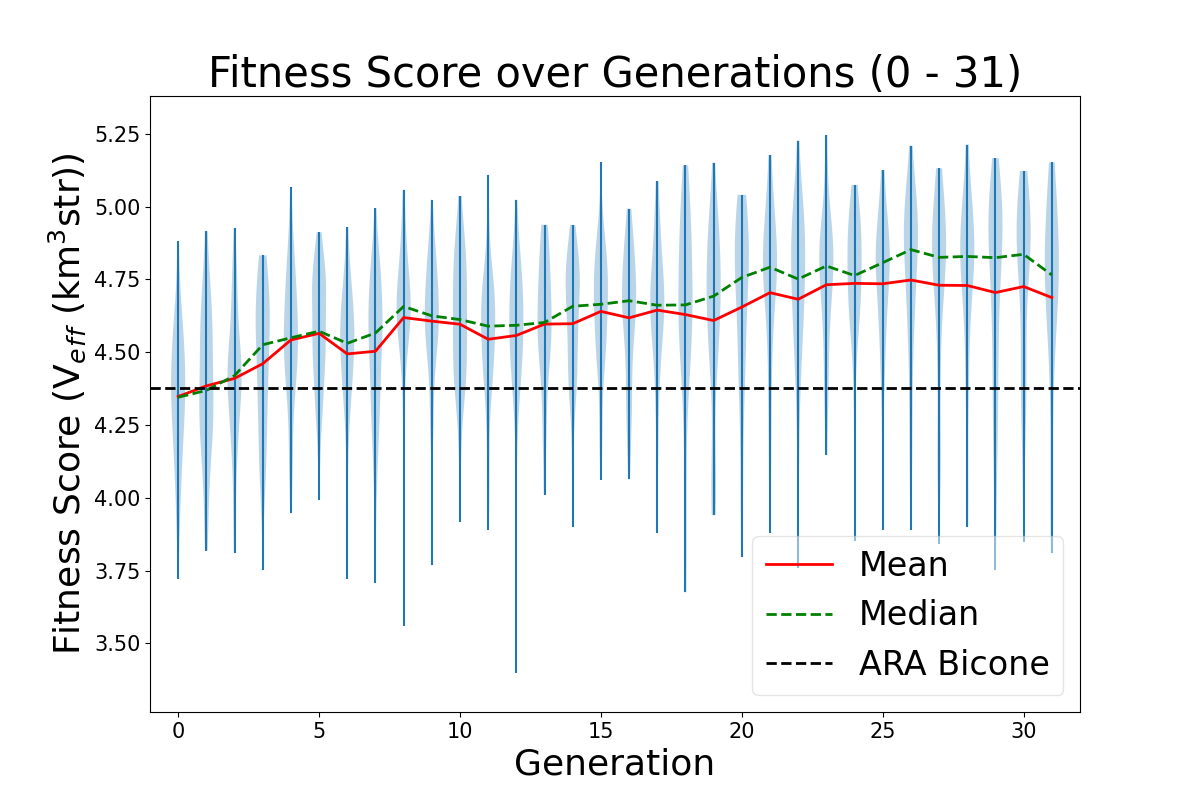
Alex M | Run Details: AraSim_Polarity_Fix_2021_03_19 | This is the run that is discussed in the GENETIS paper submitted to Physical Review D in December of 2021. It was conducted beginning on March 19, 2021. The preprint can be found here. It ran for 31 generations with 50 individuals per generation. Each individual was run through AraSim for 300,000 neutrinos.
The ratio of generative operators was: 72% crossover, 22% immigration, 6% reproduction.
The ratio of selection operators was: 80% roulette, 20% tournament, 0% rank.
The highest scoring individual had a fitness score of 5.24. However, when it was rerun with many more neutrinos (3*10^7), it had a score of 4.90, an 11% improvement over the ARA bicone.
This run was conducted before the introduction of the automatic run_details.txt generator. Instead, there is a file called Run_Notes.txt (attached) which details some of the errors that were encountered. These errors were remedied during runs by removing the offending AraOut file (which had too high of a fitness score due to a weight being calculated to be greater than 1, which shouldn't be possible) and have since been prevented by modifying the data file AraSim uses to calculate the weights. |
| Attachment 1: Run_Notes.txt
|
//Notes for AraSim_Polarity_Fix_2020_03_19 run

3/27/21: We ran into a rare error we see where AraSim gives an absurd weight (>>1) to a passed event. We reverted the state and replaced the effective volume in that file (AraOut_6_3_8.txt) with the average from the other AraOut files for that individual. DO NOT USE AraOut_6_3_8.txt WHEN ANALYZING ARASIM DATA.

5/9/21: We ran into the same error as above. We reverted the state and replaced the effective volume in the file (AraOut_23_7_7.txt). DO NOT USE AraOut_23_7_7.txt WHEN ANALYZING ARASIM DATA.

5/11/21: We ran into the same error. We are reverting the state and replacing the file (AraOut_25_10_6.txt). DO NOT USE AraOut_25_10_6.txt WHEN ANALYZING ARASIM DATA.
|
| Attachment 2: Violin_Plot_super_big.png
|  |
|
158
|
Tue Jun 7 11:01:59 2022 |
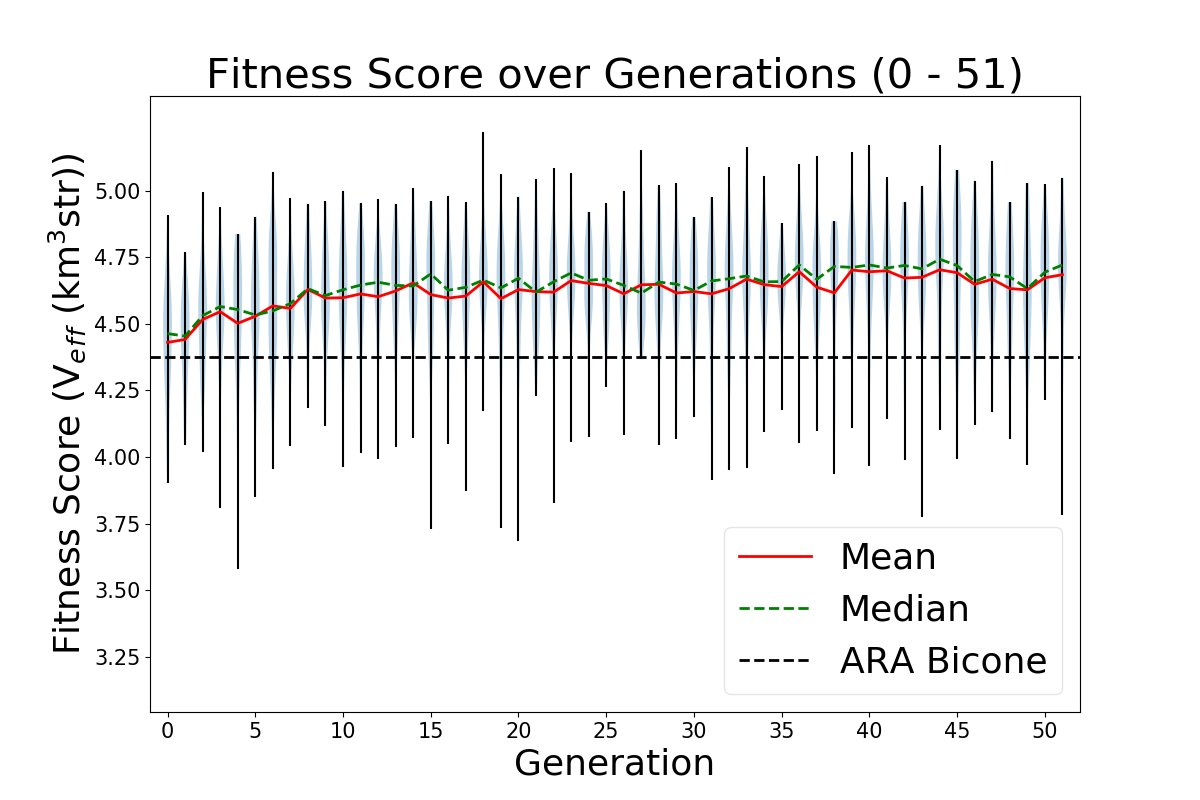
Alex M | Run Details: 2022_02_08_Rank_Test | This run was started on February 2, 2022. It is a full run of 50 generations with 50 individuals per generation using the quadratic version of the loop. This means that each individual is defined by 8 genes (length, inner radius, linear coefficient, and quadratic coefficient for each cone). Attached is the txt file run_details.txt that is automatically generated when the loop is run. Each individual was run for 300,000 neutrinos.
This run used the usual ratio of generative operators: 72% crossover, 22% immigration, and 6% reproduction. It also used the proper mutation function: 1% of genes created through crossover were mutated by adding a number chosen from a Gaussian distribution centered at 0 with a width of 5% of the gene's value (MUTATION WAS NOT USED BUT WAS AVAILABLE).
This run was the first full run in which the rank selection operator was used. The ratio of selection operators was: 0% roulette, 10% tournament, 90% rank, 0% elite.
This run used the script fitness_check.py to average the scores of identical individuals that appeared across multiple generations. This gives us a more accurate measure of those individuals' scores. It may also explain why this run appears so flat (on the violin plot): fluctuations in the scores should die down as repeated individuals have more accurate scores, and newly generated individuals that perform highly regress to their mean (actual) score when they are reproduced/recreated through crossover. This has led us to question our GA parameters, as Audrey and Autumn demonstrated that roughly 1/4 individuals in the run are repeat individuals. |
| Attachment 1: run_details.txt
|
####### VARIABLES: LINES TO CHECK OVER WHEN STARTING A NEW RUN ###############################################################################################
RunName='2022_02_08_Rank_Test'	## This is the name of the run. You need to make a unique name each time you run.
TotalGens=100			## number of generations (after initial) to run through
NPOP=50				## number of individuals per generation; please keep this value below 99
Seeds=10			## This is how many AraSim jobs will run for each individual## the number frequencies being iterated over in XF (Currectly only affects the output.xmacro loop)
FREQ=60				## the number frequencies being iterated over in XF (Currectly only affects the output.xmacro loop)
NNT=30000			## Number of Neutrinos Thrown in AraSim
exp=18				## exponent of the energy for the neutrinos in AraSim
ScaleFactor=1.0			## ScaleFactor used when punishing fitness scores of antennae larger than the drilling holes
GeoFactor=1			## This is the number by which we are scaling DOWN our antennas. This is passed to many files
num_keys=4			## how many XF keys we are letting this run use
database_flag=0			## 0 if not using the database, 1 if using the database
				## These next 3 define the symmetry of the cones.
RADIUS=1			## If 1, radius is asymmetric. If 0, radius is symmetric
LENGTH=1			## If 1, length is asymmetric. If 0, length is symmetric
ANGLE=1				## If 1, angle is asymmetric. If 0, angle is symmetric
CURVED=1			## If 1, evolve curved sides. If 0, sides are straight
A=1				## If 1, A is asymmetric
B=1				## If 1, B is asymmetric
SEPARATION=0    		## If 1, separation evolves. If 0, separation is constant
NSECTIONS=2 			## The number of chromosomes
DEBUG_MODE=0			## 1 for testing (ex: send specific seeds), 0 for real runs
				## These next variables are the values passed to the GA
REPRODUCTION=3			## Number (not fraction!) of individuals formed through reproduction
CROSSOVER=36			## Number (not fraction!) of individuals formed through crossover
MUTATION=1			## Probability of mutation (divided by 100)
SIGMA=5				## Standard deviation for the mutation operation (divided by 100)
ROULETTE=0			## Percent of individuals selected through roulette (divided by 10)
TOURNAMENT=1			## Percent of individuals selected through tournament (divided by 10)
RANK=9				## Percent of individuals selected through rank (divided by 10)
ELITE=0				## Elite function on/off (1/0)

#####################################################################################################################################################
|
| Attachment 2: Violin_Plot.png
|  |
|
157
|
Mon Jun 6 14:19:59 2022 |
Alex M | Important Runs (2) | This is a duplicate post of a previous post from the end of 2020 where I listed the important runs with some of their details in a table (as below). I am extending this table to include the important runs that have been conducted since this post. This includes the run used for the paper as well as the curved run done earlier this year.
In order to access the data for these runs, you can find them by going to this directory: /fs/ess/PAS1960/BiconeEvolutionOSC/BiconeEvolution/current_antenna_evo_build/XF_Loop/Evolutionary_Loop/Run_Outputs
Some of these runs can also be accessed in the old project space directory, though they should all be contained in the above directory. Here's the path if interested:
The runs are contained in directories available in the above path. Use caution when listing files in some of these directories--some contain many files (primarily the .uan files -- more recent runs are better organized), which means it may take a long time to list files/directories.
| Name |
Description |
Symmetry |
NPOP |
Generations |
Roulette/Tourney/Rank |
Crossover |
Reproduction |
Mutation |
Injection |
Penalty |
Neutrinos |
|
| Machtay_20200824_Real_Run |
First real run with significant amounts of data after the summer improvements.______________________________________
|
Symmetric |
10 |
15 |
100% Roulette |
100% |
0% |
- |
100% |
Yes |
100k |
|
| Machtay_20200827_Asym_Length_Run |
First asymmetric length run after summer improvements. |
Asymmetric length |
10 |
17 |
100% Roulette |
100% |
0% |
- |
100% |
Yes |
100k |
|
| Machtay_20200831_Asym_Length_and_Angle |
Asymmetric length and angle run after summer improvements. |
Asymmetric length and angle |
10 |
42 |
100% Roulette |
100% |
0% |
- |
100% |
Yes |
150k |
|
| Machtay_20200911_Symmetric |
Longer symmetric run with fewer neutrinos. |
Symmetric |
10 |
35 |
100% Roulette |
100% |
0% |
- |
100% |
Yes |
30k |
|
| Machtay_20200914_Asymmetric_50_Individuals |
Longer asymmetric run with fewer neutrinos. |
Asymmetric (all dimensions) |
50 |
26 |
100% Roulette |
100% |
0% |
- |
100% |
Yes |
30k |
|
| Machtay_20201016_Symmetric_Improved_GA |
First run using improvements to GA based on Ryan's paperclip/fast loop analysis. |
Symmetric |
50 |
10 |
50/50/0 |
75% |
10% |
- |
15% |
Yes |
30k |
|
| Machtay_20201023_300K_Nus_50_Individuals |
Started with all identical individuals to demonstrate evolution; replaced penalty with hard cutoff. Increased Nus for higher fitness score precision. |
Asymmetric (all dimensions |
50 |
25 |
50/50/0 |
75% |
10% |
- |
15% |
No |
300k |
|
| AraSim_Polarity_Fix_2021_03_19 |
Run used in the paper. In this run, we fixed an error that had been noticed by Brian and Jorge in AraSim. The error involved the polarity of the signals in Report.cc (hence the name of this run). |
Asymmetric(all dimensions) |
50 |
31 |
80/20/0 |
72% |
6% |
- |
22% |
No |
300k |
|
| 2022_02_08_Rank_Test |
This was the first long run done using a new gene for the curvature of the cones. We recast the side lengths to be described by the coefficients of a quadratic polynomial, rather than by the opening angle. This also used rank selection instead of roulette.
Additionally, mutation has been changed here so as to apply small perturbations to existing genes rather than regenerating those genes altogether. This only applies to individuals created by crossover. The mutation column indicates the probability of mutating a gene and the standard deviation of the gaussian that determines the change (in terms of % of the original value).
|
Asymmetric, Quadratic |
50 |
50 |
0/90/10 |
72% |
6% |
1%, 5% |
22% |
No |
300k |
|
| 2022_04_14_Identical_Asym_Lower_Min |
This run used the asymmetric GA to see if by lowering the minimum length (down to 10 cm instead of 37.5) the GA would try to run away to ever smaller lengths. |
Asymmetric |
50 |
6 |
2/8/0 |
72% |
6% |
- |
22% |
No |
300k |
|
|
|
155
|
Fri May 20 17:17:32 2022 |
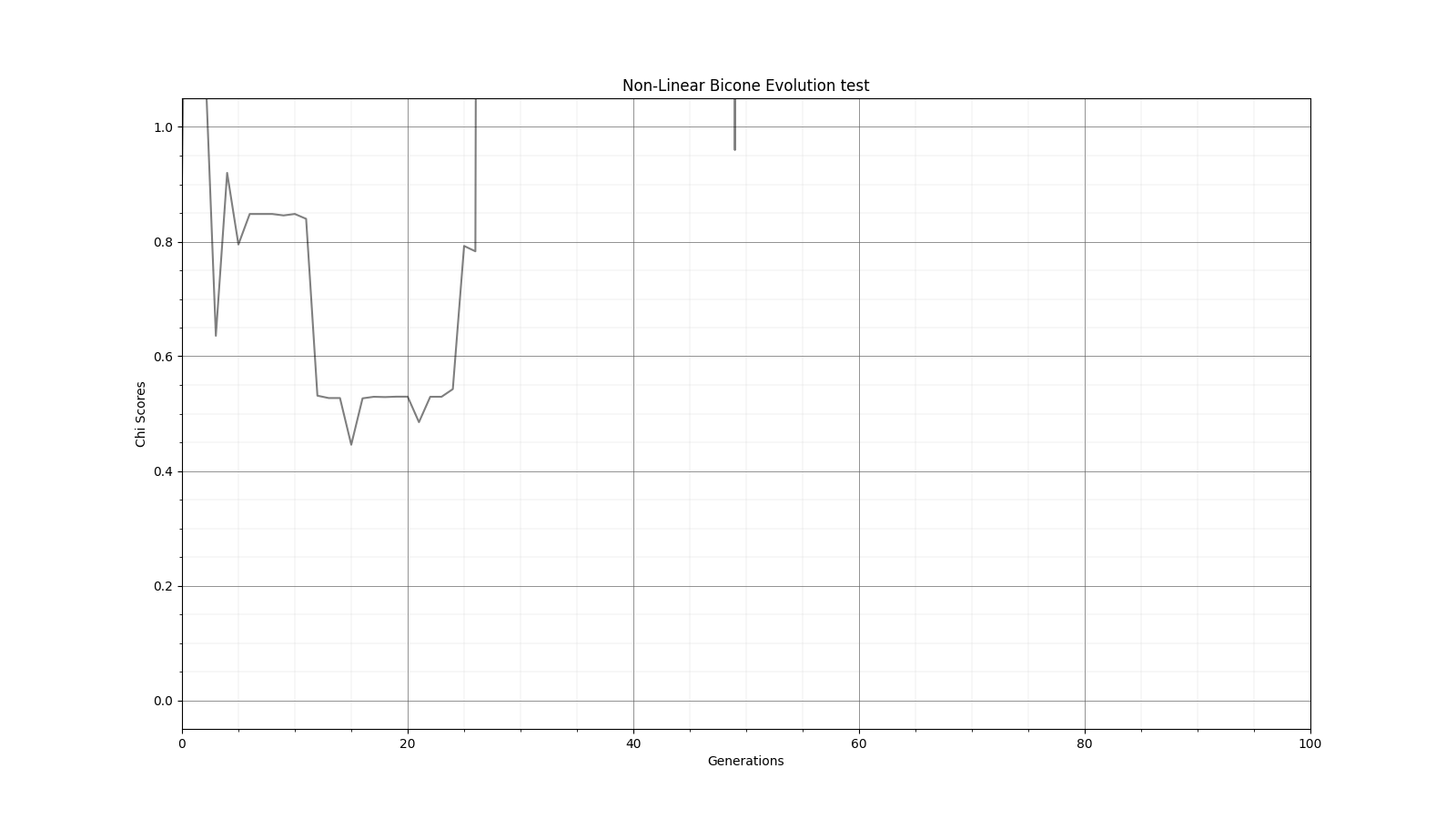
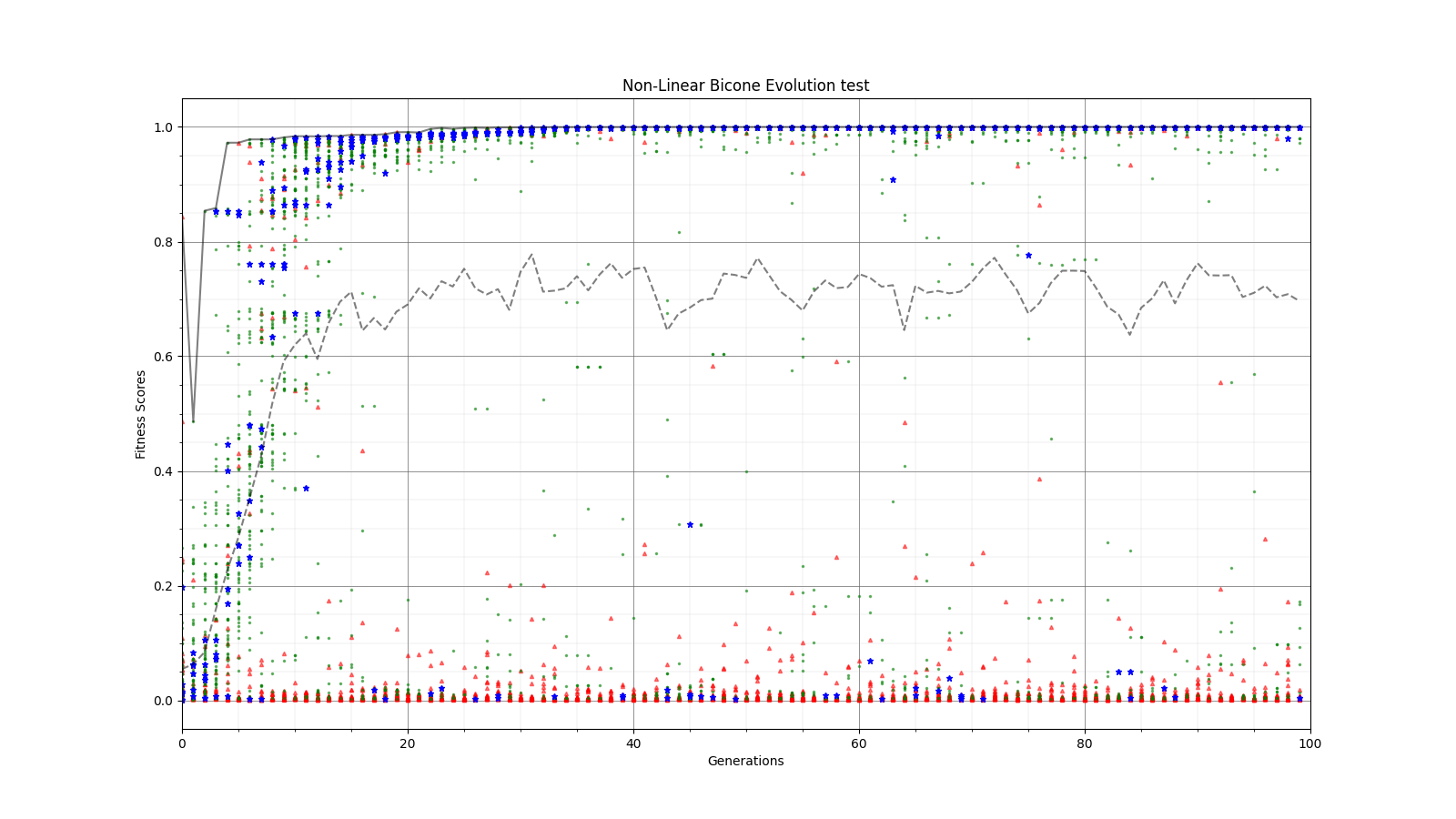
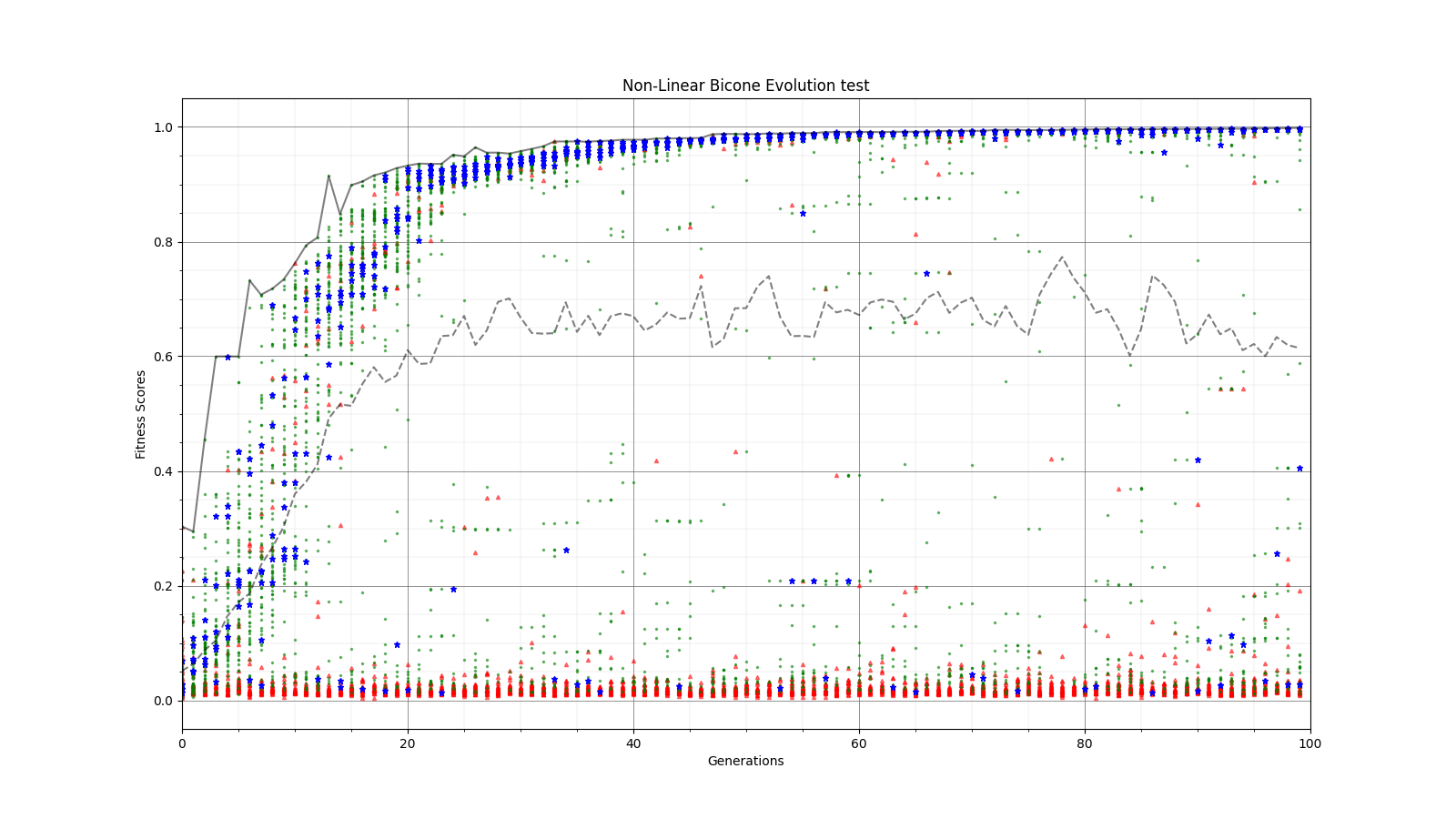
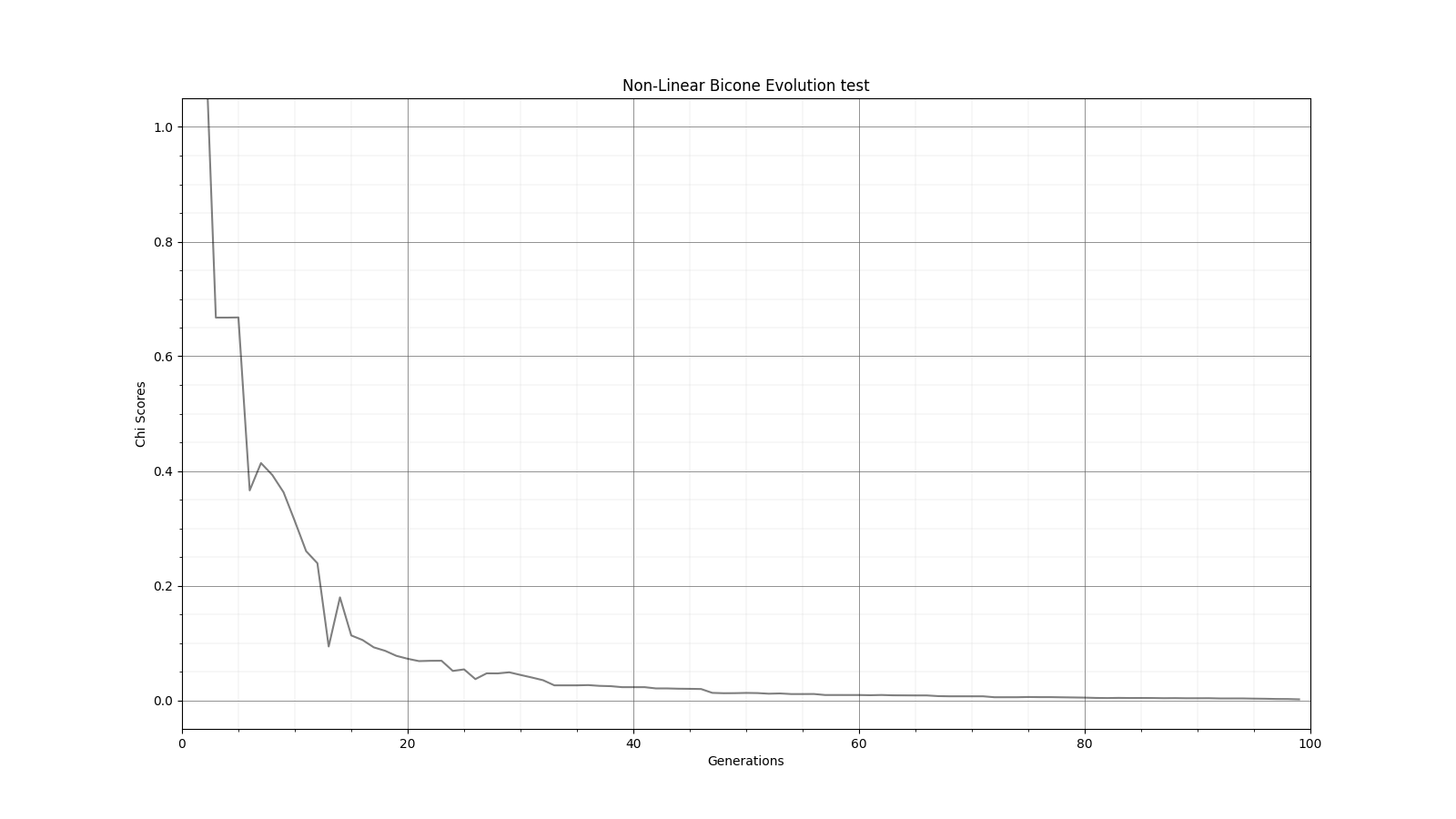
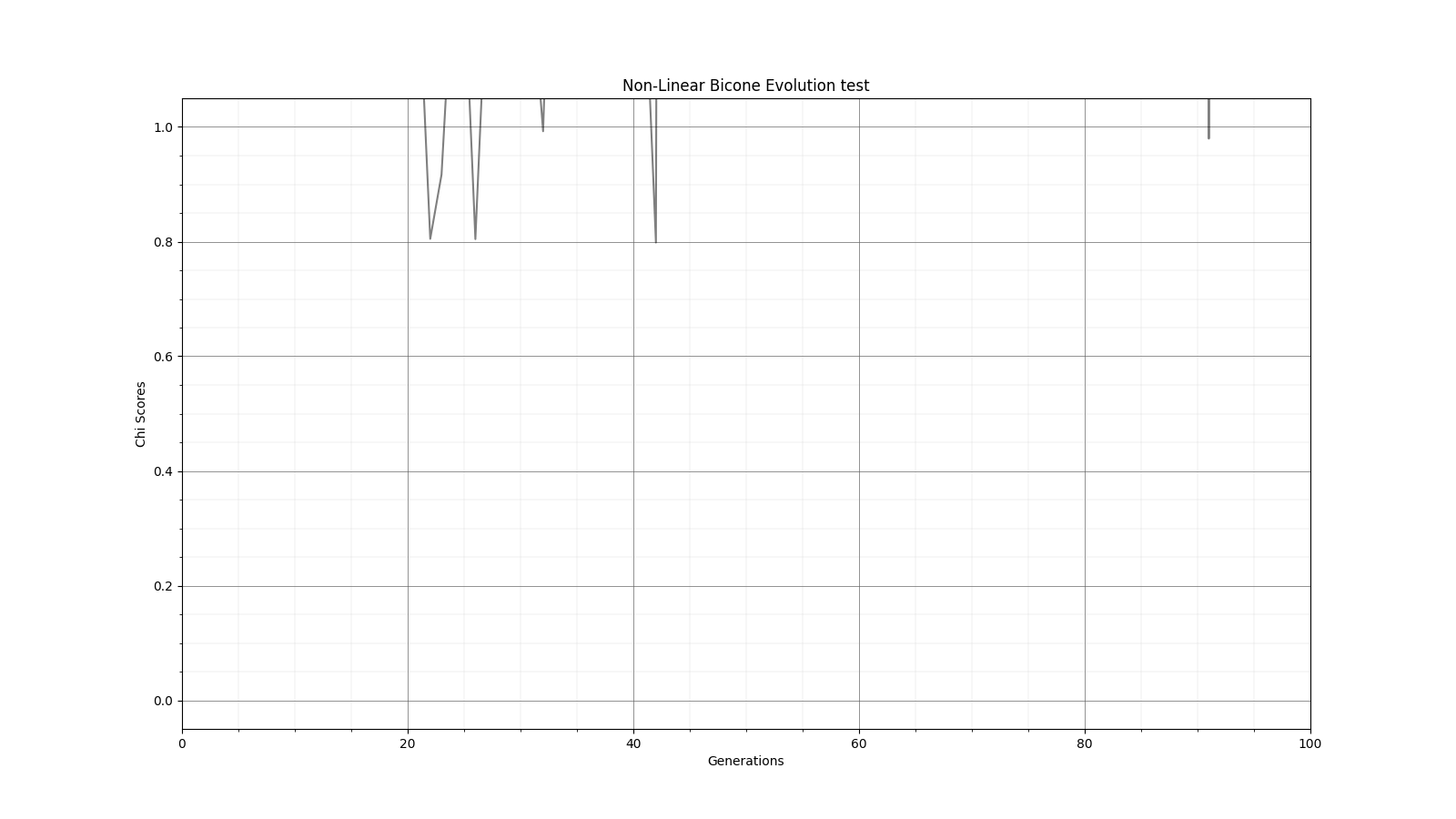
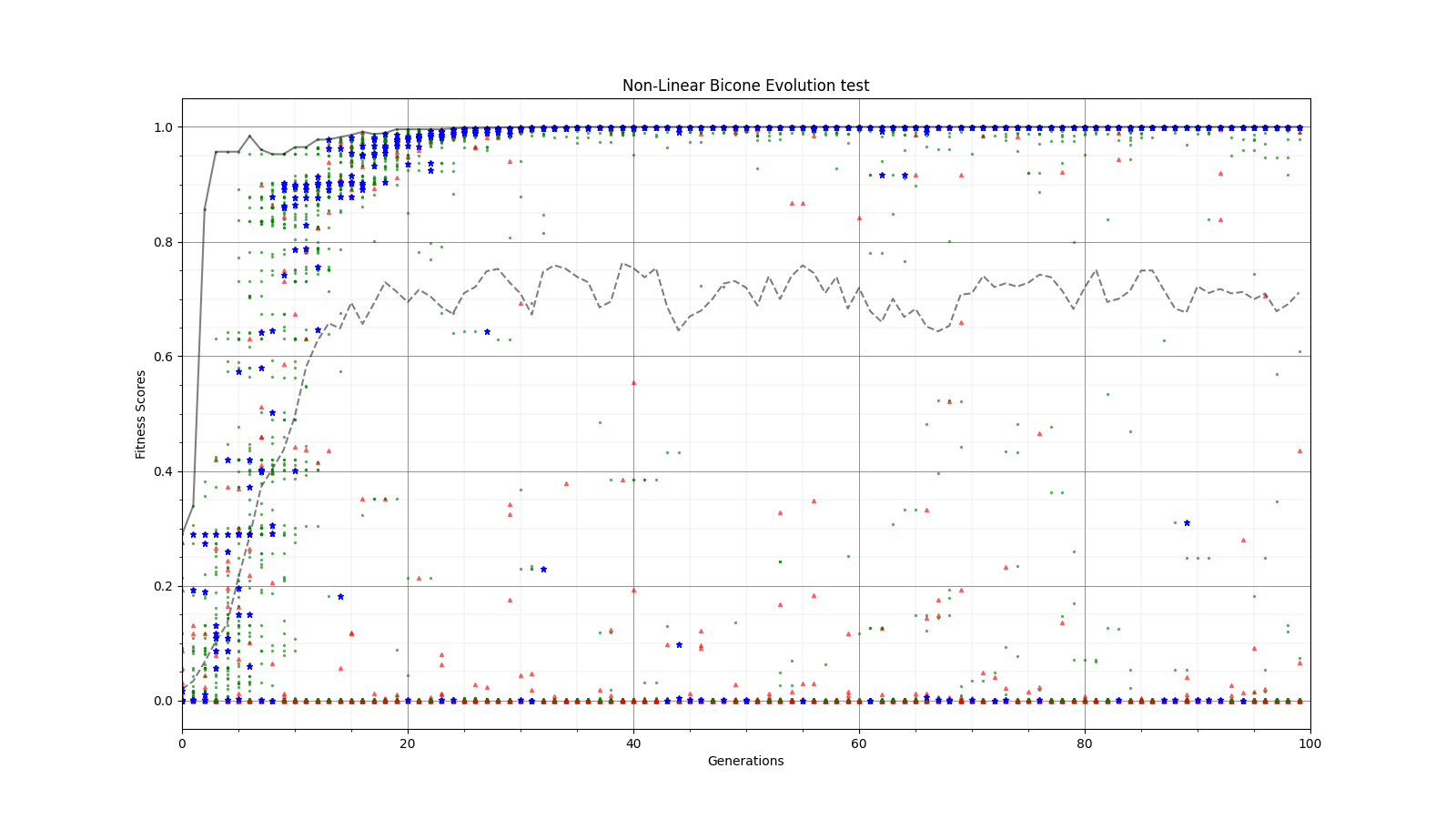
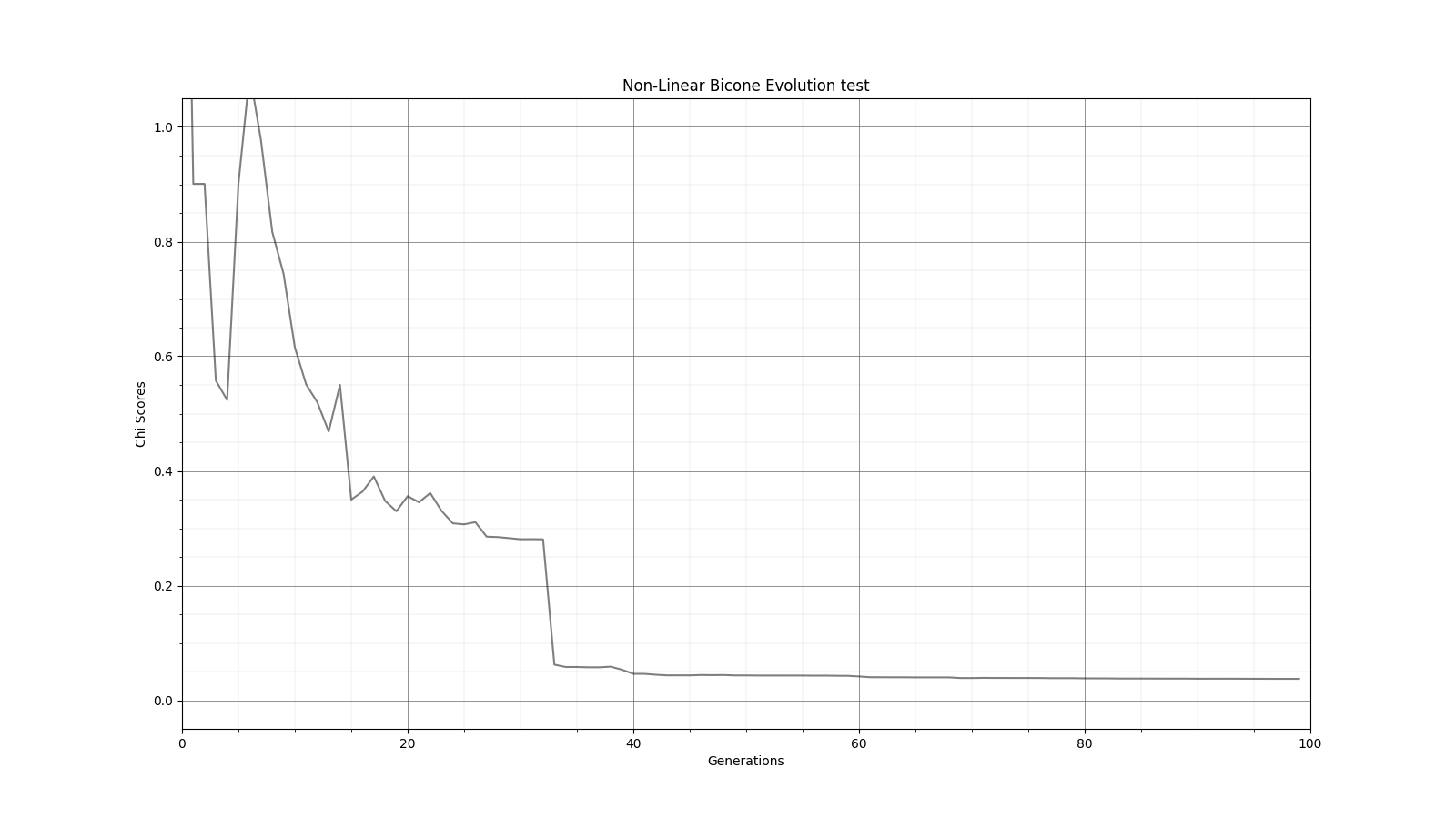
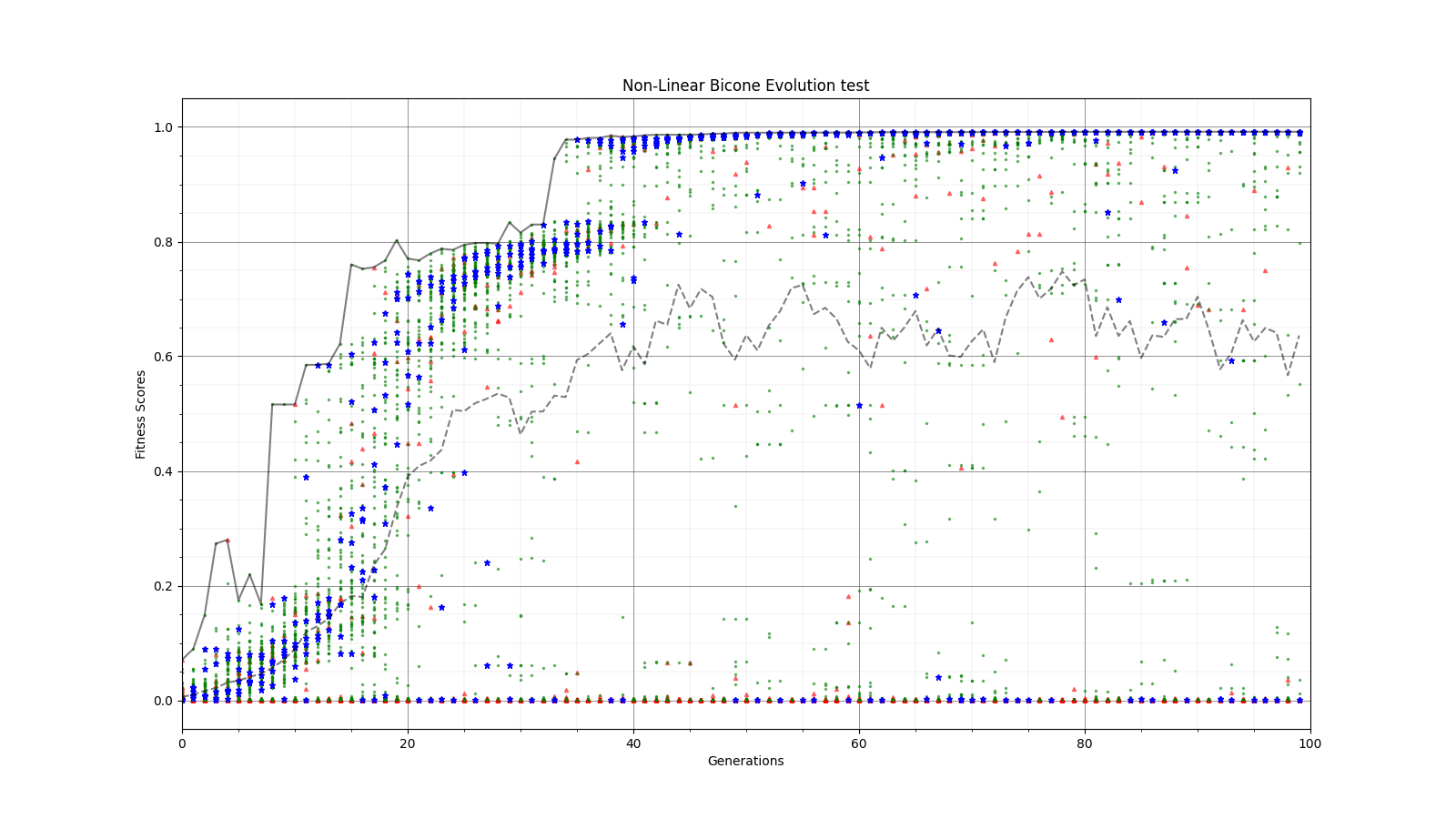
Ryan Debolt | Fitness Functions Test | Bellow lies plots testing different scores and comparing them using a chi^2 score.
The functions used are as follows
Gaussian: e^(-2) (Red)
Inverse: 1/(1+(O-E)^2) (Purple)
Algebraic: 1/(1+(chi^2) )^(3/2)) (Green)
Chi: 1/(1+chi^2) (Blue)
Which are plotted here:

|
| Attachment 1: Alg_Chi.png
|  |
| Attachment 2: Alg_fitness.png
|  |
| Attachment 3: inv_Chi_Fitness.png
|  |
| Attachment 4: Inv_Chi_Chi.png
|  |
| Attachment 5: Gauss_Chi.png
|  |
| Attachment 6: Gauss_Fitness.png
|  |
| Attachment 7: Inv_Chi.png
|  |
| Attachment 8: Inv_Fitness.png
|  |
|
154
|
Fri May 20 14:26:39 2022 |
Alex M | GA Papers | I'm making this entry so that I can record some interesting papers we find on genetic algorithms. Feel free to update this list with links to papers and maybe make a description of what was interesting/of note in the paper.
|
|
153
|
Tue Apr 19 17:46:07 2022 |
Aidan Snyder | AREA - Short run testing stringReplacement2.py - 04/19/2022 |
- Run Type
- Run Date
- Run Name
- Why are we doing this run?
- Check to see if stringReplacement2.py changes were successfull
- What is different about this run from the last?
- added below code in order to create a fitness file inside of each generation to display the fitness scores for just that generation, as opposed to just having one big file full of all the generations.
f2 = open(source + "/" + "gen_{}".format(gen) + "/fitnessFile_gen_{}".format(gen) + ".txt", 'a')
f2.write(','.join(mean_Veff_array) + "\n")
f2.close()
- Symmetric, asymmetric, linear, nonlinear?
- Number of individuals (NPOP)
- Operators / Selection methods used (% of each)
- roulette crossover 50%
- roulette mutation 16%
- tournament crossover 18%
- tournament mutation 16%
- Are we using the database?
|
|
152
|
Fri Apr 8 16:07:22 2022 |
Alex M | Identical Asymmetric Lowered Length Minimum Run | We are trying to do a short run of the asymmetric bicone so that we can see how it tries to evolve the antenna when the minimum length is lowered from 37.5 cm to 10 cm. Currently, there is a problem with the loop in the asymmetric version. Attached is the run detail file. |
| Attachment 1: run_details.txt
|
####### VARIABLES: LINES TO CHECK OVER WHEN STARTING A NEW RUN ###############################################################################################
RunName='2022_04_07_Identical_Asym'	## This is the name of the run. You need to make a unique name each time you run.
TotalGens=100			## number of generations (after initial) to run through
NPOP=50				## number of individuals per generation; please keep this value below 99
Seeds=10			## This is how many AraSim jobs will run for each individual## the number frequencies being iterated over in XF (Currectly only affects the output.xmacro loop)
FREQ=60				## the number frequencies being iterated over in XF (Currectly only affects the output.xmacro loop)
NNT=30000			## Number of Neutrinos Thrown in AraSim
exp=18				## exponent of the energy for the neutrinos in AraSim
ScaleFactor=1.0			## ScaleFactor used when punishing fitness scores of antennae larger than the drilling holes
GeoFactor=1			## This is the number by which we are scaling DOWN our antennas. This is passed to many files
num_keys=4			## how many XF keys we are letting this run use
database_flag=0			## 0 if not using the database, 1 if using the database
				## These next 3 define the symmetry of the cones.
RADIUS=1			## If 1, radius is asymmetric. If 0, radius is symmetric
LENGTH=1			## If 1, length is asymmetric. If 0, length is symmetric
ANGLE=1				## If 1, angle is asymmetric. If 0, angle is symmetric
CURVED=0			## If 1, evolve curved sides. If 0, sides are straight
A=1				## If 1, A is asymmetric
B=1				## If 1, B is asymmetric
SEPARATION=0    		## If 1, separation evolves. If 0, separation is constant
NSECTIONS=2 			## The number of chromosomes
DEBUG_MODE=0			## 1 for testing (ex: send specific seeds), 0 for real runs
				## These next variables are the values passed to the GA
REPRODUCTION=3			## Number (not fraction!) of individuals formed through reproduction
CROSSOVER=36			## Number (not fraction!) of individuals formed through crossover
MUTATION=1			## Probability of mutation (divided by 100)
SIGMA=5				## Standard deviation for the mutation operation (divided by 100)
ROULETTE=2			## Percent of individuals selected through roulette (divided by 10)
TOURNAMENT=8			## Percent of individuals selected through tournament (divided by 10)
RANK=0				## Percent of individuals selected through rank (divided by 10)
ELITE=0				## Elite function on/off (1/0)

#####################################################################################################################################################
|
|