| ID |
Date |
Author |
Subject |
|
108
|
Mon Sep 14 17:23:26 2020 |
Alex M | GENETIS Update 9/14/20 | I just wanted to give an update on what I've been doing today for GENETIS. I went ahead and recorded myself running the loop. It should be useful for new people we're onboarding but I also went through a whole generation, which I think is interesting for everyone to understand the timescale of each part of the loop. I'm making a small edit (I have no clue how to edit videos haha) so once I'm done I'll try to send it via email and post it on slack. I also started a long run Amy requested using antennas which are asymmetric in length and opening angle and 50 individuals per generation. Since it has so many individuals it will take a long time to go through each generation. I also had to decrease the number of AraSim jobs (thus increasing the number of neutrinos per job) because otherwise we'd be submitting too many jobs and have a lot of them blocked, holding us back from running. If anyone has problems with me using up too many jobs let me know and I can try to decrease the numer of jobs per individual futher (right now I have 10 jobs per individual with 3000 neutrinos per job, which gives us 500 AraSim jobs per generation). |
|
Draft
|
Tue Jul 14 00:15:42 2026 |
Alex M | GENETIS Update 9/14/20 | I just wanted to give an update on what I've been doing today for GENETIS. I went ahead and recorded myself running the loop. It should be useful for new people we're onboarding but I also went through a whole generation, which I think is interesting for everyone to understand the timescale of each part of the loop. I'm making a small edit (I have no clue how to edit videos haha) so once I'm done I'll try to send it via email and post it on slack. I also started a long run Amy requested using antennas which are asymmetric in length and opening angle and 50 individuals per generation. Since it has so many individuals it will take a long time to go through each generation. I also had to decrease the number of AraSim jobs (thus increasing the number of neutrinos per job) because otherwise we'd be submitting too many jobs and have a lot of them blocked, holding us back from running. If anyone has problems with me using up too many jobs let me know and I can try to decrease the numer of jobs per individual futher (right now I have 10 jobs per individual with 3000 neutrinos per job, which gives us 500 AraSim jobs per generation). |
|
40
|
Tue Mar 17 16:18:29 2020 |
Julie Rolla | GENETIS Planning Meeting | Attendance: Julie Rolla, Alex M.
Today Alex and I met to discuss how to move forward given the COVID-19 restrictions. We have resent out a message polling people's schedules to create online working sessions. Here is what we are planning:
| Group name |
Tasks |
Participants |
Times per week to meet |
| Loop Group |
Running the loop, updating software, getting plots |
Julie, Alex M., Alex P. |
2 |
| Lecture |
Attend Leo's lectures |
Full group |
1 |
| Training (Python, c++, and Bash projects) |
Completing the training modules (Alex M. and Julie will be answering questions) |
Mitchell, Ryan, Evelyn, Eliot, Julie, Alex M. |
2 |
Once we collect times for each group, we will have separate meetings for all of these entities. This way it's easier for us to meet without all having different items to discuss/work on. All of these will be zoom meetings moving forward. Meeting info will be announced shortly!
Tasks for "the Loop Group":
- Make wall time a variable for XF sim.
- Test current software edits.
- Such as item #1 above
- Make sure the bottleneck function is working.
- Right now it seems to be working; however, we keep hitting a wall time error. If we can make the wall time a variable then we can be sure the bottleneck function is working, and the wall time is truly the error.
- Get Ruby working on XF
- when I type:
/usr/local/xfdtd/7.8.1.4/remcom/bin/xfdtd I get:
Info: Using latest available version (7.8.1.4)
Info: Running /usr/local/xfdtd/7.8.1.4/remcom/XFdtd_7.8.1.4/bin/xfdtd
Error: Unable to find executable to run.  This command must exist
- Get Alex's account of Ruby working.
- He received an email and is still unable to log in. He is touching base with them again.
Tasks for "the Training Group":
- Julie and Alex need to finish the C++ project!
|
|
Draft
|
Thu Mar 26 15:56:22 2026 |
Julie Rolla | GENETIS Planning Meeting |
| Quote: |
|
Attendance: Julie Rolla, Alex M.
Today Alex and I met to discuss how to move forward given the COVID-19 restrictions. We have resent out a message polling people's schedules to create online working sessions. Here is what we are planning:
| Group name |
Tasks |
Participants |
Times per week to meet |
| Loop Group |
Running the loop, updating software, getting plots |
Julie, Alex M., Alex P. |
2 |
| Lecture |
Attend Leo's lectures |
Full group |
1 |
| Training (Python, c++, and Bash projects) |
Completing the training modules (Alex M. and Julie will be answering questions) |
Mitchell, Ryan, Evelyn, Eliot, Julie, Alex M. |
2 |
Once we collect times for each group, we will have separate meetings for all of these entities. This way it's easier for us to meet without all having different items to discuss/work on. All of these will be zoom meetings moving forward. Meeting info will be announced shortly!
Tasks for "the Loop Group":
- Make wall time a variable for XF sim.
- Test current software edits.
- Such as item #1 above
- Make sure the bottleneck function is working.
- Right now it seems to be working; however, we keep hitting a wall time error. If we can make the wall time a variable then we can be sure the bottleneck function is working, and the wall time is truly the error.
- Get Ruby working on XF
- when I type:
/usr/local/xfdtd/7.8.1.4/remcom/bin/xfdtd I get:
Info: Using latest available version (7.8.1.4)
Info: Running /usr/local/xfdtd/7.8.1.4/remcom/XFdtd_7.8.1.4/bin/xfdtd
Error: Unable to find executable to run.  This command must exist
- Get Alex's account of Ruby working.
- He received an email and is still unable to log in. He is touching base with them again.
Tasks for "the Training Group":
- Julie and Alex need to finish the C++ project!
|
|
|
Draft
|
Mon Jul 13 06:51:38 2026 |
Julie Rolla | GENETIS Planning Meeting | Attendance: Julie Rolla, Alex M.
Today Alex and I met to discuss how to move forward given the COVID-19 restrictions. We have resent out a message polling people's schedules to create online working sessions. Here is what we are planning:
| Group name |
Tasks |
Participants |
Times per week to meet |
| Loop Group |
Running the loop, updating software, getting plots |
Julie, Alex M., Alex P. |
2 |
| Lecture |
Attend Leo's lectures |
Full group |
1 |
| Training (Python, c++, and Bash projects) |
Completing the training modules (Alex M. and Julie will be answering questions) |
Mitchell, Ryan, Evelyn, Eliot, Julie, Alex M. |
2 |
Once we collect times for each group, we will have separate meetings for all of these entities. This way it's easier for us to meet without all having different items to discuss/work on. All of these will be zoom meetings moving forward. Meeting info will be announced shortly!
Tasks for "the Loop Group":
- Make wall time a variable for XF sim.
- Test current software edits.
- Such as item #1 above
- Make sure the bottleneck function is working.
- Right now it seems to be working; however, we keep hitting a wall time error. If we can make the wall time a variable then we can be sure the bottleneck function is working, and the wall time is truly the error.
- Get Ruby working on XF
- when I type:
/usr/local/xfdtd/7.8.1.4/remcom/bin/xfdtd I get:
Info: Using latest available version (7.8.1.4)
Info: Running /usr/local/xfdtd/7.8.1.4/remcom/XFdtd_7.8.1.4/bin/xfdtd
Error: Unable to find executable to run.  This command must exist
- Get Alex's account of Ruby working.
- He received an email and is still unable to log in. He is touching base with them again.
Tasks for "the Training Group":
- Julie and Alex need to finish the C++ project!
|
|
1
|
Wed Feb 6 17:23:18 2019 |
Julie Rolla | GENETIS Paper working draft | The current working draft of the GENETIS paper can be seen here: https://www.overleaf.com/6783528497tvqbjphsgvzn
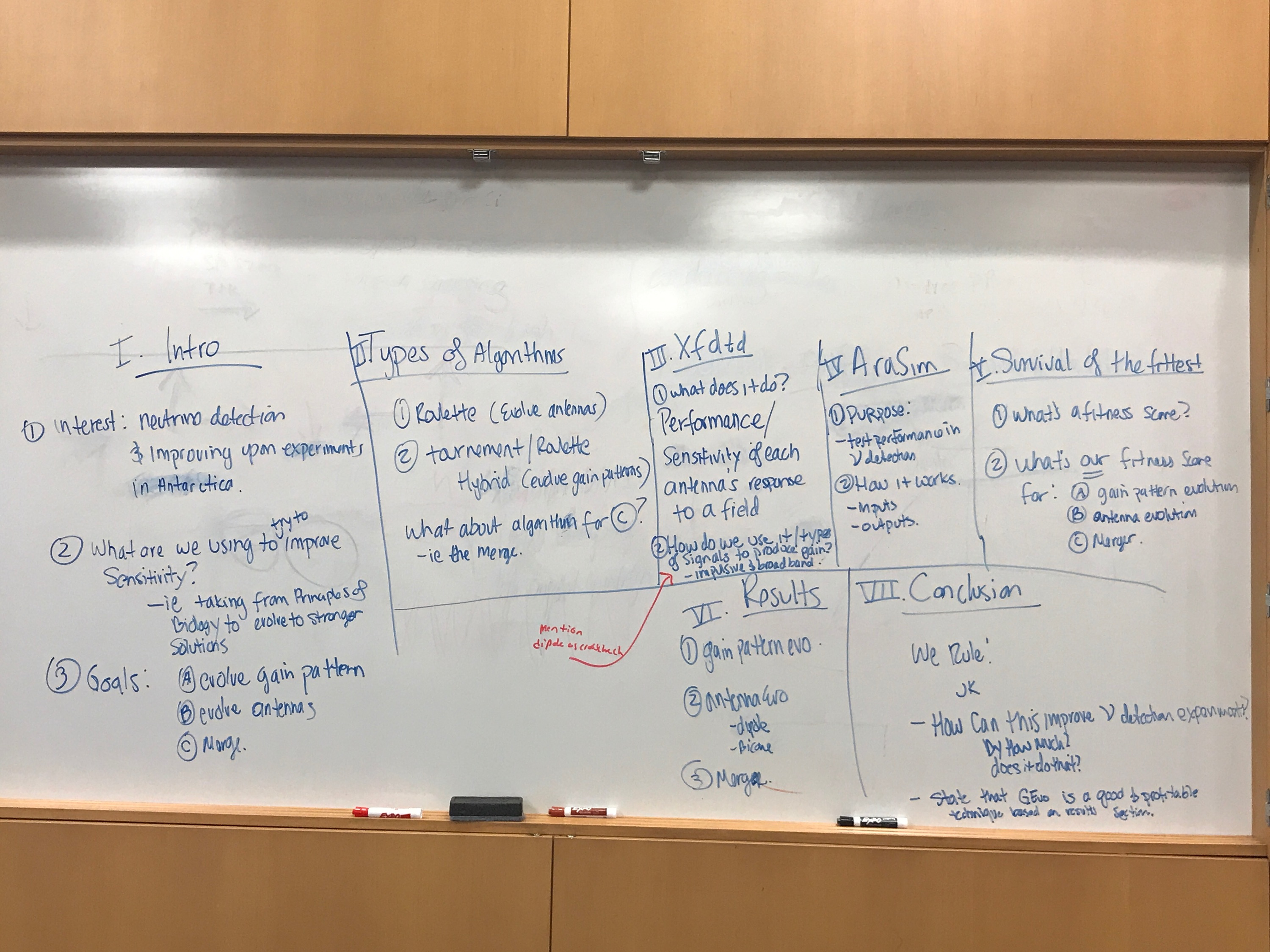
Additionally, here's our outline for the paper. The section assignments are as follows:
I. Intro (Julie)
II. Types of Algorithms (Suren)
III. XFdtd (Cade)
IV. AraSim -- will be called something else... (Max)
V. Fitness function (Suren)
VI. Results (Julie)
VII. Conclusion (We will see..)
Note that the order of the sections may change. |
| Attachment 1: IMG_2881.JPG.jpeg
|  |
|
43
|
Thu Apr 2 16:14:29 2020 |
Julie Rolla | GENETIS Meeting update | This is a general update. Most of our recent meetings have been to teach the students to use Git properly, or to answer questions on the training modules.
Update
1. Git Update: I recently cleaned up our Git and GitHub so that we have a better way to develop this code. Once I cleaned it up the goal is to educate all of the students to properly use Git so we develop code correctly moving forward. The repository had become quite a mess. The students were constantly developing on a branch, and never merging it back to the main branch. This means that we never had a working copy that we could run on while edits were being made in parallel. I attempted to merge the edits to the main branch with the hopes of getting this functioning so we could evolve while working on the bottleneck function; however, it looks like someone with poor knowledge of Git edited the main branch and we had an abundance of merge conflicts.
What I've done now is reset the repository so that all merge conflicts are resolved and a working copy exists on the main branch. I've also added a .gitignore that will ignore all data files. Git doesn't like these because (1) it hates when tracked files disappear -- ie when we delete trial run data, if someone accidentally pushed it then Git complains-- and (2) it means it we constantly are adding more untracked files (every single new file we make is untracked and then gets tracked, like the flag files). So, I've had it only track useful code.
The goal once I train the other on Git is to move the place of the data files and make it it's own git repository (once we start doing fewer trial runs so we won't lose important data). If the others learn to check the status of files before pushing them, they can make sure they don't push useless trial data sets, and either (1) delete them, or (2) add them to the .gitignore.
As for now, we successfully have the working, run-able copy on the main branch now. When any more revisions are made (e.g. the talk of adding the wall time variable), we can branch and edit on that so we still run.
2. Evolution/bottleneck update: We got the loop working to the point that it can run all the way through a generation without fatal problems. The only potential problem we can see right now is if we need to go backward in the savestate. We're working on making that not a problem--the solution is to better organize the output files and data, which we were interested in anyway. Right now we are running with 10 individuals in each generation. Alex got through 2 generations without a problem, so he'll keep running but now we're trying to make some of these more minor fixes so we may have to stop the run. Alex does have plots (they don't look great, but at least they're being made correctly without error). At the moment we are swimming in GPUs. We haven't had much trouble at all this week with getting them, so that's why we were able to get 2 generations done between around midnight last night and 2ish today; not sure how long that will persist, but Pitzer has had relatively little usage whenever we've looked lately.
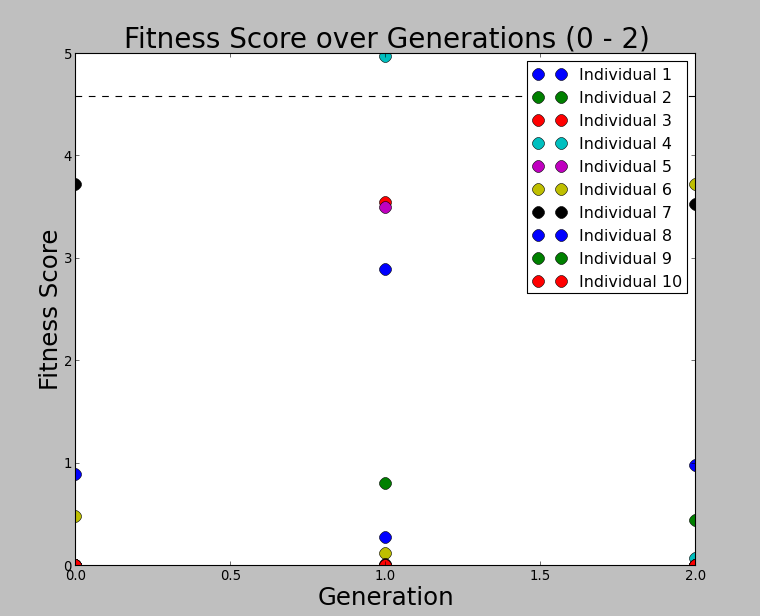
Comments on the plots: We're discussing this now, we don't think the individuals should really be color coded/separate on the legend because it is not like they follow one individual across multiple generations; however, we do need to label the dotted line. Another thing we were considering is decreasing the penalty factor for when the cones are too big for the hole. If we get something with a much much better Veff but it's only slightly larger than the hole, it might be worth it to help that one stick around a little bit more.
3. Wall time Variable Update: Also, last week Carl and Alex talked about the variable wall time again. We decided the best idea is to start by implementing a variable wall time based on the cylindrical volume that he mentioned before, but in the future, we might also be able to check the time of each GPU job and then plot it against the dimensions of the cone/cylindrical volume to get a better estimate of the wall time for each job
|
| Attachment 1: Fitness_Score.png
|  |
|
44
|
Tue Apr 7 15:48:54 2020 |
Julie Rolla | GENETIS Meeting Update | Meeting Attendance: Julie, Alex M., Alex P, Eliot, Leo, Evelyn, Mitchell, Ryan.
Today is the deadline for confirming our attendance at the virtual APS meeting. Alex M. will be confirming and we will be orienting ourselves so that we can have some results. Here is our to-do list for today:
- Create a method for automatically adding our plots to dropbox each day.
- The way we are going to do it is by adding the command: mail -s "Test Subject" someemailaddress@gmail.com < testScript
- We will create a random email to use for this that will only be receiving emails from this command.
- We are trying to find and set up a client that as soon as this random email address receives an email, it uploads it to the Dropbox here.
- This is still being worked on.
- Start developing a database of old antenna runs and parameters, and pull data from that for any repeat dimensions.
- This should speed up some of our run time.
- We want to create a database of old antenna dimensions and their associated UAN files. That way, if we repeat an antenna geometry very closely, instead of re-submitting a job to produce the gain patterns, we can pull from one that has already been created.
- This should limit:
- The number of jobs we have to submit.
- The number of GPU hours/minutes we have to request and wait for.
- These should probably still be run through AraSim, however, since the energy could change from run to run.
- Keep running and collecting data.
- Do we want to run and have data for 20ish generations with 10 individuals for APS?
- We have already made some progress on this so we could likely make more generations for APS if we keep going.
- Do we want to instead switch to doing something like 20 individuals even if we get fewer generations completed?
Notes apropos developing our database for antenna info. This is how we are going to do it, and what we need to develop in our code:
- Add all info to csv files.
- The csv files will have columns: length, radius, theta, uan file directory and name (ie /file/location/database#/).
- # will be the row that this matches the L, R, Theta within the csv file
- Inside /file/location/database#/ will be all the uan files for each frequency for these dimensions.
- We need an "if/else" statement in the bash script that tells the code to look in this csv file (read it in).
- IF the produced L, R, Theta match any of those that currently exist, save the 4th column (file location) to a variable (say we call it ExistingUan=/file/location/database#/).
- Then cd ExistingUan
- Make a loop that:
- does CP /file/location/database#/gen_individual_freq.uan BiconeEvolutionOSC/BiconeEvolution/current_antenna_evolution/XF_Loop/Evolutionary_Loop/Run_Outputs/$RunName/ (ie to the file name and location that XFintoAra.py reads. This will make sure that it has the data as if we actually completed the XF simulations for the antennas that had repeat sizes from our past runs (I mean past by runs we may have EVER done -- not past generations).
- We need to copy ALL of the frequency uan files for that individual into Run_Outputs/$RunName
- Else fill another line in that csv file with the L, R, Theta of this individual so we can keep it for later.
- mkdir the new directory /file/location/database#/
- Add the name of this new directory (ie database#) to the 4th column on the csv file next to the correlating L, R, Theta.
- Then submit the XF job for this individual.
- Once it finished the XFSolver job and produces the .uan files (for each frequency), do a loop that:
- cp individual_freq.uan /file/location/database#/gen_individual_freq.uan
- Note that I wrote to cp individual_freq.uan instead of gen_individual_freq.uan. Note that XF produces it as individual_freq.uan, and it is changed to gen_individual_freq.uan when we move it into the Run_Outputs/$RunName directory.
- So you can do it either (1) after it moves it to Run_Outputs/$RunName with the name gen_individual_freq.uan, or (2) before it moves the file with the name individual_freq.uan.
- We need to make a new directory that holds all of these database# directories and their uan files, and the csv file the "if/else" statement checks.
- We need to add this new directory to the .gitignore!
|
|
Draft
|
Mon Apr 13 14:43:54 2020 |
Julie Rolla | GENETIS Meeting Update | Note that Pitzer usage over the weekend was much better! Maybe weekends are our best time to run? Today (Monday) has been a little bit worse.
Over the past few days the following items have been accomplished:
- We got the jobs to stop canceling on OSC.
- Issue was the destination command for the error and output files for the GPU jobs inside the GPU job script; we fixed it by taking it out.
- This issue was causing jobs to fail. They are no longer failing, and the loop is working again.
- Set up a way to be able to automatically upload both the L, R, Theta plots and the Fitness Score plot to dropbox as we work.
- Set up an email that automatically uploads to dropbox under the folder GP_Antennas/Updates/DailyFitnessScoreImages when you send an attachment with that email.
- We added this command into the loop:
mail -s "Subject" dropbox.2dwp1o@zapiermail.com < FScorePlot2D.png
- It automatically has it upload an image when the loop finishes a generation. It's currently so that the file will be named whatever the subject of the email is so we can control that by whatever is after the -s command. It's currently set to not overwrite.
- Still need to add the Veff plot to dropbox.
- Made gitpush.sh and gitpushforce.sh
- Each time one of us pushes changes to GitHub, it makes a permssion lock on the directories. From now on, after looking at what files are changed (using git status. Remember to make sure to add any data files missed to the .gitignore)users should do:
- git add .
- git commit -m "add message" or git commit --amend --no-edit
- Then run: ./gitpush.sh if you made a full new commit, or use ./gitpushforce.sh if you amended this edit to the previous commit. They both exist in: /fs/project/PAS0654/BiconeEvolutionOSC
- These files run the git push or git push -f commands and then immediately run a chmod to change permissions after.
- Alex is starting the APS slides!
- He should be sharing them shortly. I told him to look at Suren's from last year for guidance.
- We have started working on adding the feature that pulls non-unique (ie repeat parameter) individuals from an antenna database.
- It's currently being developed on the Antenna_Database branch in git.
- Alex has started writing c++ code that reads in the csv file and appends unique items to it.
- Comments from Amy we need to remember:
- Doing "==" on doubles is bad!
- We want this "likeliness" to be between 1 and 10% (start with 10%).
- Remember: is this difference between L stored and new L a fraction of the wavelength?
|
|
47
|
Thu May 7 14:35:00 2020 |
Julie Rolla | GENETIS Meeting Update | The students have been meeting to work out the summer schedule. We are dividing into to groups:
(1) Paper writing: Julie, Alex M., Alex. P
- We need Amy to start an overleaf draft (she has the premium version that allows you to share with more than 1 person)
- In tomorrow's collaboration meeting (Now Fridays at 3pm) we are going to request discussion on an outline
(2) Adding wall time variable structure: Eliot, Evelyn, Leo (Alex P. will help oversee)
- In order to prepare group (2) Alex M. has been going over the edits he started and is discussing his code. We also are taking some time to catch them up on the current code -- ie how it runs, what all of the pieces involved do -- so that they can know how to test the code after edits are made, and where each essential piece may lie. We will be going over this for the next few days in good detail.
- Group (2) will then be coming up with a scheduled time each day that they will be coworking on zoom. This will work the same as if they were sitting in an office together. They'll announce this time to everyone once it is set.
Alex P, Alex M, and I are going to push to rapidly finish this antenna database so that the others can create a new branch to work on the wall time variable with. This will leave us very busy for the next few days. |
|
48
|
Mon May 11 17:56:36 2020 |
Julie Rolla | GENETIS Meeting Update | We met today for a long time and pushed to catch up. The following is what we have done:
(1) Worked for a bit on our current tasks. They will work on these current tasks before they start on their summer projects.
- Antenna database (Julie, Alex P., Alex M.)
- Worked on a paper outline (Julie, Alex M.)
- Worked on wall time variable (Eliot, Evelyn, Leo)
Note I also have to: (1) Fix merge conflict and make sure students are good about only editing the dev branch moving forward. (2) Get branches and GitHub set up for both the asymmetric bicone and the non-linear bicone.
(2) Went over the details of how the loop works as a group.
- Went over how each piece works.
- Went over how to run it.
- Went over best ways to test new edits.
(3) Went over summer tasks.
- Eliot: Add parameters to bicone (ie make bicone asymmetric)
- Julie & Alex M.: Paper, and helping others
- Alex P.: Frequency database for AraSim (to speed up AraSim)
- Evelyn & Leo: Make non-linear bicone (wiggly sides)
|
|
22
|
Sat Nov 30 22:04:30 2019 |
Julie Rolla | GENETIS Loop Work: Fixing Consol Errors | GENETIS Loop Work: Fixing Consol Errors By Julie Rolla
1. Python programs are not running: I think either (1) the user isn't module loading python, or (2) they are loading the wrong version of Python (remember there's a discrepancy for Python2, and Python3).
Solution: I added a line "module load python/3.6-conda5.2" in our araenv.sh script to address the issue. All of the users are sourcing the araenv.sh script in their .bashrc when they login. It's in the directory: /fs/project/PAS0654/BiconeEvolutionOSC. I also added a line in the XF_Loop.sh script (at the top in the "Initialization of Variables" section) that sources araenv.sh just in case the user hasn't put that in their .bashrc. The line reads: source /fs/project/PAS0654/BiconeEvolutionOSC/araenv.sh
Error message fixed:
 0
Data successfully read. Data successfully written.
Fitness scores successfully written.
Fitness function concluded.
rm: cannot remove 'runData.csv': No such file or directory
Unable to parse the pattern
^CTraceback (most recent call last):
  File "LRPlot.py", line 99, in <module>
    plotLR(generations, lengths, radii, g.numGens, g.destination)
  File "LRPlot.py", line 45, in plotLR
    plt.show()
  File "/usr/lib64/python2.7/site-packages/matplotlib/pyplot.py", line 143, in show
    _show(*args, **kw)
  File "/usr/lib64/python2.7/site-packages/matplotlib/backend_bases.py", line 108, in __call__
    self.mainloop()
  File "/usr/lib64/python2.7/site-packages/matplotlib/backends/backend_gtk.py", line 83, in mainloop
    gtk.main()
KeyboardInterrupt
2. rm runData.csv error: The following error was printed to consol
rm: cannot remove 'runData.csv': No such file or directory
I found these line in section (E) of the loop.
cd "$WorkingDir"
rm runData.csv
python gensData.py 0
cd Antenna_Performance_Metric
python LRPlot.py "$WorkingDir" "$WorkingDir"/Run_Outputs/$RunName 1 $NPOP
cd ..
# Note: gensData.py floats around in the main dir until it is moved to
I think this error is fine. This is how it works: (Step 1) removes runData.csv, if it exists. (Step 2) Runs gensData.py, which creates a new runData.csv. We wanted to delete it before the .py program was run at the start of the run, because gensData.py appends data to runData.csv, if it already exists. (alternatively if runData.csv doesn't exists it creates it-- which is what we want in this case). That's also why we don't delete it later in the "looping part" of XF_Scripts.sh (part G). We want it to append at this point, so we only delete it in the very beginning to make sure it doesn't append to an old run.
3. cp: cannot stat 'Antenna_Performance_Metric/1.uan': No such file or directory (similarly for 2.uan, 3.uan...etc): This error exists just as the fitness score is being calculated -- ie part E. Here is the print:
cp: cannot stat 'Antenna_Performance_Metric/1.uan': No such file or directory
cp: cannot stat 'Antenna_Performance_Metric/2.uan': No such file or directory
Congrats on getting a fitness score!
  File "FScorePlot.py", line 1
    -*- coding: utf-8 -*-
    ^
IndentationError: unexpected indent
Note that we have a few errors here. Right now I am directly addressing the error with the "cp" command. It looks like these files are actually being saved as gen_individual#.uan. For example 0_1.uan. The current line in part E says:
for i in `seq 1 $NPOP`
do
#Remove if plotting software doesnt need
#cp data/$i.uan ${i}uan.csv
cp Antenna_Performance_Metric/$i.uan "$WorkingDir"/Run_Outputs/$RunName/${i}.uan
done
However, this is not how these files are being saved. I corrected the first iteration of the loop (ie Part E for generation 0) by editing the line to say:
for i in `seq 1 $NPOP`
do
#Remove if plotting software doesnt need
#cp data/$i.uan ${i}uan.csv
cp Antenna_Performance_Metric/0_$i.uan "$WorkingDir"/Run_Outputs/$RunName/0_${i}.uan
done
And for the looping part of XF_Loop.sh (ie part G) it has been edited to say:
for i in `seq 1 $NPOP`
do
# Gens data used to create a .csv file for the uan file for gain plotting
# cp Antenna_Performance_Metric/$i.uan ${i}uan.csv
cp Antenna_Performance_Metric/${gen}_${i}.uan "$WorkingDir"/Run_Outputs/$RunName/${gen}_${i}.uan
done
4. Made Number of Neutrinos thrown (NNU) in AraSim's setup.txt file a variable: I've added the following line in part D -- as well as the looping section in part G.
These lines replace the number of neutrinos thrown in our setup.txt AraSim file with what ever number you assigned NNT at the top of XF_Loop.sh in the "variables" section. "setup_dummy.txt" is a copy of setup.txt that has NNU=num_nnu instead of a number. NNU is the number of neutrinos thrown (as seen in setup.txt). This "sed" line finds every instance of num_nnu in setup_dummy.txt and replaces it with $NNT (the number you assigned NNT in the variable section at the top of XF_Loop.sh). It then pipes this information into setup.txt (and overwrites the last setup.txt file allowing the number of neutrinos thrown to be as variable changed at the top of this script instead of manually changing it in setup.txt each time. Command works the following way: sed "s/oldword/newwordReplacingOldword/" path/to/filewiththisword.txt > path/to/fileWeAreOverwriting.txt. Both setup.txt and setup_dummy.txt can be found in the directory: /fs/project/PAS0654/BiconeEvolutionOSC/AraSim/
cd "$AraSimExec"
for i in `seq 1 $NPOP`
do
#This next line replaces the number of neutrinos thrown in our setup.txt AraSim file with what ever number you assigned NNT at the top of this program. setup_dummy.txt is a copy of setup.txt that has \
NNU=num_nnu (NNU is the number of neutrinos thrown. This line finds every instance of num_nnu in setup_dummy.txt and replaces it with $NNT (the number you assigned NNT above). It then pipes this infor\
mation into setup.txt (and overwrites the last setup.txt file allowing the number of neutrinos thrown to be as variable changed at the top of this script instead of manually changing it in setup.txt e\
ach time. Command works the following way: sed "s/oldword/newwordReplacingOldword/" path/to/filewiththisword.txt > path/to/fileWeAreOverwriting.txt
sed "s/num_nnu/$NNT/" /fs/project/PAS0654/BiconeEvolutionOSC/AraSim/setup_dummy.txt > /fs/project/PAS0654/BiconeEvolutionOSC/AraSim/setup.txt
#We will want to call a job here to do what this AraSim call is doing so it can run in parallel
cd $WorkingDir
qsub -v num=$i AraSimCall.sh
rm outputs/*.root
done
5. rm cannot remove 'simulation_PEC.xmacro': No such file or directory error appearing in generations after the first (ie not seen in gen 0, but seen in gen 1+).
Statistics initialized.
Tournament parents selected.
Tournament complete.
rm: cannot remove 'simulation_PEC.xmacro': No such file or directory
I found that it tries to remove it twice. See here:
######## Loop (G) ######################################################################################
# 1. Does steps A-F for each generation
###########################################################################################################
for gen in `seq 1 $TotalGens`
do
# used for fixed number of generations
#gen=0; while [ `cat highfive.txt` -eq 0 ]; do (( gen++ ))
# use for runs until convergence
#should the line below be double indented?
read -p "Starting generation ${gen}. Press any key to continue... " -n1 -s
#Part A
cd $XmacrosDir
rm simulation_PEC.xmacro
cd "$WorkingDir"
./roulette_algorithm.exe cont $NPOP
cp generationDNA.csv Run_Outputs/$RunName/${gen}_generationDNA.csv
##chmod -R 777 $WorkingDir
#we can make a function that does this with the flag $gen
#doing this in part A would mean setting $gen=0
#Part B
# First, remove the old .xmacro files
#when do that, we end up making the files only readable; we should just overwrite them
#alternatively, we can just set them as rwe when the script makes them
cd $XmacrosDir
#I'm commenting out the next two lines. They are written to below (around lines 154-170)
#If we keep them this way then the files have restricted permissions
rm output.xmacro
rm simulation_PEC.xmacro
I have commented the first removal of simulation_PEC.xmacro. If there are any issues with it running, we can go ahead and comment it back in; however, I suspect this is not a necessary line to have added in. A run has not been performed since these edits. So, once it has been tested, we can delete the comments out:
#Part A
#I think these next two lines can be deleted. Its repeated again just below...11/30/19 comment by Julie #cd $XmacrosDir #rm simulation_PEC.xmacro
cd "$WorkingDir"
./roulette_algorithm.exe cont $NPOP
cp generationDNA.csv Run_Outputs/$RunName/${gen}_generationDNA.csv
6. Python Error from FScorePlot.py: The error can be seen in the line below.
Congrats on getting a fitness score!
File "FScorePlot.py", line 1
-*- coding: utf-8 -*-
^
IndentationError: unexpected indent
Congrats on getting some nice plots!
I've commented out this strange line at the start of this python program: -*- coding: utf-8 -*-. This fixed the immediate error, but threw another one when I tried to run it outside of the loop with the command
python FScorePlot.py /fs/project/PAS0654/BiconeEvolutionOSC/BiconeEvolution/current_antenna_evo_build/XF_Loop/Evolutionary_Loop/Run_Outputs/Julie_11_30/ /fs/project/PAS0654/BiconeEvolutionOSC/BiconeEvolution/current_antenna_evo_build/XF_Loop/Evolutionary_Loop/Run_Outputs/Julie_11_30/ 2
The next error it threw can be seen below.
Traceback (most recent call last):
File "FScorePlot.py", line 79, in <module>
fScores.append(fScorei[2:])
AttributeError: 'numpy.ndarray' object has no attribute 'append'
This is Alex P. I edited the append() and changed it to np.append(fScores, fScorei[2:]) on line 79 in FScorePlot.py
7. rm: cannot remove 'outputs/*.root': No such file or directory: This error comes up right after the AraSim job is submitted in part D.
1011007.pitzer-batch.ten.osc.edu
rm: cannot remove 'outputs/*.root': No such file or directory
Waiting for AraSim jobs to finish...
It's definitely coming from the lines:
for i in `seq 1 $NPOP`
do        #We will want to call a job here to do what this AraSim call is doing so it can run in parallel
        cd $WorkingDir
        qsub -v num=$i AraSimCall.sh        rm outputs/*.rootdone
We are currently in $WorkingDir at this point-- which is: WorkingDir= /fs/project/PAS0654/BiconeEvolutionOSC/BiconeEvolution/current_antenna_evo_build/XF_Loop/Evolutionary_Loop. There is not directory called "outputs" in this location. This is why we are getting an error.Can someone explain what .root files we are trying to remove, and why? I cannot proceed unless someone makes this clear to me, as I do not know what files we are looking to remove (and where they exist/when they are created).
Immediately after that, I get the following error:
Waiting for AraSim jobs to finish...
rm: remove write-protected regular file 'AraSimFlags/1.txt'? y
rm: remove write-protected regular file 'AraSimFlags/2.txt'? y
mv: cannot stat '*.root': No such file or directory
It looks like it is coming from the following line:
cd "$WorkingDir"/Antenna_Performance_Metric
mv *.root "$WorkingDir/Run_Outputs/$RunName/RootFilesGen0/"
However-- again-- it looks like it's trying to move .root files from the directory: /fs/project/PAS0654/BiconeEvolutionOSC/BiconeEvolution/current_antenna_evo_build/XF_Loop/Evolutionary_Loop/Antenna_Performance_Metric and put them into: /fs/project/PAS0654/BiconeEvolutionOSC/BiconeEvolution/current_antenna_evo_build/XF_Loop/Evolutionary_Loop/Run_Outputs/$RunName/RootFilesGen0/
It can't move these, because they do not exist where it is trying to take them from. Similarly, the question in bold above would help me with this a lot. From what I can see, we are only utilizing an .txt file output from Arasim. Does Arasim output this to .txt, or are we somehow converting from a .root to a .txt?
This error has not yet been corrected!!!!
Cade's comment here:
The .root files live in BiconeEvolutionOSC/AraSim/outputs/ folder. Thus, we were looking at the wrong directory. They were being removed because it is a giant file (GB size) and are created everytime AraSim runs. It just overwrites itself everytime though so it doesnt add up too much. We can have them deleted later if needed. It's our choice on whether we take it out completely, or redirect to delete the .root files in the correct directory.
8. New errors found after running with these corrections: These need to be fixed!
cp: cannot stat ‘Antenna_Performance_Metric/0_1.uan’: No such file or directory
cp: cannot stat ‘Antenna_Performance_Metric/0_2.uan’: No such file or directory
Congrats on getting a fitness score!
Traceback (most recent call last):
File "FScorePlot.py", line 86, in <module>
Gen = np.zeros(fScores.shape[0]*fScores.shape[1])
I found the cp error. It looks like I was incorrect in #3 about this cp command for the .uan files. I moved all of the currently existing .uan files into a new directory in
/fs/project/PAS0654/BiconeEvolutionOSC/BiconeEvolution/current_antenna_evo_build/XF_Loop/Evolutionary_Loop/Antenna_Performance_Metric/UAN
With all of them out of the Antenna_Performance_Metric directory, I did a run from scratch to see what it creates. Here's the outcome: So on generation 1, for individual one its going
1_1.uan
1_2.uan
1_3.uan
ie-- > individual_frequencyStep.uan
So once it hits all 60 frequencies for individual 1, it does all 60 for individual 2 by saying:
2_1.uan
2_2.uan
2_3.uan
...etc.This isn't great because it never actually cares about generation number. In section E (so generation 0) we currently have it as:
for i in `seq 1 $NPOP`
do
    #Remove if plotting software doesnt need
    #cp data/$i.uan ${i}uan.csv
    cp Antenna_Performance_Metric/0_$i.uan "$WorkingDir"/Run_Outputs/$RunName/0_${i}.uan
done
and in section G of the looping part (gens 1+) we have:
    for i in `seq 1 $NPOP`
        do
    # Gens data used to create a .csv file for the uan file for gain plotting
    # cp Antenna_Performance_Metric/$i.uan ${i}uan.csv
                cp Antenna_Performance_Metric/${gen}_${i}.uan "$WorkingDir"/Run_Outputs/$RunName/${gen}_${i}.uan
      done
This doesn't seem like it's being output from XF the way we thought it is. I think the easiest way to do this is to edit the xmacros to have it output like:
generation_individual_frequency.uan
and thus
cp Antenna_Performance_Metric/${gen}_${i}_${frequency}.uan
If so, we'd have to make a new variable in the bash script for $frequency to go from 1-60, and have it loop moving all of those. I will be looking into this with Cade tomorrow 12/3/19 (since he is the xmacro script expert). Stay tuned!
Phew....thanks for sticking with me on this long update. |
|
207
|
Mon Mar 27 13:10:02 2023 |
Alex M | GENETIS Hackathon Summary and Next Steps | This entry will serve to summarize what tasks we've completed and still need to complete after last week's GENETIS hackathon.
Alex
My focus was on the XF scripting for making the PUEO antenna. Before last week, we had a script which made the geometry of a PUEO-like antenna. The xmacro script has been modified in the following ways:
- Now includes power sources connecting the ridges that are opposite each other.
- Generalized to use variables without hardcoding.
- Reads in data from the output files of the PUEO GA.
- Loops over all read in antennas to set up all of the simulations at once.
At this point, the script for setting up the simulations of the PUEO loop is just about ready for use. The only change to be made is to the frequency list. The script for printing out the gain data is also ready, though it only prints out the gain in theta and phi, not the cross polarization.
Here are some outstanding points that need to be hammered out, though they impede the quality and accuracy of a run rather than the actual functioning of the loop.
- The shape of the ridges in the generated antennas from the GA are considerably different from the PUEO antenna.
- This is likely something that can be fixed by adjusting the constraints--the subspace of the parameter space that leads to PUEO-like ridges may be very small as-is.
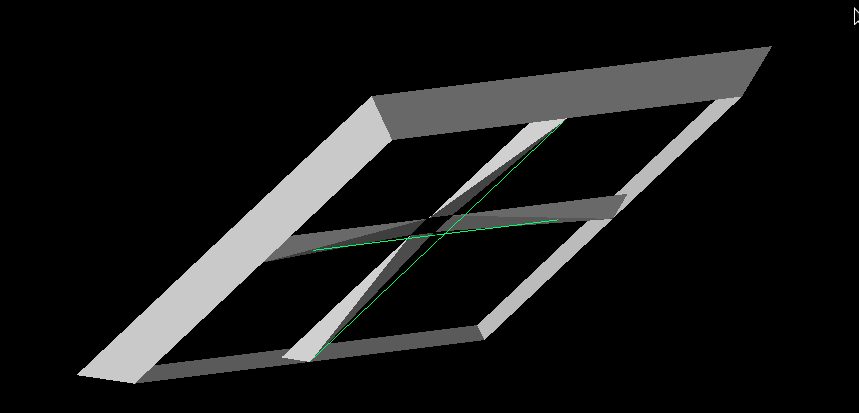
- You can see an example of an antenna from the GA attached (viewed from slightly below). It looks dramatically different. This seems to be due to constraints on the height and width being too small, but the ridges are also clearly misshapen.
- The curve on the ridges looks like it needs some work.
- For very PUEO-like antennas, the slopes look reasonable, but they do flare in or out slightly. This is more dramatic for ridges that deviate from PUEO's significantly.
- My best guess is that the parametric form of the curves is placing the curves in a plane that is different from the rest of the ridge. This should be fixable by somehow constraining the curve to a given plane.
- The simulation still only outputs polarization data for theta and phi, not the cross polarization.
- It looks like XF naturally gives us the theta and phi polarization. It's not clear how to get the cross polarization gain (which we think means the gain when the signal is at 45 degrees).
- One idea is to redo the simulation but with the antenna rotated 45 degrees in the azimuth. But I'm not certain that that iwll work.
- Amy indicated that the correct way to do this is by simulating the antenna with just one power source at a time.
- Leaving the VPol source would produce the VV and VH data and leaving the HPol would produce the HH and HV data (HV and VH could be flipped!).
- Currently, the antennas have a fixed opening angle. We'd like to add this as a parameter, though at the moment it might be ok to forego that.
- We need to make sure that the power sources aren't too close together (fixed!).
To do for this week:
1. Modify the script to make two simulations for each antenna, each with only one power source.
2. Adjust the constriants on the parameters to fix the curvature.
3. When we begin a run, we will want to just evolve the height and the inner side length (these determine both the inner side length and the outer side length).
Dylan and Jacob
Dylan and Jacob focused on getting PUEOsim/icemc working, which will be the simulation software needed for the PUEO loop. Here's a summary from Dylan:
- Plotting and bash scripts should be mostly good to go.
- Currently have 4/5 of the PUEO prerequisites for pueoBuilder, and the GENETIS-specific code is ready to implement and test when it's built. I’m trying to build the correct root version one more time before today’s meeting, and if it fails again I’m going to ask Will.
- The main thing left is to get the correct version of root installed, which while annoying, shouldn't take too long
To do for this week:
1. Once PUEOsim is working, run it with the usual settings to get the default performance. It will need to be submitted as a job array (ask Alex for help with this if you need; ask Will for advice on how many neutrinos to run).
|
| Attachment 1: Weird_PUEO_Model.png
|  |
|
Draft
|
Fri Apr 3 05:24:59 2026 |
Alex M | GENETIS Hackathon Summary and Next Steps | This entry will serve to summarize what tasks we've completed and still need to complete after last week's GENETIS hackathon.
Alex
My focus was on the XF scripting for making the PUEO antenna. Before last week, we had a script which made the geometry of a PUEO-like antenna. The xmacro script has been modified in the following ways:
- Now includes power sources connecting the ridges that are opposite each other.
- Generalized to use variables without hardcoding.
- Reads in data from the output files of the PUEO GA.
- Loops over all read in antennas to set up all of the simulations at once.
At this point, the script for setting up the simulations of the PUEO loop is just about ready for use. The only change to be made is to the frequency list. The script for printing out the gain data is also ready, though it only prints out the gain in theta and phi, not the cross polarization.
Here are some outstanding points that need to be hammered out, though they impede the quality and accuracy of a run rather than the actual functioning of the loop.
- The shape of the ridges in the generated antennas from the GA are considerably different from the PUEO antenna.
- This is likely something that can be fixed by adjusting the constraints--the subspace of the parameter space that leads to PUEO-like ridges may be very small as-is.
- You can see an example of an antenna from the GA attached (viewed from slightly below). It looks dramatically different. This seems to be due to constraints on the height and width being too small, but the ridges are also clearly misshapen.
- The curve on the ridges looks like it needs some work.
- For very PUEO-like antennas, the slopes look reasonable, but they do flare in or out slightly. This is more dramatic for ridges that deviate from PUEO's significantly.
- My best guess is that the parametric form of the curves is placing the curves in a plane that is different from the rest of the ridge. This should be fixable by somehow constraining the curve to a given plane.
- The simulation still only outputs polarization data for theta and phi, not the cross polarization.
- It looks like XF naturally gives us the theta and phi polarization. It's not clear how to get the cross polarization gain (which we think means the gain when the signal is at 45 degrees).
- One idea is to redo the simulation but with the antenna rotated 45 degrees in the azimuth. But I'm not certain that that iwll work.
- Amy indicated that the correct way to do this is by simulating the antenna with just one power source at a time.
- Leaving the VPol source would produce the VV and VH data and leaving the HPol would produce the HH and HV data (HV and VH could be flipped!).
- Currently, the antennas have a fixed opening angle. We'd like to add this as a parameter, though at the moment it might be ok to forego that.
- We need to make sure that the power sources aren't too close together (fixed!).
To do for this week:
1. Modify the script to make two simulations for each antenna, each with only one power source.
2. Adjust the constriants on the parameters to fix the curvature.
3. When we begin a run, we will want to just evolve the height and the inner side length (these determine both the inner side length and the outer side length).
Dylan and Jacob
Dylan and Jacob focused on getting PUEOsim/icemc working, which will be the simulation software needed for the PUEO loop. Here's a summary from Dylan:
- Plotting and bash scripts should be mostly good to go.
- Currently have 4/5 of the PUEO prerequisites for pueoBuilder, and the GENETIS-specific code is ready to implement and test when it's built. I’m trying to build the correct root version one more time before today’s meeting, and if it fails again I’m going to ask Will.
- The main thing left is to get the correct version of root installed, which while annoying, shouldn't take too long
To do for this week:
1. Once PUEOsim is working, run it with the usual settings to get the default performance. It will need to be submitted as a job array (ask Alex for help with this if you need; ask Will for advice on how many neutrinos to run).
|
|
206
|
Tue Mar 21 17:58:21 2023 |
Alex M | GENETIS Hackathon Day 2 | Today was day two of the GENETIS hackathon. See the previous entry for details on day one.
Alex
I continued working on the XF scripting for the PUEO horn antenna. Amy showed me an actual horn antenna from ANITA in Lisa's office so I could get the dimensions and see how the loads (power sources in XF) were offset. Offsetting the power sources led to fixing the asyemmtry problem from yesterday. I tested offsetting the loads by various heights and found that they all give the same gain patterns except for when they overlap, proving that they were interfering with each other when they crossed.
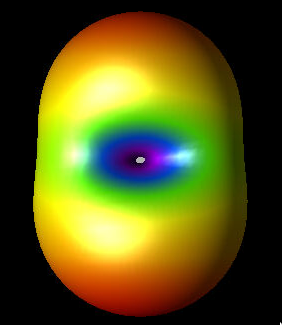
There is still, however, an asymmetry between the x and y axes (but the gain patterns are now symmetric across either of them). This is more reasonable, though I'm not positive that it should be this way. I attached an image of the gain pattern to show this asymmetry. Note that it is still at 83 MHz, which is well outside the PUEO bandwidth, but higher frequency gain patterns show the same thing (but they have more nodes so they're harder to look at). I attached images from the x-axis, y-axis, and above of the gain pattern. One way to check this will be to compare to the data stored in PUEOsim/icemc and see if they demonstrate similar asymmetries.
My next step is to test the constraints we've decided on using the script. I'll try out a few different values of the parameters and then if everything is working I'll use the GA Ryan and Dylan wrote to generate many individuals and have XF make the models for them. We don't necessarily need to see the simulation outputs from those XF runs, we just need to see if we run into error. Beyond that, we need to figure out how to extract the proper gain data from XF to create the same format that PUEOsim and icemc use.
Amy also mentioned that we should add the opening angle of the horn antenna as a gene. This may be a little tricky but should be doable. Once we are set with the current XF script and changing the data formatting to match what PUEOsim and icemc need, I'll work on adding that as a gene.
Dylan and Jacob
We tried to get IceMC running and able to read in gain files - we failed. Something was wrong with my make files and Jacob’s c++ compiler, so neither of us got a working version of IceMC. We then switched gears to focus on pueoSim. I created a branch on the nicemc github to output a veff.txt in the format of IceMC, so we can reuse the already-made code. Jacob and I also have been trying to install pueoSim, but we’ve been running into many errors and issues from the “C++ Gods”. For the next steps, I will finish the veffective branch and create a pull request. Then, I will work on a branch to make it so pueoSim can read in a variable path to the gain files.
Ryan
Tuesday: Created a new branch on the PEUO repository, version0.0, and placed the repository in the same location as the Ara one for familiarity. I also added an alias to this directory onto the genstudents channel if people would like to add the path to their .bashrc's. I then went through the the Evolutionary_Loop directory and cleaned up any residual Ara based files that were not needed to run this loop. This will make navigating and troubleshooting easier as we finish building. This branch was then commited and pushed to the github and submitted a pull request. |
| Attachment 1: ANITA_Gain_X.png
|  |
| Attachment 2: ANITA_Gain_Y.png
| 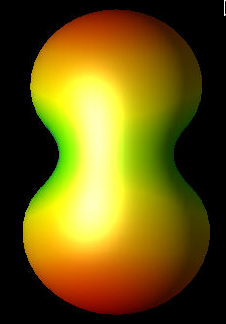 |
| Attachment 3: ANITA_Gain_Z.png
| 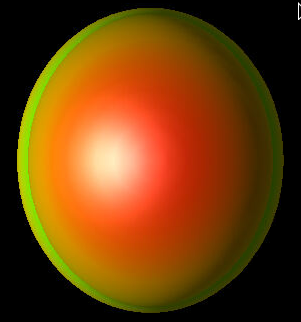 |
| Attachment 4: Top_Down_ANITA.png
| 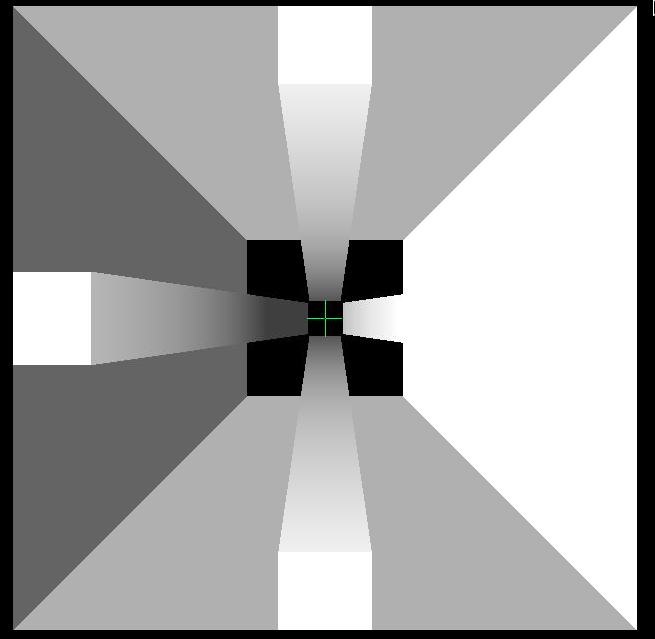 |
|
205
|
Mon Mar 20 17:32:42 2023 |
Alex M | GENETIS Hackathon Day 1 | Today was the first day of the GENETIS Hackathon. We are spending several days this week specifically tackling the PUEO project to get it into full form (or close to it). Here is a progress update after day 1.
Alex
I am working on the xmacro script for the ANITA antenna. Before today, we had a working xmacro script to make the geometry of the ANITA horn antenna. Now I am trying to modify it to make it 1) more true to the actual ANITA antenna (in terms of which parts are electrically connected) and 2) add in the power source and sensors so that we can get simulation results. I've attached the xmacro script here along with a picture of the geometry and some gain patterns. There are four ridges in the antenna. They are all connected by the outer walls of the antenna. However, only the ones directly across from each other are connected by a load (in this case, a power source, since we simulate as a radiator). So we have two power sources, one connected each "ridge bicone".
In making this, I have generated some gain patterns. I want to test a few cases to see if the results coming from XF seem reasonable, though I don't know what I should expect the gain pattern to look like when I've done things correctly. Here are the options I'll compare:
- Just use one "ridge bicone".
- Use two "ridge bicones" with the walls but just one power source.
- Use two "ridge bicones" without the walls and two power sources.
- Use the full form, with two "ridge bicones", walls, and two power sources.
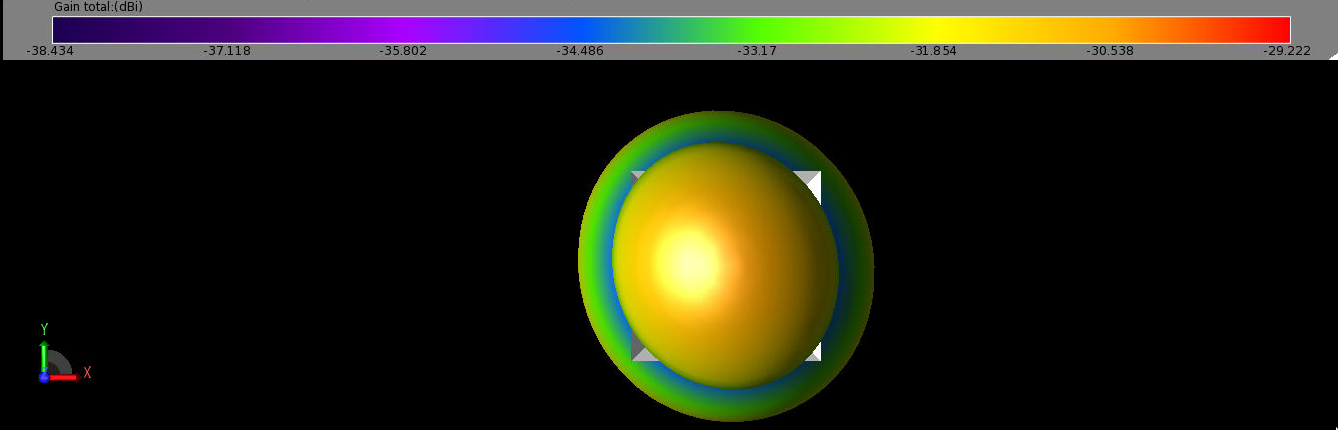
Case (4) is the one I expect to be correct. However, when I simulate that, I get a slightly asymmetric gain pattern compared to what I expect (I expect symmetry across the "ridge bicones"). You can see from the attached image that there is a strange preference in one corner. My guess is that this has to do with which ridges are set to be ground and which are set to 1V (the potential). Feel free to ask me for more details about these figures/scripts on slack and I'll fill them in on here. I'll clean up the script and add in full test cases later this week.
The image of the antenna I attached is a bird's eye view. The green lines represent the power sources I've connected between the ridges. They do appear to overlap, but my understanding is that they are not actually affecting each other (they should just be a representation of the power sources).
The image of a gain pattern (which is 3D and also a bird's eye view) is for the case of the antenna with both power sources and the walls remaining (the antenna is still shown too, to demonstrate the asymmetry of the gain pattern). This is well outside of the frequency range ANITA cares about (83 MHz), and I haven't looked closely at the higher frequencies yet, but I still am surprised by the asymmetry. I'll update tomorrow with more gain patterns to compare.
Dylan and Jacob
Dylan and Jacob are working on the bash scripts for the PUEO loop. They are taking the parts of the bicone loop that are specific to ARA/bicones and changing them to be specific to the PUEO loop.
All the bash scripting outside of implementing the new software we’re developing should now be complete (we just need to debug when we do test runs). The new GA is implemented into the PUEO loop. We tried and failed to build a version of pueoSim on our own. Will has provided us with a precompiled version and instructions for installing it on our users as well as access to the necessary pueoBuilder repo. Jacob and Dylan are scheduled to go through the installation with him on Thursday at 4pm in his office, M2024.
We have also found that peuoSim currently only outputs root files. So, we will need to create a conversion script or modify pueoSim for when we implement it into the loop. Currently, using IceMC looks to be the easiest way to get a test run going. For the next steps, we have a plan for making IceMC read in a variable file path name to avoid recompiles and issues with parallelization (Alex has given us the path to look at how ARA does it). Then, we will work on installing pueoSim and testing its current viability.
Bryan
Upon checking the existing plotting scripts used for previous GENETIS work, it appears that they can be used for PUEO with minimal changes. In order to test the plotting scripts, sample output data from the PUEO loop is needed, or at least test data that mimics the form of the output for the PUEO loop. After more progress is made with installing an MC package and the PUEO loop can be run to produce test outputs, the plotting scripts can be tested and implemented in the bash script. |
| Attachment 1: ANITA_Antenna_Project.xmacro
|
App.getActiveProject().getGeometryAssembly().clear();
var freq = [83.33, 100.00, 116.67, 133.33, 150.00, 166.67, 183.34, 200.00, 216.67, 233.34, 250.00, 266.67, 283.34, 300.00, 316.67, 333.34, 350.00, 366.67, 383.34, 400.01, 416.67, 433.34, 450.01, 466.67, 483.34, 500.01, 516.68, 533.34, 550.01, 566.68, 583.34, 600.01, 616.68, 633.34, 650.01, 666.68, 683.35, 700.01, 716.68, 733.35, 750.01, 766.68, 783.35, 800.01, 816.68, 833.35, 850.02, 866.68, 883.35, 900.02, 916.68, 933.35, 950.02, 966.68, 983.35, 1000.00, 1016.70, 1033.40, 1050.00, 1066.70]
CreatePEC();
var units = " cm";
num_ridges = 4; // either 2 or 4
// Make the walls and a ridge
build_walls(10,1,30);
// Note that to avoid overlap, we need x0 >= y0
x0=0.04001; // previously 0.04
y0=0.04; // previously 0.04
build_ridges(x0, y0, 0.0, 0.1, 0.06, 0.3, 0.26, 0.1, 0.1, 1);
CreateAntennaSource();
CreateGrid();
CreateSensors();
CreateAntennaSimulationData();
QueueSimulation();

// Try making copies of the ridge
var new_ridges = new EllipticalPattern();
Output.println(new_ridges.getInstances());
new_ridges.setInstances(7);
//new_ridges.clone();
//Output.println(new_ridges);

// Makes the outer walls of the horn antenna
// S is the side length of the bottom of the wall
// a is the coefficient for the linear function the walls extrude according to
function build_walls(S,m,H)
{
	// Make the edges to define the square
	var edge1 = Line( new Cartesian3D(-S + units,-S + units, 0), new Cartesian3D(-S + units, S + units, 0));
	var edge2 = Line( new Cartesian3D(-S + units, S + units, 0), new Cartesian3D(S + units, S + units, 0));
	var edge3 = Line( new Cartesian3D(S + units,S + units, 0), new Cartesian3D(S + units, -S + units, 0));
	var edge4 = Line( new Cartesian3D(S + units,-S + units, 0), new Cartesian3D(-S + units, -S + units, 0));

	// Declare sketches to be made from the edges
	var wallSegment = new Sketch();
	var bottomSegment = new Sketch();
	wallSegment.addEdge(edge1);
	wallSegment.addEdge(edge2);
	wallSegment.addEdge(edge3);
	wallSegment.addEdge(edge4);
	bottomSegment.addEdge(edge1);
	bottomSegment.addEdge(edge2);
	bottomSegment.addEdge(edge3);
	bottomSegment.addEdge(edge4);

	// Let's start by making the bottom
	var bottomCover = new Cover(bottomSegment);
	var bottomRecipe = new Recipe();
	bottomRecipe.append( bottomCover );
	var bottomModel = new Model();
	bottomModel.setRecipe( bottomRecipe );
	// Add the surface
	//var bottom = App.getActiveProject().getGeometryAssembly().append(bottomModel);
	//bottom.name = "Bottom square";

	// Now we need to extrude the edges to get height
	var walls = new Extrude( wallSegment, H + units);				// Makes an Extrude
	var wallOptions = walls.getOptions();						// Gives the possible options for
	// We will use the draft law option to extrude linearly
	wallOptions.draftOption = SweepOptions.DraftLaw;			// allows for draftlaw
	wallOptions.draftLaw = "("+m+"*x)";							// Set the expression for the extrude
	wallOptions.draftOption = 4;								// 4 indicates we use draftlaw
    //Walter - Change the gap type to Extended to get the desired shape
	wallOptions.gapType = SweepOptions.Extended; 				// I actually don't like this when we have x^2, but it doesn't do much for just x
    //Walter - Create a shell instead of a solid part
	wallOptions.createSolid = false;							// This way the shape isn't filled in
	walls.setOptions ( wallOptions );							// Sets the settings we assigned above

	// Make a recipe for a model
	var wallRecipe = new Recipe();
	wallRecipe.append(walls);
	var wallModel = new Model();
	wallModel.setRecipe(wallRecipe);
	wallModel.name = "Outer Walls";
	wallModel.getCoordinateSystem().translate(new Cartesian3D(0,0,0));	// Makes the model start at the origin

	// Set the material for these parts
	var wallProject = App.getActiveProject().getGeometryAssembly().append(wallModel);	// Adds the model to the project
	var pecMaterial = App.getActiveProject().getMaterialList().getMaterial( "PEC" );	// Makes the material available
	App.getActiveProject().setMaterial( wallProject, pecMaterial );						// Sets the material
	//App.getActiveProject().setMaterial( bottom, pecMaterial );						// Sets the material

}

// A function to build the inner ridges
// Here are the arguments, which are primarily used when making the LawEdges
// Bottom x distance from center
// Bottom y distance from center
// Top x distance from center
// Top y distance from center
// Full x
// Full y
// Full height
function build_ridges(x_0, y_0, z_0, x_f, y_f, z_f, tau, beta, S, m)
{

//	build_ridges(0.04, 0.04, 0.0, 0.1, 0.06, 0.3, 0.26, 0.1, 0.1, 1);

	// Logarithmic slopes
	//var Log1 = new LawEdge( "0.04 + u", "0.04 + 0.02/0.26*u", "1/10*ln((exp(3)-1.0)/0.26*u+1.0)", 0, 0.26); // alpha = z_max/beta
	//var Log2 = new LawEdge( "0.04 + u", "-0.04 - 0.02/0.26*u", "1/10*ln((exp(3)-1.0)/0.26*u+1.0)", 0, 0.26);

	var Log1 = new LawEdge( ""+x_0+" + ("+z_f+"-"+x_0+")/"+tau+"*u", ""+y_0+" + ("+y_f+"-"+y_0+")/"+tau+"*u", ""+beta+"*ln((exp("+z_f+"/"+beta+")-1.0)/"+tau+"*u+1.0)", 0, tau); // alpha = z_max/beta
	var Log2 = new LawEdge( ""+x_0+" + ("+z_f+"-"+x_0+")/"+tau+"*u", "-"+y_0+" - ("+y_f+"-"+y_0+")/"+tau+"*u", ""+beta+"*ln((exp("+z_f+"/"+beta+")-1.0)/"+tau+"*u+1.0)", 0, tau);


	// Inner straight slopes
	var IS1 = new LawEdge( ""+x_0+" + ("+z_f+"-"+x_0+")/"+tau+"*u", ""+y_0+" + ("+y_f+"-"+y_0+")/"+tau+"*u", "("+z_f+"-"+z_0+")/"+tau+"*u", 0, tau); // a_0 + at, b_0 + bt, c_0 + ct
	var IS2 = new LawEdge( ""+x_0+" + ("+z_f+"-"+x_0+")/"+tau+"*u", "-"+y_0+" - ("+y_f+"-"+y_0+")/"+tau+"*u", "("+z_f+"-"+z_0+")/"+tau+"*u", 0, tau);

	// Bottom line
	var BL1 = new LawEdge(""+x_0+" + ("+x_f+"-"+x_0+")/"+tau+"*u", ""+y_0+"", ""+z_0+"", 0, tau);
	var BL2 = new LawEdge(""+x_0+" + ("+x_f+"-"+x_0+")/"+tau+"*u", "-"+y_0+"", ""+z_0+"", 0, tau);

	// Top line
	var TL1 = new LawEdge(""+z_f+" + "+x_f+"/"+tau+"*u", ""+y_f+"", ""+z_f+"", 0, tau);
	var TL2 = new LawEdge(""+z_f+" + "+x_f+"/"+tau+"*u", "-"+y_f+"", ""+z_f+"", 0, tau);

	// Outer Straight slopes
	var OS1 = new LawEdge( ""+x_f+" + "+z_f+"/"+tau+"*u", ""+y_0+" + ("+y_f+" - "+y_0+")/"+tau+"*u", ""+z_f+"/"+tau+"*u", 0, tau);
	var OS2 = new LawEdge( ""+x_f+" + "+z_f+"/"+tau+"*u", "-"+y_0+" - ("+y_f+" - "+y_0+")/"+tau+"*u", ""+z_f+"/"+tau+"*u", 0, tau);

	// Inner top line
	var ITL = new LawEdge( ""+z_f+"", "-"+y_f+" + 2*"+y_f+"/"+tau+"*u", ""+z_f+"", 0, tau);

	// Outer top line
	var OTL = new LawEdge( ""+x_f+" + "+z_f+"", "-"+y_f+" + 2*"+y_f+"/"+tau+"*u", ""+z_f+"", 0, tau);

	// Inner bottom line
	var IBL = new LawEdge( ""+x_0+"", "-"+y_0+" + 2*"+y_0+"/"+tau+"*u", ""+z_0+"", 0, tau);

	// Outer bottom line
	var OBL = new LawEdge( ""+x_f+"", "-"+y_0+" + 2*"+y_0+"/"+tau+"*u", ""+z_0+"", 0, tau);

	// Make the sketches
	var straightEdge1 = new Sketch(); 	// All straight edges (IS1, BL1, TL1, OS1)
	var straightEdge2 = new Sketch(); 	// All straight edges (IS2, BL2, TL2, OS2)
	var curvedLog1 = new Sketch(); 		// Logarithmic edge (IS1 and Log1)
	var curvedLog2 = new Sketch(); 		// Logarithmic edge (IS2 and Log2)
	var topRectangle = new Sketch(); 	// Top rectangle
	var bottomRectangle = new Sketch(); // Bottom rectangle

	// Add the edges to the sketches
	straightEdge1.addEdges( [IS1, BL1, TL1, OS1] );	// Inner straight slope
	curvedLog1.addEdges( [IS1, Log1] );				// Right logarithm part
	straightEdge2.addEdges( [IS2, BL2, TL2, OS2] ); 	// Inner straight slope
	curvedLog2.addEdges( [IS2, Log2] );			 	// Left logarithm part
	topRectangle.addEdges( [ITL, OTL, TL1, TL2] );		// Top rectangle
	bottomRectangle.addEdges( [IBL, OBL, BL1, BL2] );	// Bottom Rectangle

	//WALTER - The Elliptical pattern is added as a recipe to the parts
	//In this case the location of the center and direction of the normal are simple, but for more complex scenarios, may need to use mroe functionality to find them.
	var ePattern = new EllipticalPattern();
	ePattern.setCenter(new CoordinateSystemPosition(0,0,0));
	ePattern.setNormal(new CoordinateSystemDirection(0,0,1));
	ePattern.setInstances(num_ridges);
	ePattern.setRotated(true);

	var cov = new Array();
	cov.push(new Cover(straightEdge1));
	cov.push(new Cover(straightEdge2));
	cov.push(new Cover(curvedLog1));
	cov.push(new Cover(curvedLog2));
	cov.push(new Cover(topRectangle));
	cov.push(new Cover(bottomRectangle));

	var pecMaterial = App.getActiveProject().getMaterialList().getMaterial( "PEC" );

	//WALTER - We can loop over all our parts and add them to the project as follows.  You can use similar concepts above.
	models = new Assembly();
	for(var w = 0; w < cov.length; w++)
	{
		var r = new Recipe();
		r.append(cov[w]);
		r.append(ePattern);
		var m = new Model();
		m.setRecipe(r);
		m.name = "Test Surface " + (w+1);
		//WALTER - Seperate array for the models, though we could just get them from the GemoetryAssembly again
		models.append(m);
		App.getActiveProject().setMaterial( m, pecMaterial );

	}

	// Work on the loft
	var vertex_position1 = curvedLog1.getPosition(curvedLog1.getVertexIds()[0]);
	var vertex_position2 = curvedLog2.getPosition(curvedLog2.getVertexIds()[0]);

	var loft = new Loft(models.at(2).pickFace(new Cartesian3D (0, 0, 0), vertex_position1, 0.5), "0.0", models.at(3).pickFace(new Cartesian3D(0,0,0), vertex_position2, 0.5), "0.0");
	loft.setPart1(models.at(2));
	loft.setPart2(models.at(3));

	var r12 = new Recipe();
	r12.append( loft );
	r12.append(ePattern);
	var m12 = new Model();
	m12.setRecipe( r12 );
	m12.name = "Loft 1";
	models.append(m12);

	//WALTER - append the assembly to the project, then loop over it to assign the material
	var assembly = App.getActiveProject().getGeometryAssembly().append(models);
	for(x = 0; x < assembly.size(); x++)
	{
		Output.println(assembly.at(x));
		App.getActiveProject().setMaterial( assembly.at(x), pecMaterial );
	}

}


// CreatPEC Function
function CreatePEC() //borrowed from XF demo
{
    //Make the material.  We will use PEC, or Perfect Electrical Conductor:
    var pec = new Material();
    pec.name = "PEC";
    var pecProperties = new PEC();      // This is the electric properties that defines PEC
    var pecMagneticFreespace = new MagneticFreespace();     // We could make a material that acts as PEC and PMC, but in this case we just care about electrical components.
    var pecPhysicalMaterial = new PhysicalMaterial();
    pecPhysicalMaterial.setElectricProperties( pecProperties );
    pecPhysicalMaterial.setMagneticProperties( pecMagneticFreespace );
    pec.setDetails( pecPhysicalMaterial );
    // PEC is historically a "white" material, so we can easily change its appearance:
    var pecBodyAppearance = pec.getAppearance();
    var pecFaceAppearance = pecBodyAppearance.getFaceAppearance();  // The "face" appearance is the color/style associated with the surface of geometry objects
        pecFaceAppearance.setColor( new Color( 255, 255, 255, 255 ) );  // Set the surface color to white. (255 is the maximum intensity, these are in order R,G,B,A).
    // Check for an existing material
    if( null != App.getActiveProject().getMaterialList().getMaterial( pec.name ) )
    {
            App.getActiveProject().getMaterialList().removeMaterial( pec.name );
    }
	    App.getActiveProject().getMaterialList().addMaterial( pec );
}

function CreateAntennaSource()
{
    // Here we will create our waveform, create our circuit component definition for the feed, and create
    // a CircuitComponent that will attach those to our current geometry.
    var waveformList = App.getActiveProject().getWaveformList();
        // clear the waveform list
	    waveformList.clear();

    // Create a gaussian derivative input wave
    var waveform = new Waveform();
    var GDer = new GaussianDerivativeWaveformShape ();
    GDer.pulseWidth = 2e-9;
    waveform.setWaveformShape( GDer );
    waveform.name ="Gaussian Derivative";
    var waveformInList = waveformList.addWaveform( waveform );

    // Now to create the circuit component definition:
    var componentDefinitionList = App.getActiveProject().getCircuitComponentDefinitionList();
    // clear the list
    componentDefinitionList.clear();

    // Create our Feed
    var feed1 = new Feed();
    var feed2 = new Feed();

    feed1.feedType = Feed.Voltage; // Set its type enumeration to be Voltage.
    //feed2.feedType = Feed.Voltage; // Set its type enumeration to be Voltage.

    // Define a 50-ohm resistance for this feed
    var rlc = new RLCSpecification();
    rlc.setResistance( "50 ohm" );
    rlc.setCapacitance( "0" );
    rlc.setInductance( "0" );
    feed1.setImpedanceSpecification( rlc );
    feed1.setWaveform( waveformInList );  // Make sure to use the reference that was returned by the list, or query the list directly
    feed1.name = "50-Ohm Voltage Source";
    var feedInList = componentDefinitionList.addCircuitComponentDefinition( feed1 );


	feed2.setImpedanceSpecification( rlc );
    feed2.setWaveform( waveformInList );  // Make sure to use the reference that was returned by the list, or query the list directly
    feed2.name = "50-Ohm Voltage Source 2";
    var feedInList = componentDefinitionList.addCircuitComponentDefinition( feed2 );

    // Now create a circuit component that will be the feed point for our simulation
    var componentList = App.getActiveProject().getCircuitComponentList();
    componentList.clear();

    var component1 = new CircuitComponent();
	var component2 = new CircuitComponent();

	component1.name = "Source";
	component2.name = "Source";

    component1.setAsPort( true );
    component2.setAsPort( true );
    // Define the endpoints of this feed - these are defined in world position, but you can also attach them to edges, faces, etc.
    var coordinate1 = new CoordinateSystemPosition( -x0, 0, 0);
    var coordinate2 = new CoordinateSystemPosition( x0, 0, 0);
	var coordinate3 = new CoordinateSystemPosition( 0, -x0, 0);
    var coordinate4 = new CoordinateSystemPosition( 0, x0, 0);
    component1.setCircuitComponentDefinition( feed1 );
... 84 more lines ...
|
| Attachment 2: ANITA_Horn.png
| 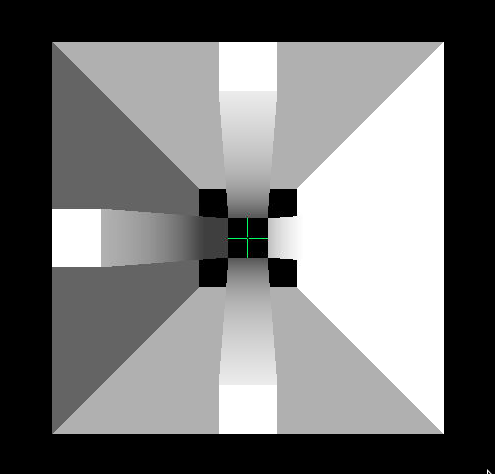 |
| Attachment 3: ANITA_Gain_Pattern_Both_Sources.png
|  |
|
132
|
Tue Apr 6 18:00:23 2021 |
Julie Rolla | GENETIS Google Drive with Talks/Posters, Grant writings, Papers | https://drive.google.com/drive/folders/1iDamk46R2_oOLHtvsOg4jNy05mCiB7Sn?usp=sharing |
|
Draft
|
Fri Apr 17 17:04:21 2026 |
Julie Rolla | GENETIS Google Drive with Talks/Posters, Grant writings, Papers |
|
|
Draft
|
Tue May 19 12:20:40 2020 |
Alex Patton | GENETIS Daily Updates | Today's Summer 2020 daily update:
As a note, today OSC was down so productivity was more limited
| Name |
Update for Today |
Plans for Tomorrow |
| Alex M. |
Mostly just wrote more on the paper in the Genetic Algorithm section. I added some citation that we used in ICRC but there are still more places that should have citations.
|
I might check tonight when OSC is back up to try to push in more updates to the loop because I wanna get Evelyn and Ryan started on running the loop. Putting in those fixes is a big priority because we want to be able to correct the potential issue with XF simulation folders being overwritten and thus uan data not corresponding to the write individuals. The two big things for me in the loop are getting the simulation data to save correctly (and also putting that in the database) and testing that we can replicate results using the specific seed. I'll probably only focus on loop stuff tomorrow.
|
| Alex P. |
Got up before OSC was down to check progress of overnight run, it seems to have worked but I noticed a problem with the database that it wasn't writing to it probably due to a permissions issue but I would have to run another time to see. Shouldn't have affected data but just the use of the database. Run got up to 8 generations with non-zero fitness score which is positive and seems to have fixed the error we originally encountered. Talked to Eliot about pointers and possible errors but was unable to look at the specific error because it is on OSC.
|
Tomorrow plan is to continue to work on database functionality and continue run to get more generations, also want to add the ability to add more plots than just the fitness score to the dropbox automatically. Plots: upload all plots (Fitness, LRT, vEff), remove legend, upload penalized red/green plot too, take off legend, add units to Fitness |
| Leo |
|
|
| Eliot |
Read about pointers and vectors in C++. Talked to Alex P a bit, and have some ideas of things to change to get the GA running. Began reading about antennas. Mostly a down day due to OSC being down.
|
Will implement changes to GA and continue familiarizing myself with how XF reads these values.
|
| Evelyn |
|
|
| Ryan |
|
|
|
|
Draft
|
Wed Mar 25 02:48:02 2026 |
Alex Patton | GENETIS Daily Updates | Today's Summer 2020 daily update:
As a note, today OSC was down so productivity was more limited
| Name |
Update for Today |
Plans for Tomorrow |
| Alex M. |
Mostly just wrote more on the paper in the Genetic Algorithm section. I added some citation that we used in ICRC but there are still more places that should have citations.
|
I might check tonight when OSC is back up to try to push in more updates to the loop because I wanna get Evelyn and Ryan started on running the loop. Putting in those fixes is a big priority because we want to be able to correct the potential issue with XF simulation folders being overwritten and thus uan data not corresponding to the write individuals. The two big things for me in the loop are getting the simulation data to save correctly (and also putting that in the database) and testing that we can replicate results using the specific seed. I'll probably only focus on loop stuff tomorrow.
|
| Alex P. |
Got up before OSC was down to check progress of overnight run, it seems to have worked but I noticed a problem with the database that it wasn't writing to it probably due to a permissions issue but I would have to run another time to see. Shouldn't have affected data but just the use of the database. Run got up to 8 generations with non-zero fitness score which is positive and seems to have fixed the error we originally encountered. Talked to Eliot about pointers and possible errors but was unable to look at the specific error because it is on OSC.
|
Tomorrow plan is to continue to work on database functionality and continue run to get more generations, also want to add the ability to add more plots than just the fitness score to the dropbox automatically. Plots: upload all plots (Fitness, LRT, vEff), remove legend, upload penalized red/green plot too, take off legend, add units to Fitness |
| Leo |
|
|
| Eliot |
Read about pointers and vectors in C++. Talked to Alex P a bit, and have some ideas of things to change to get the GA running. Began reading about antennas. Mostly a down day due to OSC being down.
|
Will implement changes to GA and continue familiarizing myself with how XF reads these values.
|
| Evelyn |
|
|
| Ryan |
|
|
|
|