| |
ID |
Date |
Author |
Subject |
|
|
134
|
Wed Jul 14 15:45:30 2021 |
Ethan Fahimi | Wednesday Updates (7/14/2021) |
| Ethan |
Worked with Alex on fixing a few bugs with AREA. We are trying to solve an issue where the individuals are not finishing runs (around one in every four gens with 100 individuals). We believe some individuals may be too good and are then taking more than the wall time we have given them. Alex is testing this while I am working on a script that will add all the weights in the temp_{ind}.txt files. (See weightAdder.py for more) |
| |
|
| |
|
| |
|
| |
|
| |
|
| |
|
|
|
|
138
|
Fri Sep 17 13:41:36 2021 |
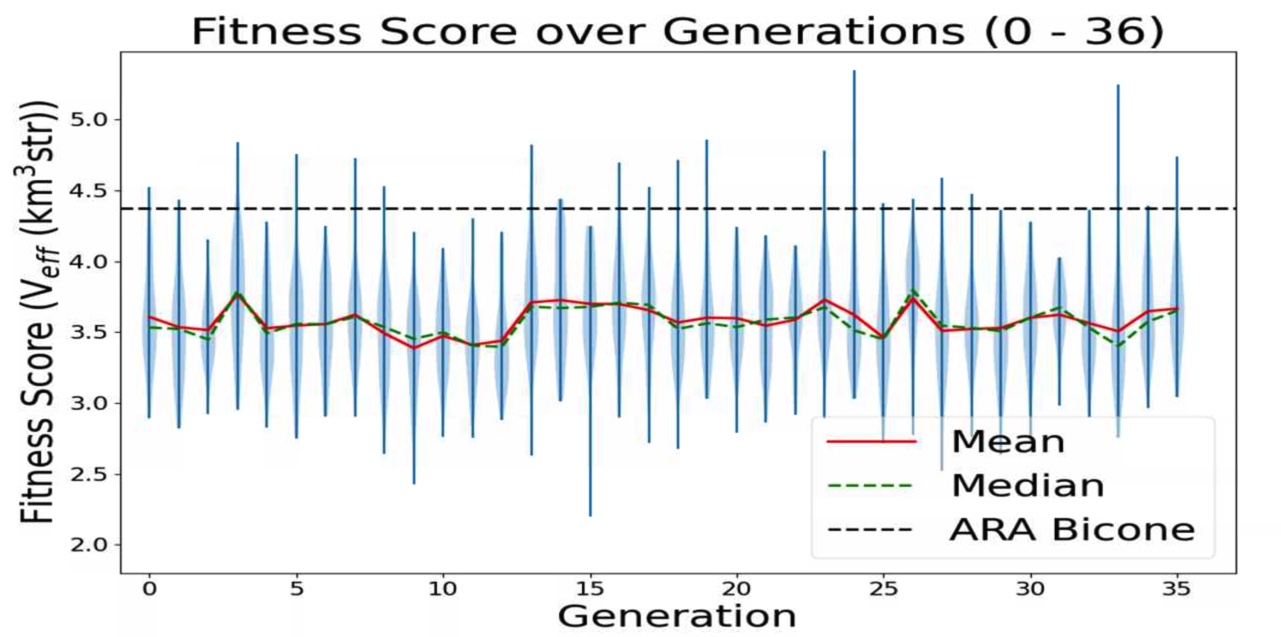
Ethan Fahimi | 07/20/2021 AREA run 3 violin plot | This is a plot made from the AREA project with full Arasim implementation. It can be seen that the Veff of any individuals is not what I would consider "good", nor is it really rising, it is quite flat. This is because in this version of AREA, the gain pattern at each frequency is generated differently than each other frequency, there is no correlation. This is known and actively being corrected. This plot is of old data and was just made for two reasons: to make sure that the violin plotting script works for AREA, to display this early form of AREA that has been adapted for full Arasim.
This run was done with 50 total individuals per generation, across 36 generations. Each individual was tested with 4 seeds of 10,000 neutrinos, for a total of 40,000 neutrinos. For each new generation, 25 individuals were created with roulette crossover, 8 with roulette mutation, 9 with tournament crossover, and 8 with tournament mutation.
This plot is further detailed in Julie Rolla's doctorate thesis. |
| Attachment 1: Image_9-13-21_at_6.35_PM.jpg
|  |
|
|
Draft
|
Mon Nov 8 17:04:30 2021 |
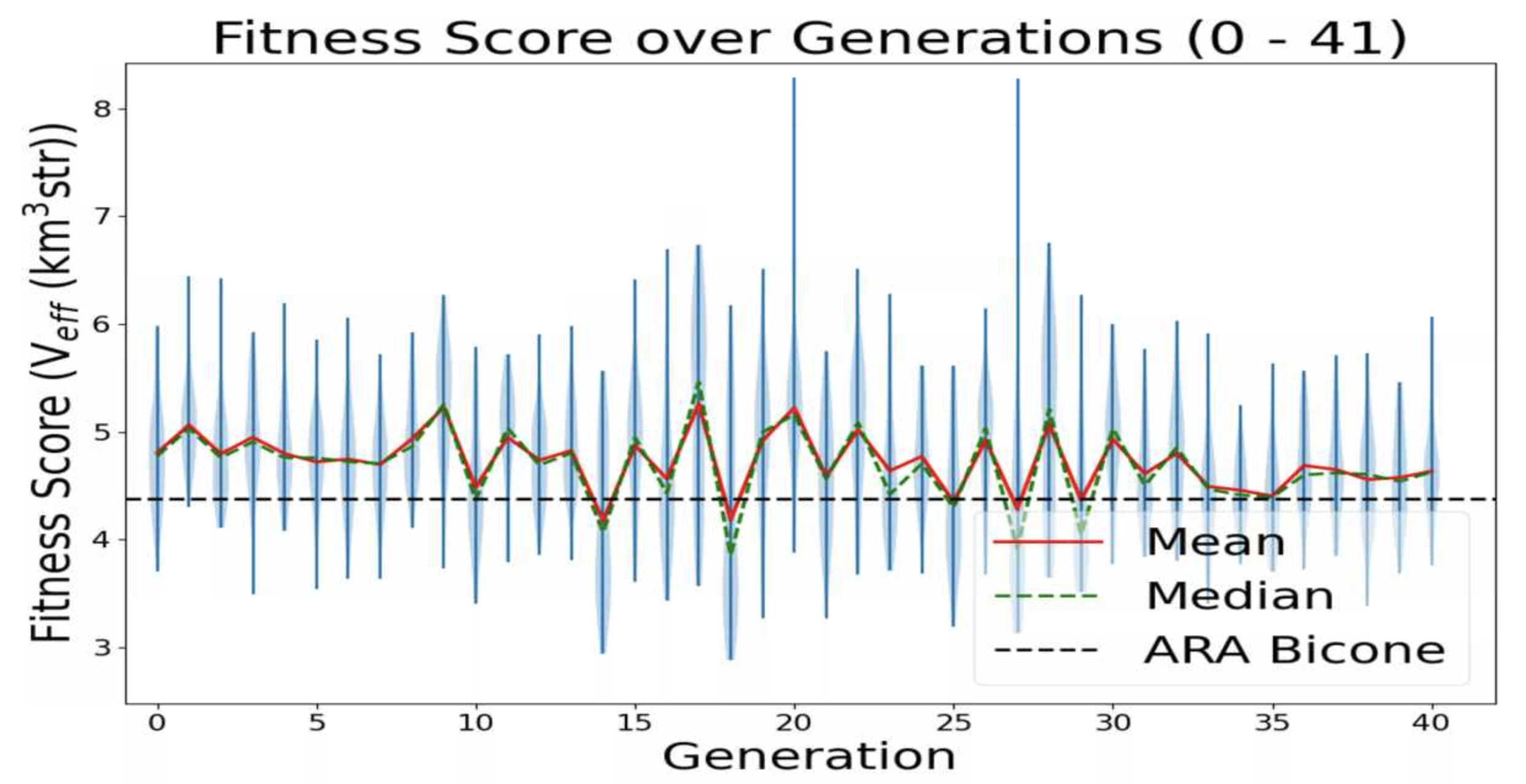
Ethan Fahimi | 11/04/2021 AREA run 2 violin plot | This is a plot made from the AREA project with full Arasim implementation with each gain pattern of each individual being fixed across all frequencies.
This run was done with 50 total individuals per generation, across 36 generations. Each individual was tested with 4 seeds of 10,000 neutrinos, for a total of 40,000 neutrinos. For each new generation, 25 individuals were created with roulette crossover, 8 with roulette mutation, 9 with tournament crossover, and 8 with tournament mutation. |
| Attachment 1: 20211104fahimi5run2.png
|  |
|
|
140
|
Mon Nov 8 17:27:01 2021 |
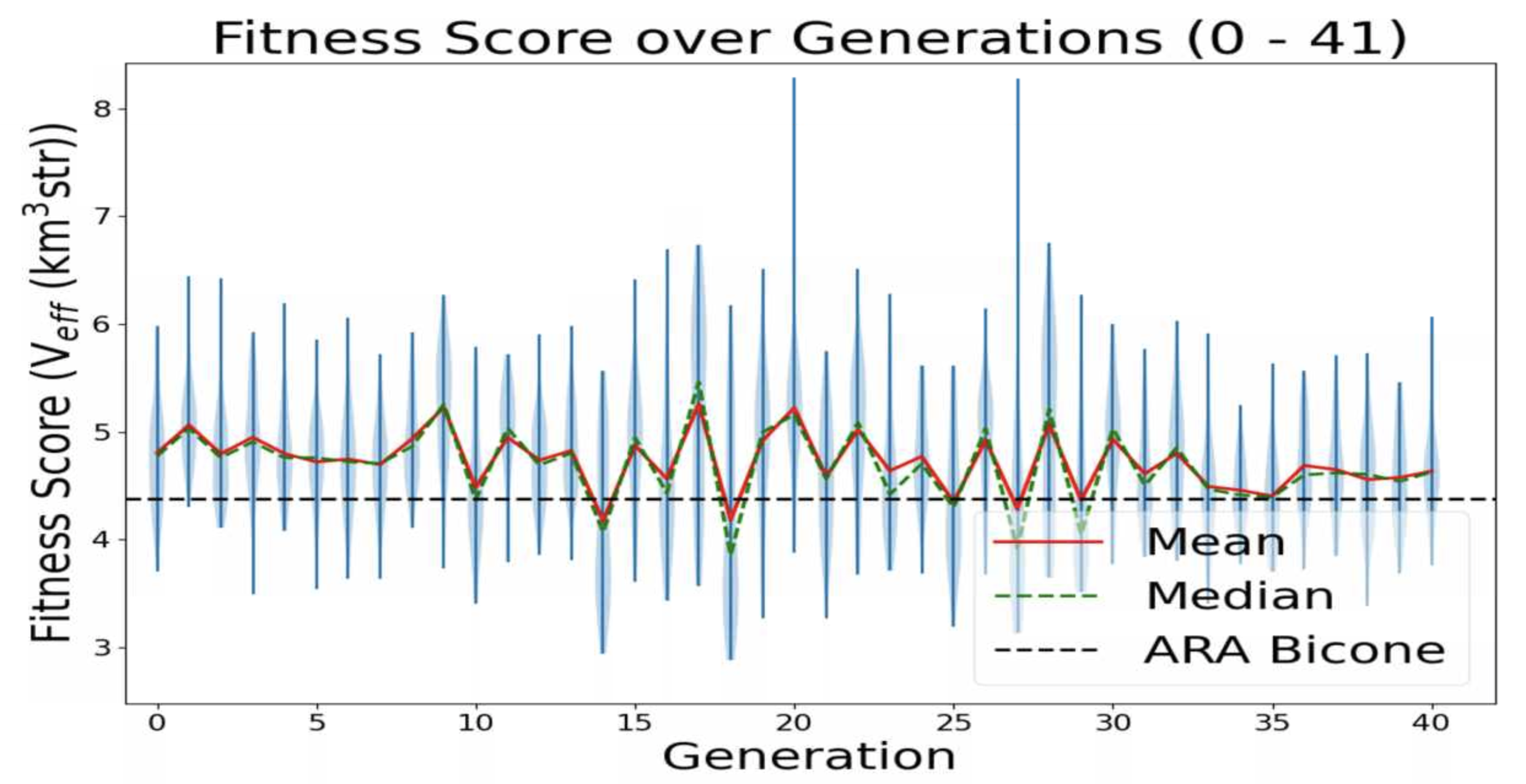
Ethan Fahimi | 07/20/2021 AREA run 3 violin plot | This is a plot made from the AREA project with full Arasim implementation with each gain pattern of each individual being fixed across all frequencies.
This run was done with 50 total individuals per generation, across 36 generations. Each individual was tested with 4 seeds of 10,000 neutrinos, for a total of 40,000 neutrinos. For each new generation, 25 individuals were created with roulette crossover, 8 with roulette mutation, 9 with tournament crossover, and 8 with tournament mutation.
individual 32 in gen 20 and individual 35 in gen 27 look promising (they have Veff > 8) |
| Attachment 1: 20211104fahimi5run2.png
|  |
|
|
161
|
Tue Jun 7 14:14:21 2022 |
Dylan Wells | Matching Circuits Slides | Slides contatining my notes on matching circuits.
https://docs.google.com/presentation/d/1x25nhiqaW7LvPZ1pNZ5O4ZzsWZbtgqxBQ5haB9uWgQY/edit?usp=sharing |
|
|
Draft
|
Tue Jun 28 13:27:13 2022 |
Dylan Wells | Changes needed for the matching circuit script |
-
Fix the functions for the SLPC, SCPL, and PLSC L networks (change the paramaters to match with the format of our data)
-
Write the PCSL function
-
Create a function to find the number of L networks necessary (N) given a source and load resistance as well as a frequency range.
-
Write a function to broadband match two impedances given a source, load, central frequency, and N. (return a list of capacitances and inductances for the L networks)
|
|
|
178
|
Wed Aug 10 22:38:20 2022 |
Dylan Wells | Instructions for Installing IceMC | Installing IceMC:
I: Getting anitaBuildTool
Clone the anitaBuildTool repository (https://github.com/anitaNeutrino/anitaBuildTool) to your user.
II: Get the Anita.sh file onto your user.
Either copy the file from /users/PAS1960/dylanwells1629/Anita.sh
or create a new file Anita.sh with the following code
# .bashrc
# Source global definitions
if [ -f /etc/bashrc ]; then
. /etc/bashrc
fi
#this modules were originally loading in both the env.sh, and bashrc_anita.sh files. This was redundant so it was added here, and removed from the others.
module load gnu/7.3.0
module load gnu
module load mvapich2
module load fftw3
#module load python/3.6-conda5.2
module load cmake
PATH=$PATH:$HOME/.local/bin:$home/bin
export PATH
export CC=`which gcc`
export CXX=`which g++`
export FFTWDIR=/fs/project/PAS0654/shared_software/fftw3/gnu/6.3/mvapich2/2.2/3.3.5
export ANITA_SOURCE_DIR=~/anitaBuildTool/
export ANITA_UTIL_INSTALL_DIR=~/anitaBuildTool/
export ICEMC_SRC_DIR=~/anitaBuildTool/components/icemc/
export ICEMC_BUILD_DIR=~/anitaBuildTool/build/components/icemc/
export DYLD_LIBRARY_PATH=${ICEMC_SRC_DIR}:${ICEMC_BUILD_DIR}:${DYLD_LIBRARY_PATH}
export ROOTSYS=/fs/project/PAS0654/shared_software/anita/owens_pitzer/build/root
# User specific aliases and functions
#This env.sh is for running the BiconeEvolution GENETIS software. This should only be un-commented if you are running GENETIS software. When you do this, comment out env.sh.
#source ~/new_root_setup.sh
source /fs/project/PAS0654/shared_software/anita/owens_pitzer/build/root/bin/thisroot.sh
#source /cvmfs/ara.opensciencegrid.org/trunk/centos7/setup.sh
#module load python/3.6-conda5.2
#BiconeGENETIS directory shortcut SHARED
alias GE='cd ../../../fs/project/PAS0654/BiconeEvolutionOSC/BiconeEvolution/current_antenna_evo_build/XF_Loop/Evolutionary_Loop/'
#emacs Alias
alias emacs='emacs -nw'
#root alias
alias root='root -l'
#Alias
alias l="ls"
alias python='/cvmfs/ara.opensciencegrid.org/trunk/centos7/misc_build/bin/python3.9'
Then source the file
Note: You will need access to PAS0654 for this step or you will get a permissions error.
III: Running the build tool.
Go into the anitaBuildTool directory
And run the building script
Note: There will be an error if you source files for running Ara in your .bashrc
Comment these out and restart your terminal before running the build. (remember to source Anita.sh before running the build tool. You could also source Anita.sh in your .bashrc)

Error if you source files for running Ara:
CMake Error at components/libRootFftwWrapper/cmake_install.cmake:238 (file):
file INSTALL cannot copy file
"/users/PAS1960/dylanwells1629/anitaBuildTool/components/libRootFftwWrapper/include/AnalyticSignal.h"
to
"/cvmfs/ara.opensciencegrid.org/v2.0.0/centos7/ara_build/include/AnalyticSignal.h":
Read-only file system.
Call Stack (most recent call first):
|
|
|
179
|
Tue Aug 16 11:41:07 2022 |
Dylan Wells | Instructions for Running IceMC | Running IceMC:
Go into the directory ../anitaBuildTool/build/components/icemc/
And run the command
*May need to chmod -R 775 ../anitaBuildTool/comonents/icemc/ if you get a permissions error
inputFile:
Must be the full path to the file
Config files are found in ../anitaBuildTool/components/icemc
Ex: /users/PAS1960/dylanwells1629/anitaBuildTool/components/icemc/inputs.anita4.conf
Config files are found in ../anitaBuildTool/components/icemc
outputDirectory:
Will be made in ../anitaBuildTool/build/components/icemc/ by default, specify full path otherwise.
runNumber:
The run number.
numberOfNeutrinos:
The number of neutrinos generated in the simulation.
Can be found in inputs.conf
Default is 2,000,000.
#How many neutrinos to generate
triggerThreshold:
Threshold for each band for the trigger.
Default is 2.3
#thresholds for each band- this is only for the frequency domain voltage trigger. If using a different trigger scheme then keep these at the default values of 2.3 because the max among them is used for the chance in hell cuts
energyExponent:
The exponent of the energy for the neutrinos
Can be found in input.conf
Default is 1020
# Select energy (just enter the exponent) or (30) for baseline ES&S (1) for E^-1 (2) for E^-2 (3) for E^-3 (4) for E^-4 (5) for ES&S flux with cosmological constant (6) for neutrino GZK flux from Iron nuclei (16-22)not using spectrum but just for a single energy (101-114)use all kinds of theoretical flux models |
|
|
181
|
Thu Aug 18 13:03:47 2022 |
Dylan Wells | Comparing inputs and outputs between AraSim and IceMC | Comparing Inputs:
Frequency Lists:
Ara - 83.33MHz - 1066.70 MHz, step = 13.33MHz
IceMC - 200MHz - 1500MHz, step = 10MHz
Number of files read in:
Ara - 1
IceMC - 8
Formating of files:
Ara - Theta, Phi, Gain (dB, thetra), Gain (theta), Phase (theta)
IceMc - Frequency, Gain (dB) (Different files cover different thetas and phis)
File Type:
Ara - .txt
IceMC - no suffix (file with 2 columns of text)
Other notes for IceMC inputs:
IceMC reads in 8 different files for gain.
vv_0 hh_0 vh_0 hv_0 vv_el vv_az hh_el hh_az
Found in ../anitaBuiltTool/components/icemc/data
vv_0 = gains for vertical polarization
hh_0 = gains for horizontal polarization
vh_0 = gains for v → h cross polarization
hv_0 = gains for h → v cross polarization
vv_el = v polarization, e angle
vv_az = v polarization, a angle
hh_el = h polarization, e angle
hh_az = h polarization a angle
for e angle and a angle in
0. 0
-
5
-
10
-
20
-
30
-
45
-
90
(iterates 1 to 6)
Comparing Outputs:
IceMC - veff is in second column in veff+runName+.txt file (in the outputDirectory directory)
Ara - veff is at the bottom of the AraOut.txt file |
|
|
183
|
Mon Oct 24 16:07:22 2022 |
Dylan Wells | Creating the matching circuit design | The first part of designing the matching crictuit was choosing a frequency range to match over. We chose 100 MHz to 1000 MHz.
The geometric mean of this range in 316.227 MHz, which is the ideal frequeny to match to.
Then, we need the impedance of the antenna we are matching to.
The data for the best antenna is found in
/fs/project/PAS0654/BiconeEvolutionOSC/BiconeEvolution/current_antenna_evo_build/XF_Loop/Evolutionary_Loop/Run_Outputs/AraSim_Polarity_Fix_2021_03_19/AraSim_Polarity_Fix_2021_03_19.xf/Simulations/001108/Run0001/output/SteadyStateOutput
The files begin at 83.33 MHz and increment by 16.66 MHz, so file 14 (316.57 MHz) is the best choice for matching.
This antenna has Impedance Z = 229.839 -i151.515 ohms
From here, we need to decide a design architecture for the matching circuit. Since the real component of the impedance is greater than the source's (50 ohms, the standard for electrical sources), a natural design is a lowpass downward circuit.
Next, we decide on a number of L networks to cascade in the circuit design, or how many 'rungs' in the ladder.
The purpose of these rungs is to artificially lower the ratio between the source impedance and the load impedance, as the closer these values, the broader the range of frequencies we can match.
The formula to calculate this is
N = ln(Rl/Rs)/ln(1+Q^2)
where
Q = ((Rl/Rs)-1)^½
Rs = real source impedance
Rl = real load impedance
For the given values, N is 14.
From here, we have all the information to find the capacitances and impedances for each L network in the ladder circuit.
The proccess of calciulating these values starts with finding the desired ratio between the impedances.
ratio = Q^2+1
Which we can use to create a list of 13 impedances between the source and load (corresponding to 14 rungs), each Q^2+1 times larger than the last. Then we can use the formula for a single lowpass downward match between the impedances of each rung.
All of this process is described in /users/PAS1960/dylanwells1629/improved_match_maker.py
The key functions PCSL, calcN, and broadbandMatchLP
|
|
|
187
|
Mon Dec 5 17:46:40 2022 |
Dylan Wells | Constraints on PUEO evolved antennas | Variables of Evolved Antennas
Wall variables:
S -- length of bottom of the walls
m -- slope of the walls (currently set to 1)
H -- height of walls
x0, y0, z0 -- 3D coordinates of the bottom of the ridge
xf, yf, zf -- 3D coordinates of the top of the ridge
Beta -- curvature of the ridge
Antenna Walls
S is half the side length of the bottom wall
m is the slope of the outer wall
H is the max height of the outer wall
Current Constraints:
S < 50cm
H < 50cm
m = 1
Antenna Ridges
x_0, y_0, z_0 are the innitial points of the inner most part of the ridge
x_f, y_f, z_f are the final points of the inner most part of the ridge
tau is the parametric time range beta is the slope of the curve of the ridge
Current Constraints:
tau = 0.26
x_f = S
0 < x_0 <= x_f
0 < y_0 <= x_0
0 < y_f < z_f
z_0 = 0
0 < z_f <= H
(4/30) * z_f < beta < 7 * z_f (for z_f in meters, designs will 'compile' in xfdtd above this upper limit, but the curve is functionally a line for all values greater) |
|
|
191
|
Mon Feb 6 10:23:53 2023 |
Dylan Wells | Matching Circuit Parts | Attached is a spreadsheet with the information on the parts we need for the N=14 matching circuit board.
https://docs.google.com/spreadsheets/d/1x8dX3tNE-WSHjH_slj_EH4XsHcAnCVC05XiRBFPtIUc/edit#gid=0 |
|
|
Draft
|
Mon Feb 6 13:20:26 2023 |
Dylan Wells | Physical Paramaters for the best antenna | Asym Straight Sides (from the paper - Generation 23, Individual 8)
(inner radius, length, opening angle in radians)
2.08711,89.924,0.0161734
0.30175,45.3616,0.0910478
individual found in
/fs/project/PAS0654/BiconeEvolutionOSC/BiconeEvolution/current_antenna_evo_build/XF_Loop/Evolutionary_Loop/Run_Outputs/AraSim_Polarity_Fix_2021_03_19/AraSim_Polarity_Fix_2021_03_19.xf/Simulations/001108/Run0001/
|
|
|
Draft
|
Mon Mar 6 00:07:32 2023 |
Dylan Wells | Current Status of PUEO and To Do List for Hackathon | I went through the current PUEO Loop and documented everything that still needs to be accomplished before we can run.
Everything is compiled in this Google Doc which I will paste the current version of below.
Current Loop Overview:
Part A:
Runs GA, need to implement most recent GA (easy)
Part B:
B1:
Enters PUEO freq into simulation_PEC.xmacro then cats in PUEO simulationPECmacroskeletons.
Will need to update simulationPECmacroskeletons with XF script to simulate the Hpol and Vpol sides of the antenna separately.
The bash portion should be working.
B2:
Currently almost the same as the ARA version. Creates the output.xmacro and moves the uan files. Will most likely need to change to get files in PUEO/icemc format, ready for input into the conversion script.
Part C:
Runs conversion script XFintoPUEO.py
The Bash portion is complete. We will need simple modifications to XFintoPUEO.py depending on XF outputs.
Part D:
D1:
Changes setup file, runs IceMCCall_Array.sh batch job
Need make this batch job to change IceMC / PUEO to read in the correct files
(vv_0_{gen}_{i}, hh_0_{gen}_{i}) for the antenna i in generation gen.
I’ve commented where this should go. The rest of the job should be complete
The debug mode for D1 might not work, but it shouldn’t be necessary to run.
So, the bash portion should be able to run.
D2:
Currently confirms runs by looking at the number of files in the AraSimConfirmed directory and looks for specific AraSim errors.
This line will need to be changed to count the output files for icemc/pueo.
Change the error detection to just resubmit the job or something similar as we aren’t yet familiar with icemc errors during runtime.
Part E:
Runs the PUEO fitness function. Unfortunately, icemc doesn’t output error bars, so we will have to remake any plots reliant on that. Veffective is also the same as fitness score.
Currently it should be working with the basic needed plots for gain patterns and veffective scores. But, we should add some more cool, automatic plots.
Part F:
The plotting software seems to be specific to ARA output, needs PUEO versions.
ASYM LOOP:
Should be working with PUEO as a switch
IMPORTANT ISSUES:
Find out how to simulate polarization in XF:
Modify the current XF model, can be found in PAS1960/dylanwells1629/testproject.xf
The current model has all 4 sides of the antenna connected. However, the actual antenna is basically 2 antennas, one hpol and one vpol, electrically disconnected from each other. So, adjacent parts shouldn’t be electrically connected like they currently are in the model. We might have to simulate the two models independently. The goal for this portion is to figure out how to split up the antenna in the xmacro, and how to either simulate hpol and vpol separately or how to get xf to output hpol and vpol gain patterns.
XF Cross - Polarization, constraints --Alex
Make IceMC / PUEO read in out input gain patterns
Will need to modify Batch_Jobs/IceMCCallArray.sh to change icemc to read in the current gain files before running. You can find the conversion script in Antenna_Performance_Metric/XFintoPUEO.py and the batch job will be run in Loop_Parts/Part_D
We need to change icemc / pueo to read in the correct gain files before running it.
This will involve changing the anitaBuildTool/components/icemc/anita.cc ReadGains function starting on line 1413 to read in vv_0_{gen}_{num}, hh_0_{gen}_{num} , etc. (Do this with PueoSim) -- Dylan
I’m not sure if you will need to recompile these functions before running the icemc executable again, so find that out too. (enter pueoBuolder/ just run make) --Dylan
Make PUEO plotting software
All of the current plotting software is found within Part_E and Part_F. Sadly, icemc does not output errors for the veffectives (at least not that I could find, maybe you can find it), so much of the Ara plotting software will not work with PUEO outputs. The fitness scores csv will be the same format as ARA’s, and veffectives will be the same as fitness scores for PUEO. Figure out how to change the existing ARA python plotting scripts or make new ones. --Bryan
Find out how to run PEUOsim and document outputs
Currently the loop is working with icemc, but we want to use PUEOsim for the future. So, document installing it, running it, and the outputs. (inputs are the same as icemc) -- Dylan |
|
|
Draft
|
Mon Apr 24 13:09:36 2023 |
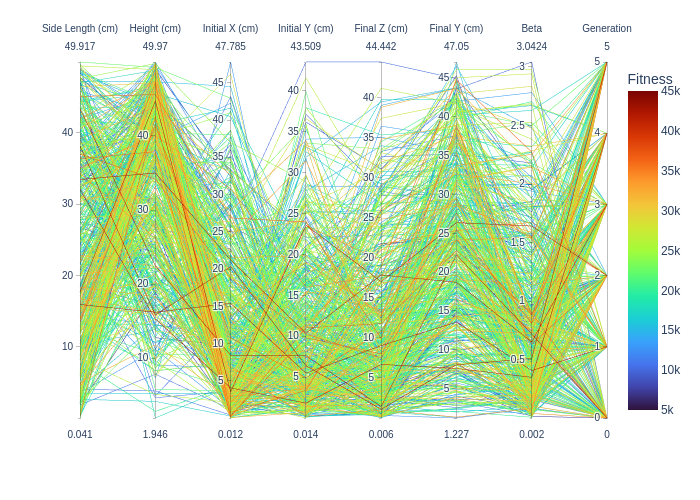
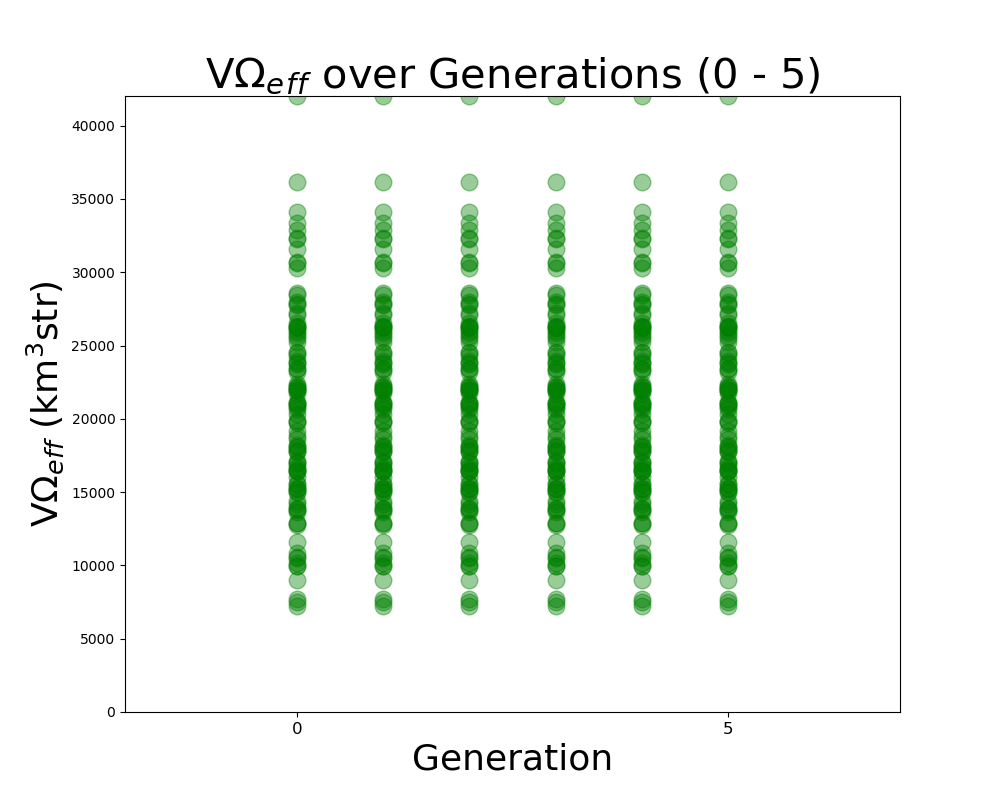
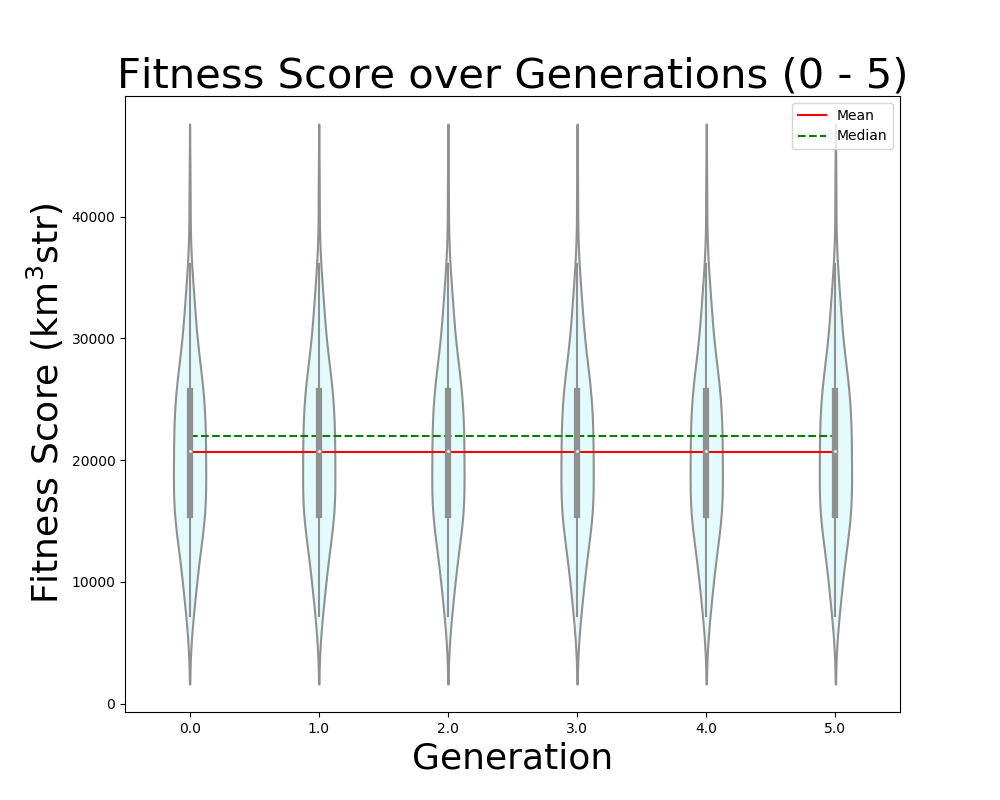
Dylan Wells | PUEO Plots Status | Plots we want to have for PUEO:
FScorePlot2D
Fitness_Scores_RG
VariablePlot (PUEO equivalent of LRT plot)
Veff_Plot (currently the veff is equivalent to the fitness score for PUEO)
Veffectives_RG
Rainbow_Plot
Violin Plot
avg_freq
gain_vs_freq
polar_plotter
physics of results
Next steps:
Get the Error values out of the pueoSim root output (talking to Will)
Use output uan files from the new two-run XF simulation to test the frequency plots. (/fs/ess/PAS1960/HornEvolutionOSC/GENETIS_PUEO/BiconeEvolution/current_antenna_evo_build/XF_Loop/Evolutionary_Loop/Run_Outputs/2023_04_21_Test_6)
Implement the physics of results plots into the loop (Talk to Bryan / Dennis)
Get the average Veff/Fitness score from the default gain pattern in pueoSim to compare our results to. |
| Attachment 1: Rainbow_Plot.png
|  |
| Attachment 2: VariablePlot.png
| 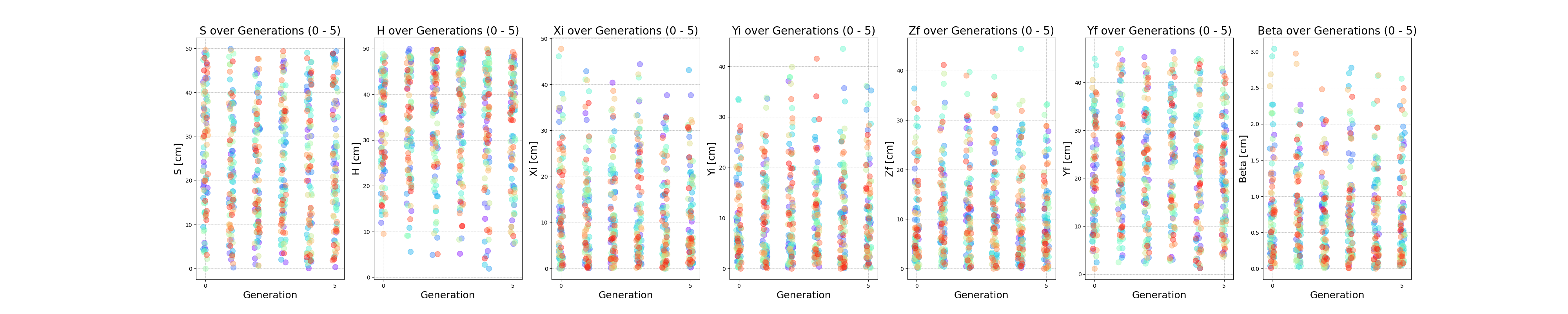 |
| Attachment 3: Fitness_Scores_RG.png
| 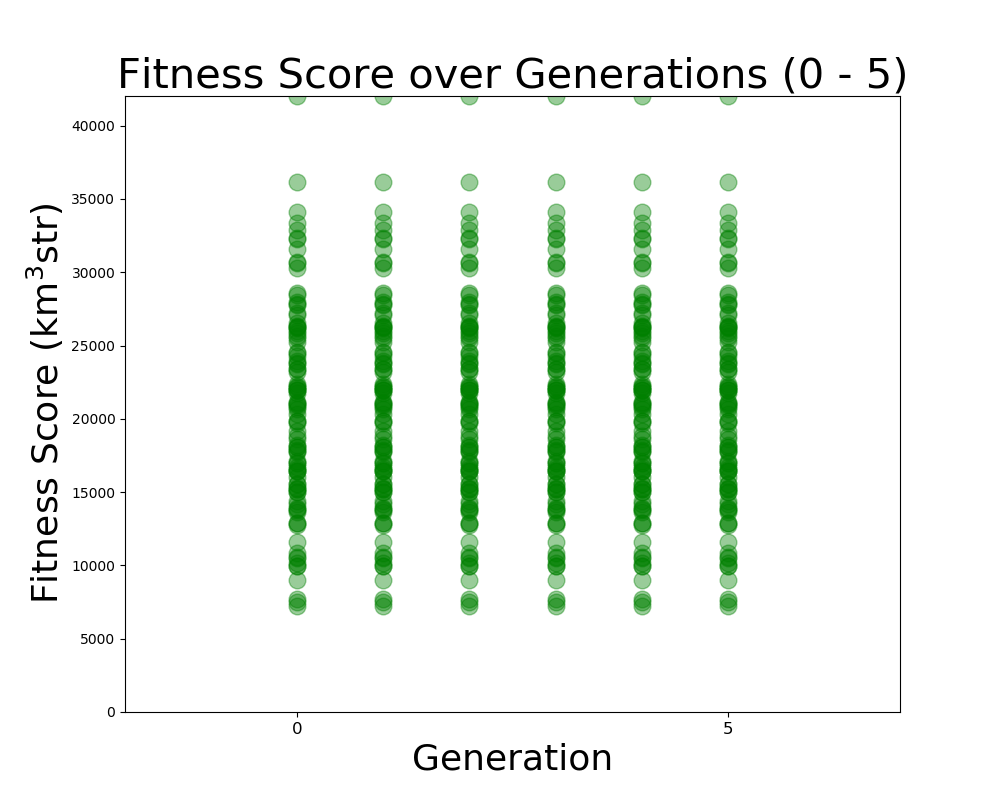 |
| Attachment 4: FScorePlot2D.png
| 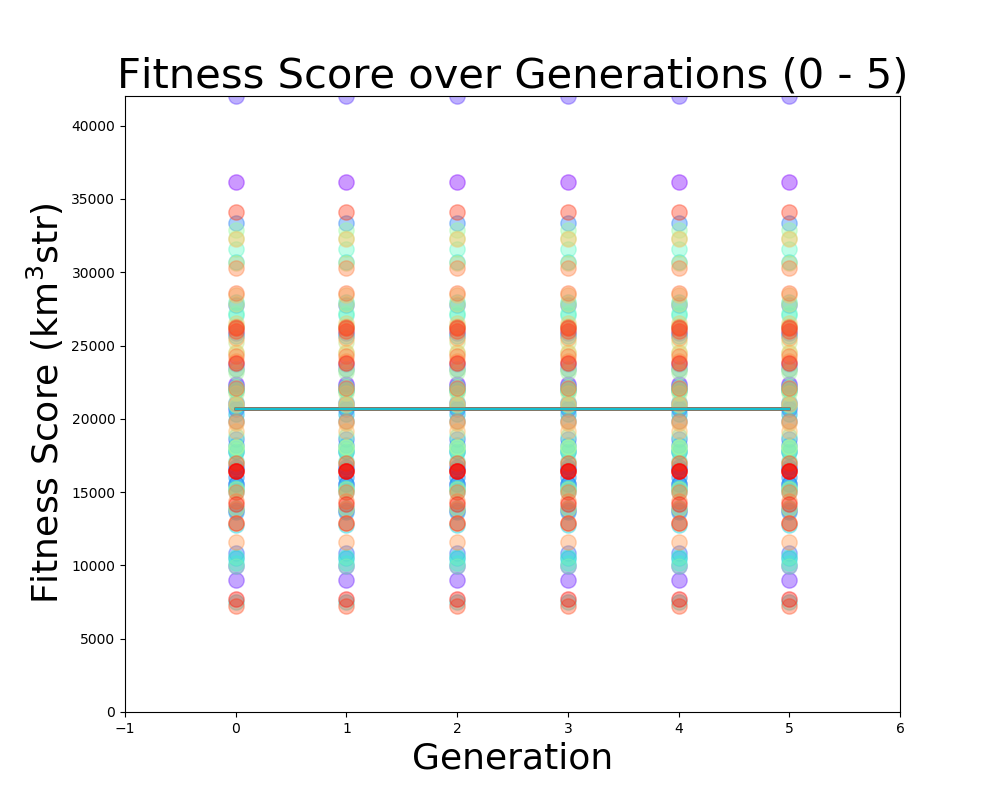 |
| Attachment 5: Veff_plot.png
| 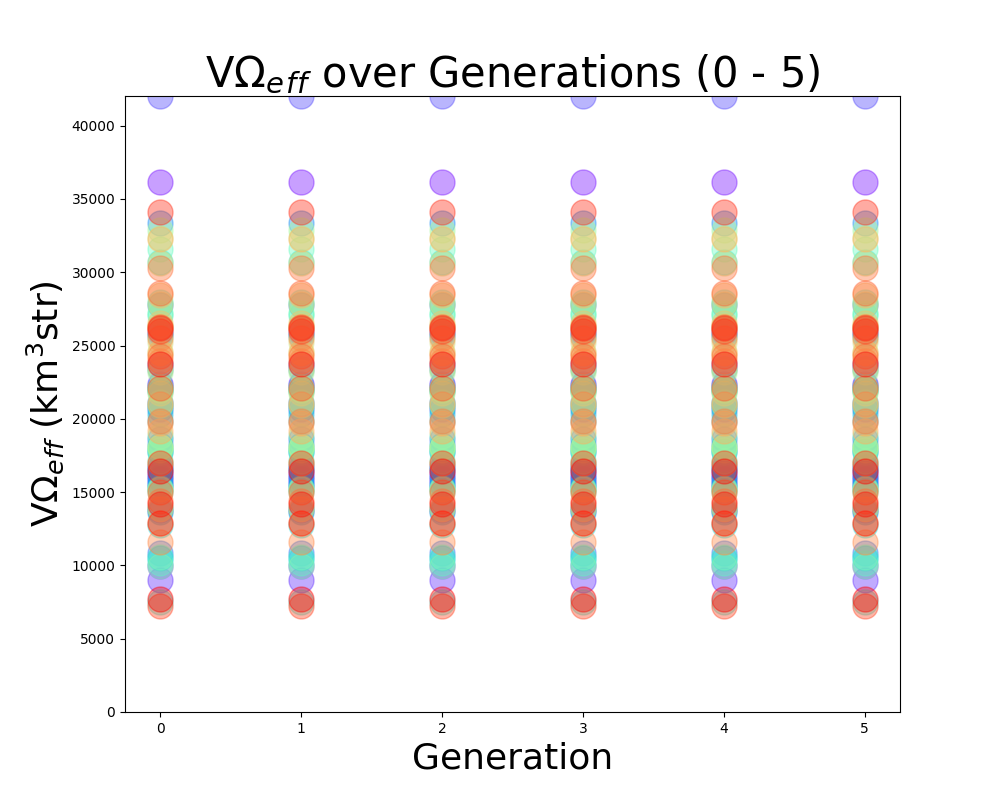 |
| Attachment 6: Veffectives_RG.png
|  |
| Attachment 7: ViolinPlot.png
|  |
|
|
Draft
|
Mon May 29 20:21:07 2023 |
Dylan Wells | Pueo Physics of Results Plots | The Physics of Results Plots have been added to the Pueo Loop. The current version of the plotter is built for pueoSim v1.0 and located in ${WorkingDir}/Antenna_Performance_Metric (Hasn't been pulled into the loop directory yet).
The pueoSim v1.0 IceFinal files were missing information on the RF direction and information needed to see an amplitude spectrum. I asked Will, and he said that the new version of pueoSim (v1.1.0) outputs the needed information.
I created an updated version of the plotter, and have a pull request here: https://github.com/osu-particle-astrophysics/GENETIS_PUEO/pull/40
However, before this can be implemented in the loop, we need a way to get errors from pueoSim v1.1.0.
Currently, there is a version of rootAnalysis.py here that can analyze the new root files and output fitness scores and errors, but instead of taking 20 minutes for a generation, it now takes 20 minutes per individual to run.
This is because the update splits the IceFinal file into IceFinal_allTree, IceFinal_passTree0, and IceFinal_passTree1. IceFinal_allTree and IceFinal_passTree1 are of comparable size to the previous IceFinal file, but the passTree0 final is
about 10-20 times larger, causing a slowdown in calculations. If we calculate without this file, it takes about 1 minute per individual, still a bit slower than before.
Ideas to solve this issue:
Don't use the passTree0 files (I have asked Will what they're for, and if we need them. Hopefully he responds after the Holiday.)
Instead of running through a Python for loop, call a C++ script that creates a CSV file the Python program can easily load in.
Submit a batch job to run the analysis in parallel before combining the outputs in the correct format. (We should maybe do this anyways?)
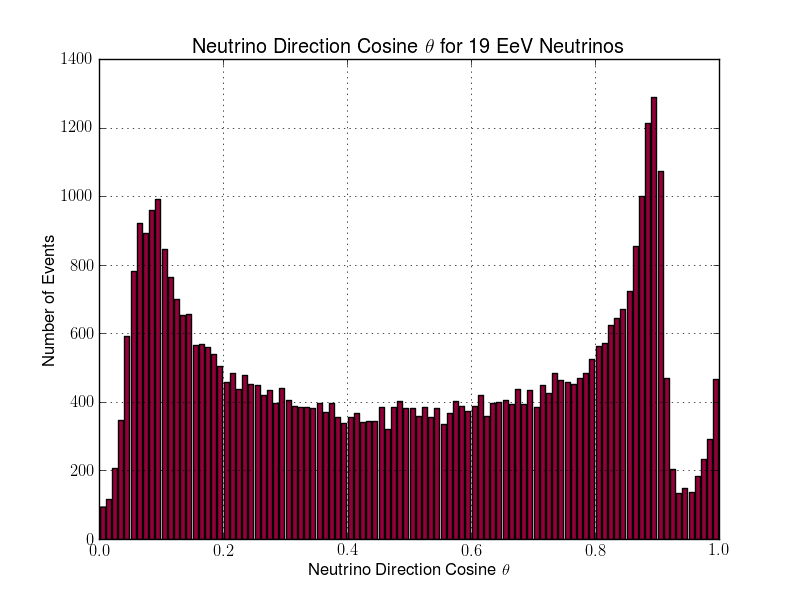
Continue using pueoSim v1.0 (I think we can still retain the Theta graphs for the incoming neutrinos, but there won't be any RF graphs or the possibility of amplitude spectrum plots)
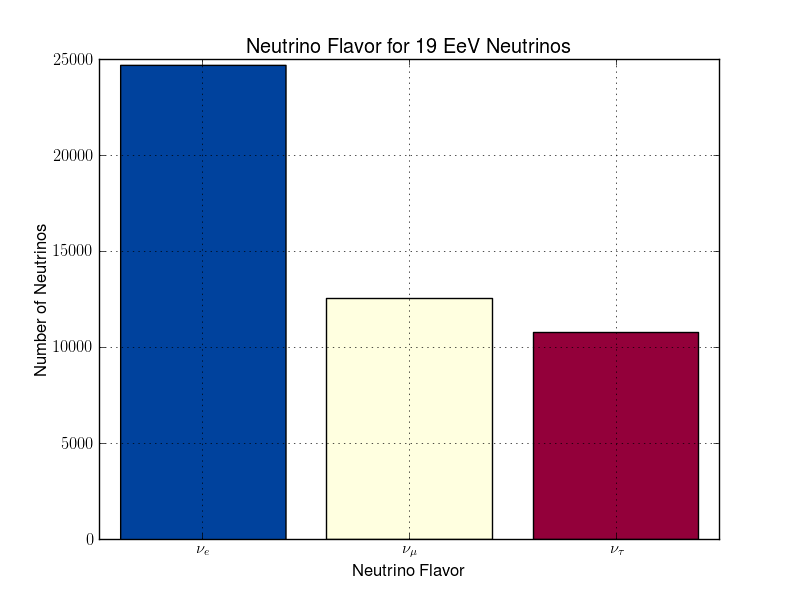
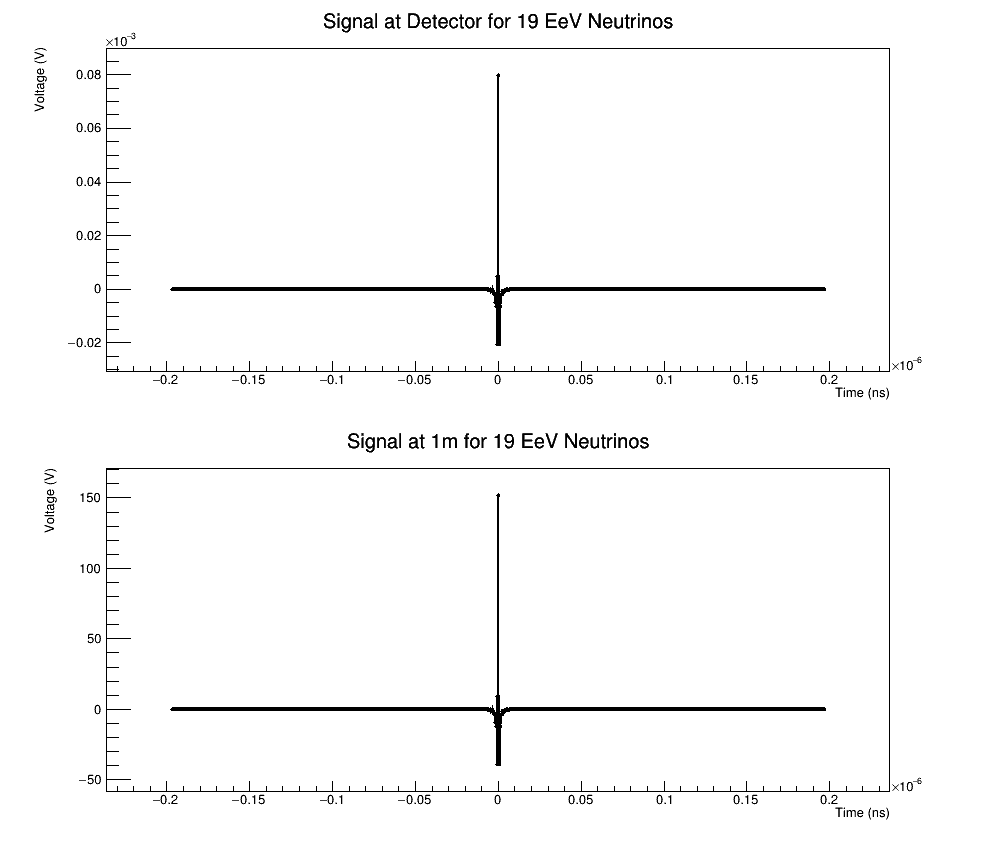
Attached is a preview of plots the v1.1 plotter is capable of making.
Add weights.
|
| Attachment 1: 1_neutrinoFlavor_bestindiv.png
|  |
| Attachment 2: 1_nuDirCosTheta_bestindiv.png
|  |
| Attachment 3: 1_nuDirTheta_bestindiv.png
| 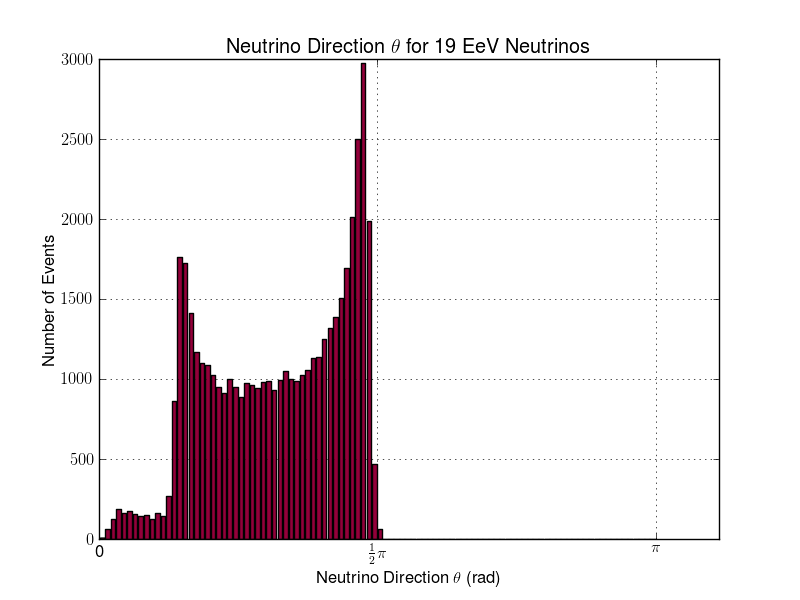 |
| Attachment 4: 1_RFdirCosTheta_bestindiv.png
| 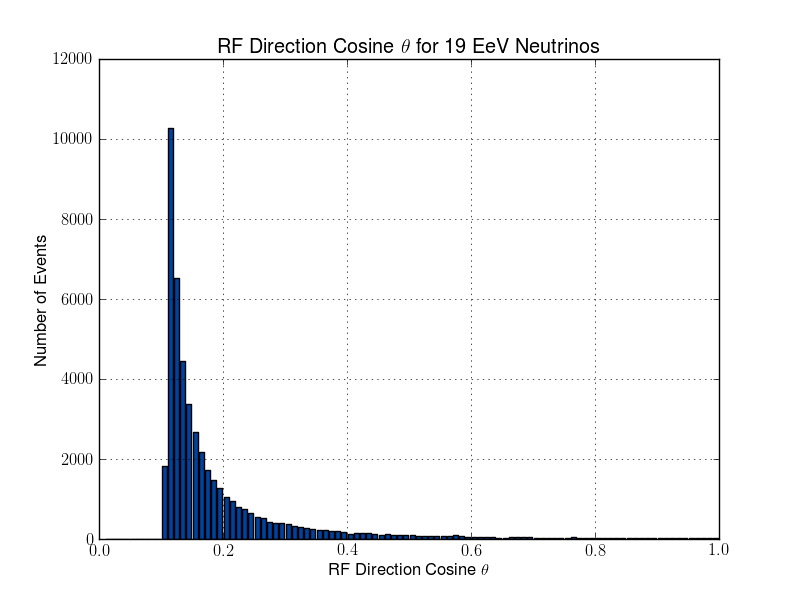 |
| Attachment 5: 1_RFdirTheta_bestindiv.png
| 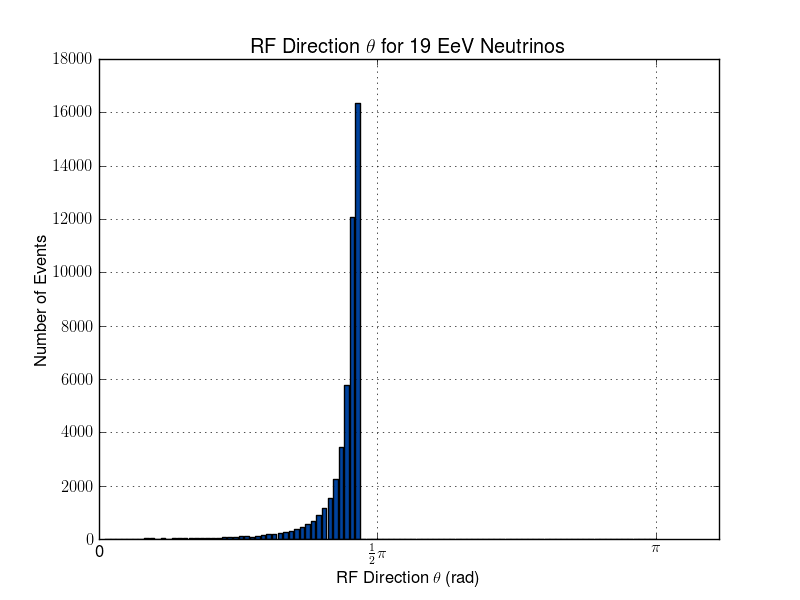 |
| Attachment 6: 1_maxEField_vs_maxEFieldFreq_2d_bestindiv.png
| 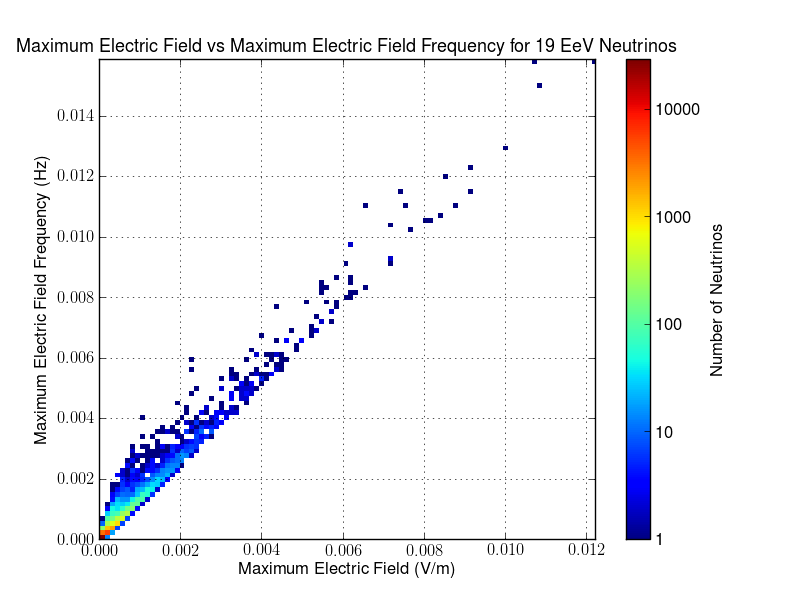 |
| Attachment 7: 1_1_signals_bestindiv.png
|  |
|
|
222
|
Thu Jun 1 21:49:29 2023 |
Dylan Wells | Guide to Updating pueoSim | How To Update PueoSim For GENETIS:
First, whoever updates pueoSim needs access to pueoBuilder, pueoSim, and niceMC on GitHub (ask Will for permissions).
Once you do, go into the peuoSim directory at /fs/ess/PAS1960/buildingPueoSim/
and source set_env.sh
`source set_env.sh`
Then, we want to make copies of the files we are currently modifying for the GENETIS loop.
For PueoSim v1.1.0 these are:
-
nicemc/src/EventGenerator.cc # Modified to create custom output root files to calculate errors
-
pueosim/test/simulatePueo.cc # Modified to stop the simulation of the LF antenna which is not needed for GENETIS
-
pueosim/src/Seavey.cc # Modified to read in custom gain files
-
pueosim/src/pueo.cc # Modified to read in custom gain files
-
pueosim/include/Seavey.hh # Modifies to read in custom gain files
Currently, I store copies of these in the `/fs/ess/PAS1960/buildingPueoSim/backups` directory in case somebody accidentally overwrites the files in pueoBuilder.
Once you’ve made the copies, you can run `./pueoBuilder.sh` from the `/fs/ess/PAS1960/buildingPueoSim/pueoBuiler` directory. This will rebuild pueoSim and niceMC, pulling the latest updates from GitHub.
You may need to delete the pueoSim and niceMC directories in order for the builder to pull the latest version from GitHub. Or, if it’s being really stubborn, move the whole pueoBuilder directory to a temporary location and run the builder from scratch with
`git clone git@github.com:PUEOCollaboration/pueoBuilder` and then `./pueoBuilder.sh`
Then, you will need to reference the copies of the changed files to make changes to the new version of pueoSim. Hope this doesn’t cause too much of a headache, and when you’re done, return to the /fs/ess/PAS1960/buildingPueoSim/pueoBuiler directory.
Then you simply type
`make install`
then
`make`
And now, pueoSim should be ready to run!
EventGeneratior.cc Changes and Rationale:
PueoSim’s default output ROOT files are very large and therefore time-consuming to parse through to get the information we need to calculate effective volume and errors. So, we want to create a custom ROOT file with only the variables we want, greatly increasing the speed of the analysis.
To do this, we want to create a new TFile with corresponding TTree and TBranches that will store the loop.positionWeight, loop.directionWeight, and neutrino.path.weight. Then, we want to fill the Tree when a detector is triggered and write the results to the file at the end of the loop.
Sample code for initializing the TFile:

simulatePueo.cc Changes and Rationale:
By default, pueoSim v1.1.0 runs a simulation for the normal antenna and a low-frequency (LF) antenna. As GENETIS is evolving for the main antenna, we are not interested in using computation time to simulate the LF antenna. So, we comment out the lines that initialize the LF detector in this file.
Seavey.cc, Seavey.hh, and pueo.cc Changes and Rationale:
As of pueoSim v1.1.0, the simulation software only has the ability to read in one antenna. This is a problem, as we want it to be able to read in files for any antenna we make. So, we need to change these scripts to be able to read in whatever gain files we want.
The convention the loop uses is to input gain files in the format of
vv_0_Toyon{runNum}
hh_0_Toyon{runNum}
…
In the ./pueoBuilder/components/pueosim/data/antennas/simulated directory
So, the main change is getting the runNum variable into Seavey.cc file where the gains are read. Currently, we define a global variable at the stary of pueo.cc and pass it into where Seavey is called. This means we have to add runNum as a parameter in Seavey.cc as well as Seavey.hh. Finally, we change the name of the read-in files to be in the above format AFTER dividing runNum by 1000 (this is because pueoSim uses the run number as a random number generating seed, so we divide runNum by 1000 to be able to read in the same gain patterns for multiple seeds of the same individual).
Note: We used to change pueoSim to output a veff.csv file. We now handle this calculation by analyzing ROOT files, so this change is no longer necessary. |
|
|
226
|
Sun Jun 18 21:32:03 2023 |
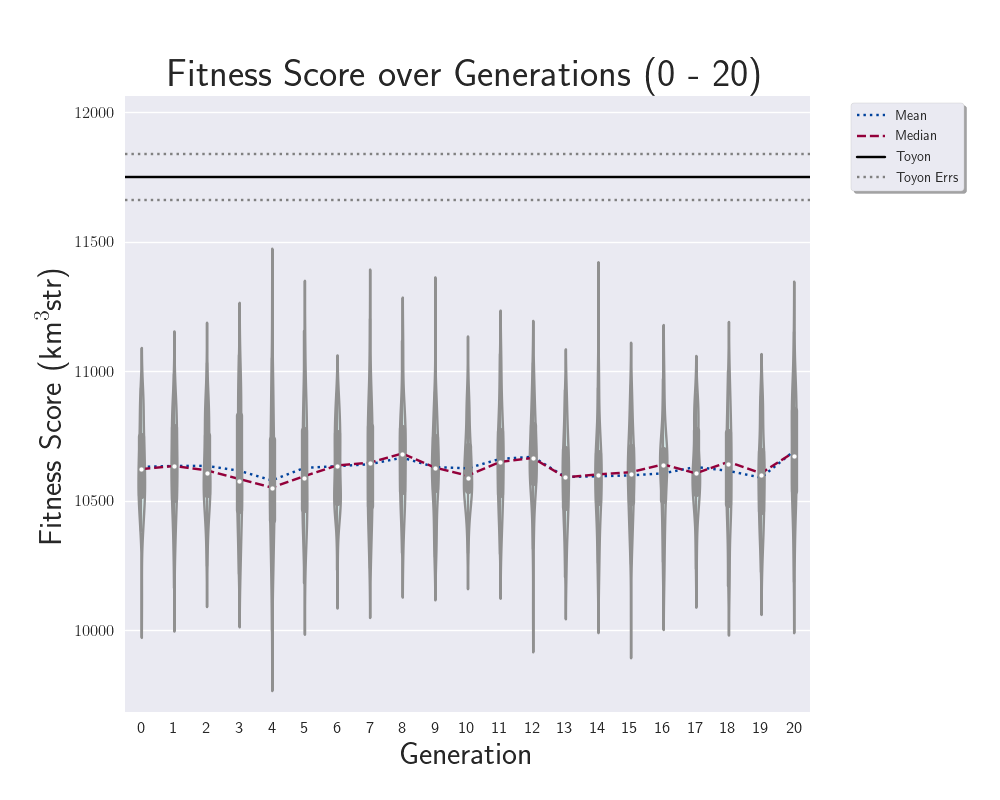
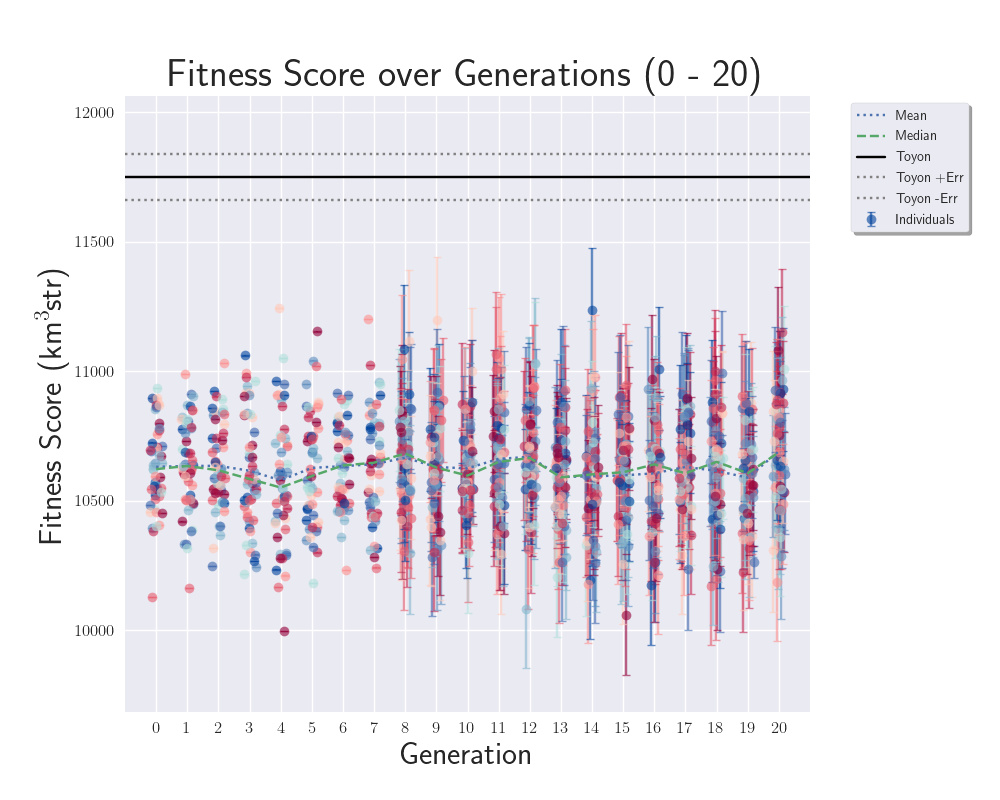
Dylan Wells | Default Toyon Antenna Simulation | To act as our comparison to the evolved antennas while plotting, we have done a simulation of pueoSim with 4,000,000 neutrinos for the measured toyon gains found in /fs/ess/PAS1960/buildingPueoSim/pueoBuilder/components/pueoSim/data/antennas/measured
In order to run the jobs, I used the runJobs.sh script found in /fs/ess/PAS1960/buildingPueoSim which submits job runs of 40,000 neutrinos at a time, mirroring what we do in the actual loop.
The resulting data is now located in /fs/ess/PAS1960/HornEvolutionOSC/GENETIS_PUEO/BiconeEvolution/current_antenna_evo_build/XF_Loop/Evolutionary_Loop/Toyon_Outputs
Veff: 11750.0503856
Plus Error: 89.0051458227
Minus Error:88.9007824246
The fitness score plots have been updated to read this value in as a comparison.
|
| Attachment 1: 248599981-8eacbc83-d42e-4da4-9746-bda05b2b4a38.png
|  |
| Attachment 2: 248599974-bee7a4db-34c6-4cfd-bde0-3682ff3ebaf7.png
|  |
|
|
Draft
|
Tue Jul 18 22:04:22 2023 |
Dylan Wells | Parallelizing pueoSim jobs | Currently, the PUEO loop runs pueoSim with 1 pueoSim process per job submitted.
Each of these jobs has 1 node and 8 cores, however, pueoSim only needs a single core to run.
Here is some data I collected by running the same seed of pueoSim with different numbers of cores in the job:
| Processes |
Cores Per Job |
Run Time (1000 neutrinos) |
Neutrinos Per Second |
| 1 |
1 |
100 |
10 |
| 1 |
8 |
102 |
10 |
| 1 |
16 |
96 |
10 |
| 1 |
40 |
96 |
10 |
So, we should be able to run multiple processes of pueoSim without losing much performance.
Tests with more cores:
| Processes |
Cores per Job |
Run Time (1000 neutrinos) |
Neutrinos Per Second |
| 8 |
8 |
106 |
75 |
| 8 |
16 |
126 |
63 |
| 8 |
40 |
107 |
75 |
| 20 |
20 |
142 |
140 |
| 20 |
40 |
138 |
144 |
| 32 |
40 |
178 |
179 |
| 40 |
40 |
208 |
192 |
A test comparing the parallelization with the 40000 neutrinos per process we simulate in the loop:
| Processes |
Cores Per Job |
Run Time (40000 neutrinos) |
Neutrinos Per Second |
| 1 |
8 |
3226 |
12 |
| 40 |
40 |
6651 |
240 |
So, these tests suggest we can simulate neutrinos ~20 times faster than currently done in the loop by utilizing more cores per job.
This method of multiple processes per job should be applicable to how we run other simulation software like AraSim as well.
(Note: both of these jobs had comparable queue times of 27 and 31 seconds respectively.
Also, I have tested and seen that the outputted root files are identical for the same seed regardless of if ran with multiple processes at the same time or with processes in serial)
(data found in /users/PAS1960/dylanwells1629/buildingPueoSim/testingouts/times.txt)
How to run multiple processes of pueoSim:
Previous Call:
./pueoBuilder/build/components/pueoSim/simulatePueo -i pueo.conf -o ${PSIMDIR}/outputs/${gen}_outputs/$SLURM_ARRAY_TASK_ID -r $run_num -n $NNT -e $Exp > $TMPDIR/out.txt
Multiple Processes Test Call:
for ((i=0; i<$threads; i++))
do
./simulatePueo -i pueo.conf -o $TMPDIR -r $i -n $NNU -e 19 > pueo.out &
done
wait
Instead of just calling peuoSim once per job, we can use the & symbol and a loop to run $threads number of pueoSim processes in the background and then wait for them to finish. |
|
|
234
|
Tue Jul 25 16:07:25 2023 |
Dylan Wells | Parallelizing XF and pueoSim in the loop | Standard Loop Architecture:
Complete an evolutionary step FOR EACH antenna before continuing on with the next step.
Steps:
1. Run the Genetic Algorithm for the entire population.
2. Run the XF radio simulation for the entire population.
3. Run the neutrino simulation software for the entire population.
4. Run root analysis and plots for the entire population.
However, due to constraints on the amount XF keys we have, we can only run 4-5 XF simulations at a time.
So, when the first antennas finish their XF simulations, their outputs will simply sit there until EVERY other antenna finished their XF simulations.
New Proposed Architecture:
Complete necessary evolutionary steps as a population, but string together those that don't rely on data from other antennas.
Steps:
1. Run the Genetic Algorithm for the entire population
2. Run the XF radio simulation for each antenna
- When an XF simulation finishes for an antenna, submit the pueoSim / root analysis jobs for that antenna
3. Run the plots for the entire population
This will allow us to complete most of our pueoSim computation while the XF portion of the loop is still running, cutting down the time between the final XF job finishing and the final pueoSim job finishing.
Test run of this new architecture with 100 antennas, 7,840,000 neutrinos per antenna.
| Part |
Time (seconds) |
| A |
1 |
| B1 |
1347 |
| Entire B2 |
54017 |
| B2 XF |
53063 |
| B2 remaining PUEO |
954 |
| E |
7 |
| F |
23 |
After the final XF job finished, the pueoSim simulations and analysis of outputted root files were completed in 954 seconds,
Comparison Between the Two Architectures (both using job optimization from Elog 232)
| Architecture |
Neutrinos |
Time In Loop (s) |
| Standard |
4,000,000 |
~6500 |
| New Proposed |
7,840,000 |
~950 |
Notes on Chart:
Source of data located in /users/PAS1960/dylanwells1629/buildingPueoSim/testingouts/times.txt and /fs/ess/PAS1960/HornEvolutionTestingOSC/GENETIS_PUEO/BiconeEvolution/current_antenna_evo_build/XF_Loop/Evolutionary_Loop/Run_Outputs/2023_07_24_test5/time.txt respectively)
Time from standard uses the time one of the 250 jobs running in parallel took in my testing of parallelizing processes inside of pueoSim jobs: 250 jobs * (40 * 40000 neutrinos per job) / 100 individuals = 4,000,000 neutrinos per individual)
The New Proposed time includes time spent analyzing the outputted root files to find fitness scores and errors, which would have taken around 100 seconds * population size for its number of neutrinos and files per individual (/fs/ess/PAS1960/HornEvolutionTestingOSC/GENETIS_PUEO/BiconeEvolution/current_antenna_evo_build/XF_Loop/Evolutionary_Loop/Run_Outputs/2023_07_23_test5/time.txt for data on this number)
So, this new architecture can provide more improvements for the amount and speed of neutrino simulation in the loop on top of the methods discussed in Elog 232.
This architecture could also be applied to see improvements in the Bicone and Hpol loops which are both affected by the limited number of XF keys.
Additional Notes:
1. For this new architecture test, each antenna uses 49 jobs for neutrino simulation instead of 2.5 previously. (49 pueoSim + 1 XF for 50 jobs per antenna, 5,000 jobs per generation)
2. The time for each antenna to submit, queue, and finish its neutrino simulation jobs must be less than the length of the XF job, or the extra time will accumulate for each antenna, losing much of the time benefits. (As long as it is less, the time spent on just pueoSim should be invariant under an increase in population)
3. The number of core hours spent on pueoSim jobs will be roughly the same for the same number of neutrinos as each job is shorter (except for a small contribution of the job overhead taking a higher percentage of total time for shorter jobs)
4. Initially I had thought that maybe queuing pueoSim jobs while running the XF jobs could slow down the queue for the XF jobs. So, I made the loop wait to submit the batch pueoSim jobs until we had space for all of them to be active with the ~250 max jobs per user.
Additionally, while observing my many tests, I didn't notice any correlation between the number of CPU peuoSim jobs in the queue and the number of GPU XF jobs out of the queue.
5. Branch I'm developing this on is here
6. The total time for the test generation was 15.4 hours, which is slightly longer than the ~14 hours from the 2023_05_08 run. However, this test also used double the population size, larger values for the range of antenna heights (on average about 3x taller), and 20x more neutrinos simulated per antenna. So, the actual speed is better than it first looks.
|
|