 Sun Apr 19 15:27:42 2026, Julie Rolla, Week 11/12/19 Update |
| Quote: |
|
Attendance for today's session: Cade, Julie, Alex M, Alex P, Mitchell, Scott.
Monday was a holiday, and we will be replaceing that meeting later this week. Today we worked on the following tasks:
Tasks:
- Check continuity of loop
- Alex M will try another run tonight, and has already requested a virtual desktop.
- Install Arasim to /fs/projects/PAS0654/BiconeEvolutionOCS to be edited and messed with
- Cade is testing whether or not this is running within the loop. He had gotten a few errors, and it is not completing. It's submitting the job with the new bash script, but it is not actually running.
- Found an error. The bash script was not grabbing the correct AraSim directory. More updates to come.
- Clean bash script
- Mitchell and Alex M are putting all current functions hard-coded in into their own .sh scrips that are now being called in the main bash script.
- Update Manual
Right now Elliot and Leo have decided to focus on working with Keith. They will not be contributing to this project for the remainder of the semester. Students have been posting individual updates here: https://www.dropbox.com/home/GP_Antennas/Updates
I've also attached the meeting minutes from the call last week, in order to keep track of updates.
|
|
|
Mon Apr 20 00:59:46 2026, Julie Rolla, GENETIS Working Meeting
|
| Quote: |
|
Today's Tasks
Julie: Write bash practice assignment, assist others when they have questions, work on Git lecture. (Will finish bash assignments early next week)
Evelyn, Mitchell, Eliot: Make progress on the "Learn the Command Line" course on Code Academy. (Should be done by the end of the week?)
Leo: Start gathering information for the "physics of antennas" lecture series! Note: Remember that Leo wants to be an educator, and would like us to find opportunities to work on "teaching" items. Most of the students don't have any background on how antennas work. He started learning about them and is going to do a lecture series (likely the first 20 minutes of every meeting) starting in a few weeks! (Should start series by hopefully 2/21)
Alex M: Clean up unused code. Fix hard-coded directories (likely finished & tested by end of day 2/11)
Alex P: Fix hard-coded variables (likely finished & tested by end of day 2/11)
I've tacked on our to-do list in the meantime so we can keep carrying the items still pending along with us. As we complete them, I will drop them off the list!
TO-DO List
The following is our coding to-do list:
-
Get our Ara sim error fixed (Alex, Julie)
-
It seems that if AraSim jobs are left to run while the user is away, it doesn't properly write one or more of the flags, and makes the loop get stuck at AraSim. We must then re-run from that state by manually editing the Save State text file.
-
We are going to try to get XF to run at the command line so that we can submit it as a job. This would alleviate us using an interactive job. We *hope* this would fix the error since the user wouldn't be "gone" while utilizing a GPU in an interactive job.
-
Alex emailed XF to ask a few questions! Stay tuned!
-
Make Hardcoded directories variables.
-
Xmacros (use sed command)
-
All over bash script functions.
-
AraSim job files (sed command?)
-
Make the following variables in the bash script:
In xmacros/simulationPECmacroskeleton_prototype.txt (use sed command):
Grid spacing=0.1
Frequency= factor of n higher
This factor of "n" higher in frequency has to be the same as the Multiplier_factor in the roulette algorithm AND the same as GeoFactor in fitnessFunction_ARA_amy.cpp.
In roulette_algirithm.cpp
Length = 50cm/Multiplier_factor;
STD= 15cm/Multiplier_factor
Radius = 1.5cm/Multiplier_factor;
STD= 0.75cm/Multiplier_factor
Also the "Multiplier_factor" line 89.
This "Multiplier_factor"has to be the same as the GeoFactor in fitnessFunction_ARA_amy.cpp AND the same as the factor higher in frequency in the xmacro.
NOTE:THIS MUST BE RECOMPILED AFTER CHANGING.
In fitnessFunction_ARA_amy.cpp:
GeoFactor=2
This GeoFactor has to be the same as the Multiplier_factor in the roulette algorithm AND the same as the factor higher in frequency in the xmacro
NOTE: THIS MUST BE RECOMPILED AFTER CHANGING.
-
Get rid of all code we are not using anymore.
-
Currently using: XF_loop_AraSeed.sh
-
Look at what items are being called in here, and remove old versions such as XF_loop_Prototype.sh, XF_loop_Functionized.sh, and the related scripts.
-
These can temporarily moved to on "old code" directory and we can delete once we finalize the loop.
-
Turn tournament on in the GA.
-
Parallelize the AraActualBicone job.
-
The AraSim run in Gen 0 that gets Veff for the ARA actual bicone input file is not currently being seeded.
|
|
|
Mon Apr 20 01:57:35 2026, Julie Rolla, ONBOARDING: Tutorial Projects, Reading, Setup, etc. for New Students
|
| Quote: |
|
For each new student joining the group, we ask them to onboard by completing each of the following items in the order given:
(1) Go to osc.edu and request an account
(2) Complete the following tutorials and reading. Note that the order of these does not matter, however, I would suggest "how to use Git" comes last, as it is the lease important for you to start. Finally, I advise you work on a tutorial concurrently with reading the pages assigned below from my Dissertation.
- OSC tutorials
- Because this project uses a lot of computation power, we run on the Ohio Super Computing Center's clusters. Please utilize these tutorials to learn more.
- Read Julie's Dissertation pages 1-9, 12-20 (starting at section 1.5.2), 28-37 (starting at section 2.3)
- Feel free to read chapter 3, as it has the history of this project and goes into details of our most up-to-date endeavors. This is optional and not mandatory.
- Complete the introduction to Bash project
- Complete the introduction to Python Project
- How to use Git (optional)
- Make sure to get an XFdtd license on OSC
(3) Finally, review the full manual and complete the bullets below. The full manual is Appendix A of Julie's Dissertation.
- Appendix A of my dissertation is our manual and acts as the holy grail of our research. Anything you need can be found here (from where our info exists on the web, to how to run the code).
- Once you have read this through entirely, we advise you log on to OSC and explore the code for PAEA in PAS1960. Once you have done so, complete this homework by making a copy of this google doc and filling it out on your own.
Once these are completed, the students are ready to start helping. This is all of the coding information and basic background information on evolutionary algorithms students must know to be proficient in assisting.
Other useful materials we have may include:
- Our old GENETIS manual
- This is somewhat out of date; however, it does have information on the general working on the loop.
- Julie's candidacy paper
- Complete the writing a genetic algorithm in C++ project
- This is still a work in progress! I'll complete it shortly!
- Read chapter 3 of this book (more if you have time) by Eiben and Smith, "Introduction to Evolutionary Computation" for a quick introduction. The book should be available electronically from a university library. Let us know if you can't find it there.
- Get to know XFdtd
- XFdtd manual is also attached; however, the link above (in 5) is more useful for coding a .xmacro.
Important notes:
MAC USERS: Using a GUI when connecting to OSC via SSH from your terminal.
You will need to set up X11 forwarding. Otherwise, when you go to plot via SSH, they will not display (they don't forward from OSC to your machine). If you are unable to run GUI's on OSC through your computer's terminal, follow these instructions:
- In your own system's terminal, type: sudo vi /etc/ssh/sshd_config
- Search for the following line: X11Forwarding no
- Change it to: X11 Forwarding yes. Save the file and exit.
- In your own system's terminal, type: sudo systemctl restart sshd
- For a Mac, download and install XQuartz.
- Connect to OSC using ssh -XY username@hostname.
- You can test that this works by typing 'xeye' or 'xclock' in the terminal when logged into OSC.
Now you should be able to use OSC's GUIs.
PC USERS:
As a PC user, there are a few things you need to do:
(1) Enable the Windows Subsystem for Linux on your device (https://developerinsider.co/stepwise-guide-to-enable-windows-10-subsystem-for-linux/#:~:text=To%20enable%20the%20Windows%20Subsystem,list%20here%20and%20click%20OK.)
(2) Get Bash on Ubuntu installed on your machine. You are going to need to have Bash on Ubuntu installed prior to starting these trainings; otherwise Bash commands will not be recognized.
(3) Get X11 forwarding working. Otherwise, when you go to plot via SSH, they will not display (they don't forward from OSC to your machine).
- Follow these steps here.
- Change your config file. To do so, in terminal (with Bash on Ubuntu open)
- type: sudo vi /etc/ssh/sshd_config
- Then change '#X11Forwarding no' to '#X11Forwarding yes' and save it.
- Make sure Putty and Xming are running every time before you ssh in. Use Xlaunch application to run Xming and press yes to everyrthing.
- Xming should now be running as a background task.
- Open PuTTY and open the pre-saved like you saved in PuTTY. (This will open a Bash terminal that asks for your OSC login password.)
|
|
 Thu Jul 9 19:23:25 2026, Julie Rolla, 3/5 Task Updates |
Tue Mar 5 17:29:02 2019
The things we worked on this week is in bold. Below the bold items is a description of exactly what we took care of.
- Paper:
- Julie added Amy's edits.
- Julie let Kai know he is welcome to edit, too.
- Julie will also keep edits updated as they come in!
- Get loop working-- specifically XF:
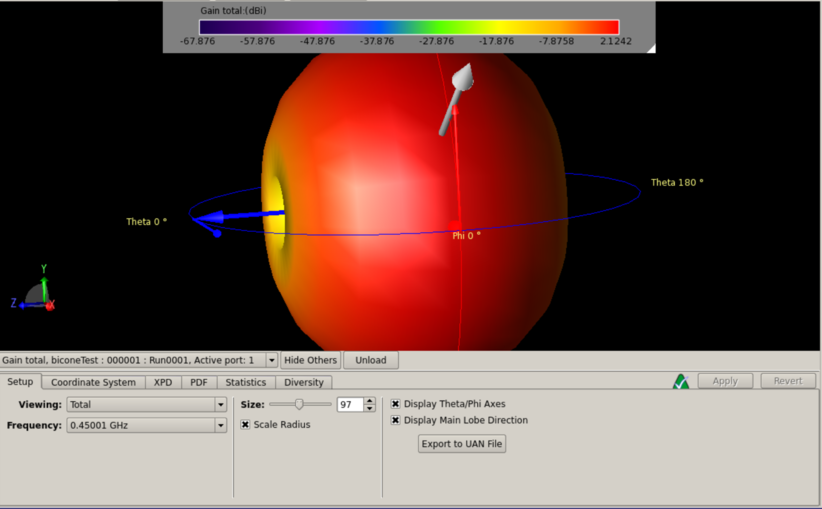
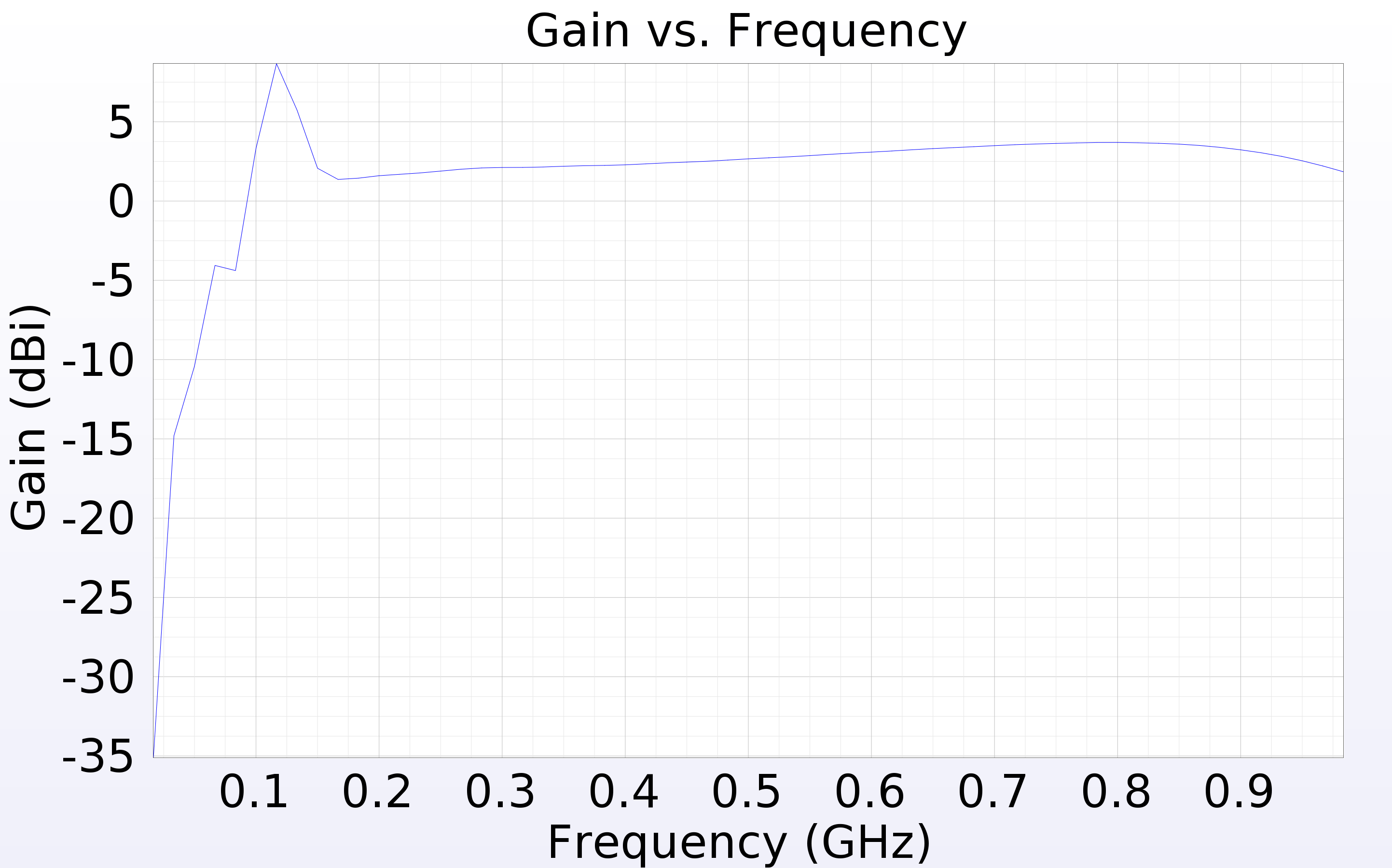
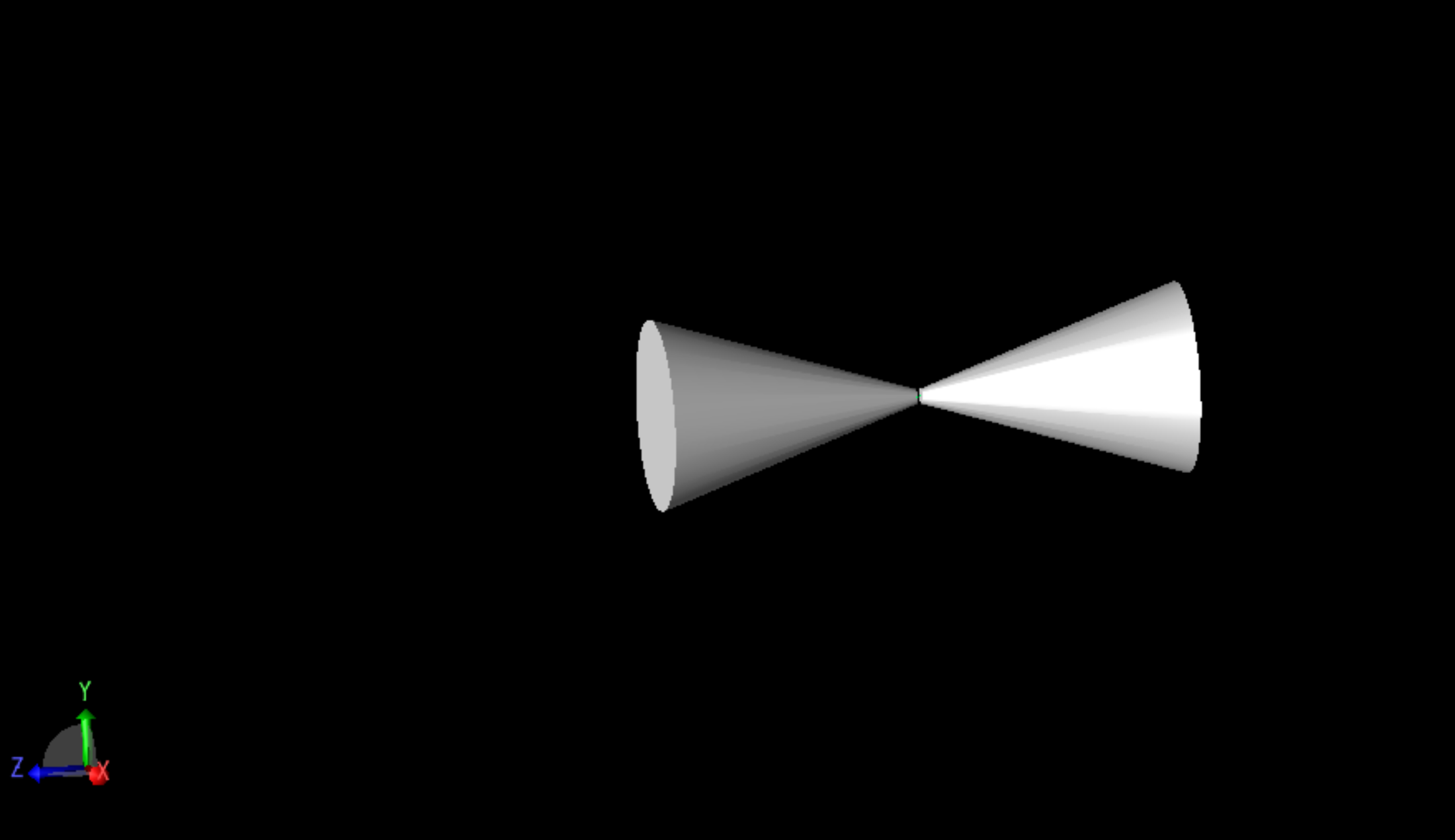
- Cade has now officially gotten reasonable outputs for his XF scripts. See the attached images for the XF outputs and associated CAD drawing. It seems to look like a reasonable gain pattern.
- The loop now works until AraSim. We are now getting the following AraSim errors:
- XF_Loop.sh: line 244: ./AraSim: No such file or directory
- XF_Loop.sh: line 244: ./AraSim: No such file or directory
- Julie is going to help Cade make sure that this directory is correct and that it has been compiled! More info to come.
- Test GA (Suren):
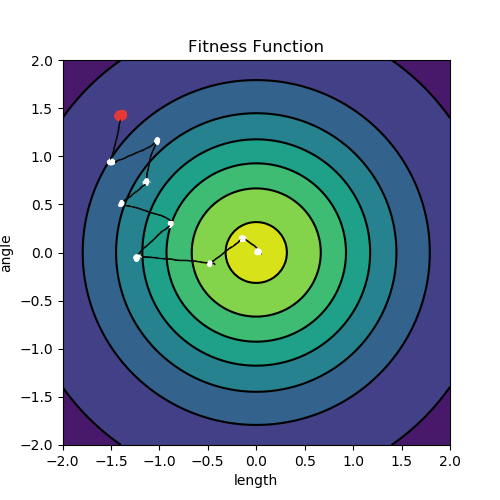
- I've been working on creating a gaussian fitness score with which I can test the performance of our genetic algorithm. The idea is as follows: We run the GA and get a generation of individuals. We provide their fitness score by simply taking the values {radius, length, angle} as the {x, y, z} coordinate in a 3D space. We can then use a 3D gaussian to output a value at that location, and use that number as our fitness score. The beauty of this method is that we can then plot the progress of our genetic algorithm each generation as a dot in this 3D space, and we can see it slowly snake to the center. Additionally, we can use more complex fitness scores, like one with a local maxima and a global maxima to see if it get's stuck in the local maxima. Below, I have an image I generated on python of a 2D section contour plot of a 3D gaussian in length-angle space. The dark purple is a lower value and the yellow is a higher value of the gaussian. The lines and dots hand-drawn on top are an idea of what it would look for like to start the GA at the red dot and see it's progress each generation until it reaches the center, shown by the white dots. Running this for our current roulette algorithm would make a very nice GA proof of concept plot for the paper, I believe!
- Gain pattern plots -- Make them 3D (Evelyn) & put on GitHub
- We need to figure out how to make a group Github. We have a lot of Githubs made by people and we need them all accessible from a group account. Right now the old dipole Github and the CalPoly stuff are linked to a group account. We need to find out how to get the Bicone account held by Max, and Evelyn's plotting code all on the group account: https://github.com/gp-antennas.
- Update: Evelyn and Max have contacted Brian to get their accounts linked. It looks like Amy, Brian, and Stephanie (Cal Poly) are the owners.
- Insert LR plot & Gain plot to loop (?)
- Edit bash script
- Update Github
- AraSim plots (Julie and Max) -- see #2 and #3 here: http://radiorm.physics.ohio-state.edu/elog/GENETIS/7 for details.
- Max and Julie have gotten sample data on Owens.
- located at /users/PCON0003/cond0068/ARA/AraSim/branches/AraSimLite/outputs
- Max and Julie have gotten sample programs from Jorge.
- https://github.com/toej93/AraSim_noise_calib/blob/master/readTree.cc
- https://github.com/toej93/AraSim_noise_calib/blob/master/M.readTree
- Julie installed root, and had Max source Julie's thisroot.sh files to run root on Owens.
- Max installed Arasim to his user.
- Next step: run plotting software given by Jorge.
- Update manual with things from Suren's last post here: http://radiorm.physics.ohio-state.edu/elog/GENETIS/8
|
|
Mon Jul 13 06:51:38 2026, Julie Rolla, GENETIS Planning Meeting
|
Attendance: Julie Rolla, Alex M.
Today Alex and I met to discuss how to move forward given the COVID-19 restrictions. We have resent out a message polling people's schedules to create online working sessions. Here is what we are planning:
| Group name |
Tasks |
Participants |
Times per week to meet |
| Loop Group |
Running the loop, updating software, getting plots |
Julie, Alex M., Alex P. |
2 |
| Lecture |
Attend Leo's lectures |
Full group |
1 |
| Training (Python, c++, and Bash projects) |
Completing the training modules (Alex M. and Julie will be answering questions) |
Mitchell, Ryan, Evelyn, Eliot, Julie, Alex M. |
2 |
Once we collect times for each group, we will have separate meetings for all of these entities. This way it's easier for us to meet without all having different items to discuss/work on. All of these will be zoom meetings moving forward. Meeting info will be announced shortly!
Tasks for "the Loop Group":
- Make wall time a variable for XF sim.
- Test current software edits.
- Such as item #1 above
- Make sure the bottleneck function is working.
- Right now it seems to be working; however, we keep hitting a wall time error. If we can make the wall time a variable then we can be sure the bottleneck function is working, and the wall time is truly the error.
- Get Ruby working on XF
- when I type:
/usr/local/xfdtd/7.8.1.4/remcom/bin/xfdtd I get:
Info: Using latest available version (7.8.1.4)
Info: Running /usr/local/xfdtd/7.8.1.4/remcom/XFdtd_7.8.1.4/bin/xfdtd
Error: Unable to find executable to run.  This command must exist
- Get Alex's account of Ruby working.
- He received an email and is still unable to log in. He is touching base with them again.
Tasks for "the Training Group":
- Julie and Alex need to finish the C++ project!
|
|
Fri Jul 17 12:08:19 2026, Julie Rolla, GENETIS Working Meeting
|
Today's Tasks
Julie: Write Python project! I have officially finished the bash course for the students. It can be found here: https://docs.google.com/document/d/1nGdPrwfYJOrO6NBT76Wsh6T0hDmGHo2-23oJ1WyeNcs/edit?usp=sharing. Mitchell is currently trying it out and will give me comments.
Mitchell: Work through my bash project and give me comments!
Evelyn, Eliot, Ryan: Make progress on the "Learn the Command Line" course on Code Academy.
Leo: continuing gathering information for the "physics of antennas" lecture series! These will take place every Friday meeting starting next week.
Alex M: Try to get scaling into the xmacro, comment the code better.
Alex P: Add on the AraSim fixes mentioned below!
TO-DO List
The following is our coding to-do list:
-
Get our Ara sim errors fixed
-
Explanation of issue (1): Usually 1 of ~100 AraSim jobs never completes. OSC shows "completed", but the flag is never written and the output file is not filled in entirely. The error file shows the following.
-
Carl believes this is due to the way we are saving our AraSim outputs. Instead of saving the files directly to our desired location, we are going to save them to $TMPDIR and use "pbsdcp" to copy them from $TMPDIR to our desired location. This may alleviate the problem since it will not be writing all the files to our desired location at once.
DATA_LIKE_OUTPUT=1,2 doesn't work with DETECTOR=0,1,2
DATA_LIKE_OUTPUT controls data-like output into UsefulAtriStationEvent format; without a real station selected (using DETECTOR==3,4), the mapping to the data-like output will not function correctly
There are 1 errors from settings. Check error messages.
SysError in <TFile::Flush>: error flushing file outputs/AraOut.setup.txt.run29.root (Stale file handle)
- Explanation of issue (2): We keep timing out of the interactive job when AraSim is running (if the user isn't remaining active on their terminal).
- OSC suggested that we use a virtual desktop (via ondemand) insead of using an interactive job. We will try this.
- Note: We should now be requesting 2GPUs instead of 1GPU.
-
Make the following variables in the bash script.
-
Alex M is working on this. We can't directly make this a variable. We need to take the array of frequencies and multiply it by some value and THEN feed it into the xmacro. He is looking into whether of not he can directly do this in bash. If not, I have written a small python script that does this, and he can write it to that file; however, he can't append it at the end so it's not the ideal way. We are going to continue to try to do it through bash first.
In xmacros/simulationPECmacroskeleton_prototype.txt (use sed command):
Grid spacing=0.1
Frequency= factor of n higher
This factor of "n" higher in frequency has to be the same as the Multiplier_factor in the roulette algorithm AND the same as GeoFactor in fitnessFunction_ARA_amy.cpp.
-
Turn tournament on in the GA.
-
Parallelize the AraActualBicone job.
-
The AraSim run in Gen 0 that gets Veff for the ARA actual bicone input file is not currently being parallelized.
-
Comment code thoroughly
-
The Gen alg is commented so thorougly that it can read like a book. We want this with ALL of our code; it will help all the less familiar people get comfortable.
|
Wed Feb 15 16:33:17 2023, Jacob Weiler, pueoSim Input Files 
|
Input File Format for pueoSim (Also ICEMC)
Frequency Range: From 200 MHz to 1500 MHz incrementing by 10 MHz steps
There are 8 different files that are required for pueoSim. They are:
vv_0: Max Gain at each Frequency, Vertical Polarization
hh_0: Max Gain at each Frequency, Horizontal Polarization
vh_0: Max Gain at each Frequency, Vertical to Horizontal Polarization
hv_0: Max Gain at each Frequency, Horizontal to Vertical Polarization
vv_el: Gain at Theta Angles [5, 10, 20, 30, 45, 90] for each Frequency, Vertical Polarization
vv_az: Gain at Phi Angles [5, 10, 20, 30, 45, 90] for each Frequency, Vertical Polarization
hh_el: Gain at Theta Angles [5, 10, 20, 30, 45, 90] for each Frequency, Horizontal Polarization
hh_az: Gain at Phi Angles [5, 10, 20, 30, 45, 90] for each Frequency, Horizontal Polarization
Currently XF doesn't output all the information we need to create all these files. The only files able to be made from current XF outputs are vv_0, vv_el, and vv_az. Once we have the correct XF Outputs, it shouldn't be too much of a hassle to fix the current translation code.
Format for each of the files are the same. One column is Frequency (Hz) and the other is Gain. Attached are example files vv_0 and vv_el to visually see the format, though the frequency range is the current ARA range and not the final PUEO range as I am using ARA data to make these files. The files are named vv_0 (no .txt or .csv or any extension) and vv_el
Link to Google Doc with this information: https://docs.google.com/document/d/1iRUF6hIEyQfMK0LL21caRuHPgXYP30ZdkSkFv_-Y8R0/edit |
|
Wed Aug 2 00:17:32 2023, Jacob Weiler, XF Antenna Drawing Progress 08/02/2023
|
I've been building in XF and have ran into some issues but currently have the following completed:
- Struts are placed, though they are not evenly spaced and the same. I have contacted XF to try and figure out how to get rotation/patterns to do what we need
- Circuit components and circuit board are in the xf file, though the components are not on the circuit board (I'm not totally sure how to put them on, that's the next step). The circuit components should be of spec, I looked up the part numbers from the previous ELOG post and grabbed the values from the manufacturer.
Here are the things that have not been completed/need answered:
- How to evenly space the struts connecting the shape (as stated previously, I've contacted XF to figure out how to do this easily. Im just bad at modeling in XF)
- Add circuit components to circuit board
- Add voltage and ground connections to the circuit board
- On the circuit diagram, figure out J1 and J2 connections. Meaning, which one connects to the signal from the cable and which connects to the other cone that is used as ground?
To see current antenna build go to: " /users/PAS1977/jacobweiler/GENETIS/XFzone/straightened_antenna_for_Jack.xf "
Attached are pictures in case there are issues pulling up model in XF. :)
|
|
Tue May 21 09:55:57 2024, Jacob Weiler, AraSim CSE Spring 2024 Work
|
# AraSim CSE Spring 2024 Work
## Goals
The main goal was to get a working multithreaded version of the AraSim codebase working. Doing this, the hope was to learn how to multithread the code and get it in a good place to hopefully also integrate GPU's at a later date.
## Where is it at currently?
A bulk of the work done was to functionalize the Connect_Interaction_Detector_V2 to allow for multithreading and to cleanup codebase.
### Going through code added/changed
Helper functions for multiple parts of code. They went through and split it up into multiple parts. Putting line numbers when needed
Part 1: Clearning Antenna Data
Part 2: Determine gain channel
Part 3: solve ray tracing (Not Done)
Part 4: Process Ray Tracing Solution (Not Done)
Part 5: Calculate Signal Factors (Not Done)
Part 6: Calculate Antenna Gain Factors (Not Done)
Part 7: Process Frequency Domain Signal
Part 8A: Process Neutrino Events. Lines 908 - 1208 (Not Done)
Part 8B: Process Arbitrary Events. Lines 1209 - 1475
Part 8C: Process Simple Pulser Simulation. Lines 1478 - 1747 (Not Done)
Part 8D: Process PVA Pulser Simulation. Lines 1751 - 2110 (Not Done)
Part 8E: Process Calpulser Event. Lines 2113 - 2445
Part 9A: Process Noise. Lines 2593 - 2955
Part 9B: Process Trigger and Mimic Waveforms. Lines 2994 - 3624
## What still needs to be done?
- Multithreading still isn't working, multiple threads are writing data to the same place causing the program to crash. This need to be resolved to at least have a working prototype.
- I believe for multithreading we need to mark explicitly where file/data writing is happening to be able to adjust to make thread-safe
- Double checking that new functions are passing variables in the correct way. The CSE students had this has a slight fear.
- Some helper functions are still not completed (3-6, 8A, 8C, 8D)
- Current completed parts of code are all in separate branches and need to be merged after double checking that variable passing is correct |
|
Mon Jun 2 14:10:59 2025, Jacob Weiler, Building Status 06/02/2025
|
We are almost to where we can start the physical building of the antenna!
I've attached all the information I currently have regarding the building project. Some of it is messy work notes and some is well-structured.
I’ve attached the following files for the GENETIS building project:
- Building Dump.txt
- My working notes that I used while trying to simulate the antenna in XFdtd (very messy)
- Building Dump of Useful Materials.txt
- List of materials that I found regarding the building project like slides, elogs, etc.
- Simulating Building Model.txt
- A writeup I made describing my process for simulating the antenna in XFdtd
- Done with change materials.zip
- Solidworks model of antenna
I also made a slide deck that contains the directory locations + has graphs HERE. |
|
Fri Mar 27 01:38:52 2026, Jacob Weiler, XF Antenna Drawing Progress 08/02/2023
|
| Quote: |
|
I've been building in XF and have ran into some issues but currently have the following completed:
- Struts are placed, though they are not evenly spaced and the same. I have contacted XF to try and figure out how to get rotation/patterns to do what we need
- Circuit components and circuit board are in the xf file, though the components are not on the circuit board (I'm not totally sure how to put them on, that's the next step). The circuit components should be of spec, I looked up the part numbers from the previous ELOG post and grabbed the values from the manufacturer.
Here are the things that have not been completed/need answered:
- How to evenly space the struts connecting the shape (as stated previously, I've contacted XF to figure out how to do this easily. Im just bad at modeling in XF)
- Add circuit components to circuit board
- Add voltage and ground connections to the circuit board
- On the circuit diagram, figure out J1 and J2 connections. Meaning, which one connects to the signal from the cable and which connects to the other cone that is used as ground?
To see current antenna build go to: " /users/PAS1977/jacobweiler/GENETIS/XFzone/straightened_antenna_for_Jack.xf "
Attached are pictures in case there are issues pulling up model in XF. :)
|
|
|
Wed Apr 1 02:33:44 2026, Jacob Weiler, pueoSim Input Files
|
Input File Format for pueoSim (Also ICEMC)
Frequency Range: From 200 MHz to 1500 MHz incrementing by 10 MHz steps
There are 8 different files that are required for pueoSim. They are:
vv_0: Max Gain at each Frequency, Vertical Polarization
hh_0: Max Gain at each Frequency, Horizontal Polarization
vh_0: Max Gain at each Frequency, Vertical to Horizontal Polarization
hv_0: Max Gain at each Frequency, Horizontal to Vertical Polarization
vv_el: Gain at Theta Angles [5, 10, 20, 30, 45, 90] for each Frequency, Vertical Polarization
vv_az: Gain at Phi Angles [5, 10, 20, 30, 45, 90] for each Frequency, Vertical Polarization
hh_el: Gain at Theta Angles [5, 10, 20, 30, 45, 90] for each Frequency, Horizontal Polarization
hh_az: Gain at Phi Angles [5, 10, 20, 30, 45, 90] for each Frequency, Horizontal Polarization
Currently XF doesn't output all the information we need to create all these files. The only files able to be made from current XF outputs are vv_0, vv_el, and vv_az. Once we have the correct XF Outputs, it shouldn't be too much of a hassle to fix the current translation code.
Format for each of the files are the same. One column is Frequency (Hz) and the other is Gain. Attached are example files vv_0 and vv_el to visually see the format, though the frequency range is the current ARA range and not the final PUEO range as I am using ARA data to make these files. The files are named vv_0 (no .txt or .csv or any extension) and vv_el
Link to Google Doc with this information: https://docs.google.com/document/d/1iRUF6hIEyQfMK0LL21caRuHPgXYP30ZdkSkFv_-Y8R0/edit |
|
Fri Feb 10 15:55:53 2023, Jack Tillman, Building - Matching Circuit PCB
|
I've completed laying out the PCB for the 14-rung matching circuit. Attached are png files of two PCB designs. One uses LPS5050 inductors while the other uses LPS6235 inductors. The dimensions shown are in millimeters. |
|
Mon Feb 13 14:56:57 2023, Jack Tillman, Building - Physics Plots for 9_50, 13_84, 18_89, 19_96, 29_87 Antennae
|
Physics plots were created for 300K events from the higher statistic simulation results for the 9_50, 13_84, 18_89, 19_96, and 29_87 antennae.
The simulation was inaccurate because a discrepancy exists between the higher simulation physics plots and the physics plots created for the 300K event results currently in the GENETIS Loop. This can be seen in the attached pdf file.
The simulation may have been inaccurate due to incorrect gain files.
The higher statistic simulations must be rerun for the 9_50, 13_84, 18_89, 19_96, and 29_87 antennae.
|
|
Sun Feb 19 17:12:34 2023, Jack Tillman, Physics Plots - 9_50, 13_84, 18_89, 19_96, 29_87
|
Attached is a pdf of physics plots generated for the 9_50, 13_84, 18_89, 19_96, and 29_87 crazy sides individuals along with another containing information on the amount of triggered events and effective volumes for each individual. The crazy sides individuals were simulated for 3 million events using the same Arasim version as is currently in the loop. |
|
Thu Jul 6 13:12:04 2023, Jack Tillman, Straightened Sides AraSim Results
|
After discretizing and straightening the sides of the curved antenna that performed the best (Generation 13, individual 84) and running the antenna through AraSim, the following results and physics plots were generated. |
|
Thu Jul 6 14:52:09 2023, Jack Tillman, Building - Matching Circuit Schematic, PCB, and components
|
Attached are images of the matching circuit schematic and PCB design. A parts list is also attached in .pdf and .csv format. The .csv format can be imported into Digikey if necessary.
Table of component values:
| Inductors |
Capacitors |
SMA Connectors |
| 22 nH |
7.5 pF |
50 Ω |
| 27 nH |
5.7 pF |
50 Ω |
|
|
Mon Oct 5 21:06:29 2020, Everyone, Data Runs
|
Machtay_20200831_Asym_Length_and_Angle 10 individuals
Machtay_20200911_Symmetric 10 individuals, fewer neutrinos
Machtay_20200914_Asymmetric_50_Individuals 50 individuals, fewer neutrinos
Machtay_20200929_Asymmetric_test_2 50 individuals, fewer neutrinos, broaden parameter range
|
|
Fri Oct 2 17:11:25 2020, Ethan Fahimi, Update Friday 10/2/2020
|
| Name |
Update |
Plans for Monday |
| Alex M |
|
|
| Alex P |
|
|
| Eliot |
|
|
| Leo |
Today I started working on improving the plots. I started with plotting the average fitness score for each generation on top of all the individuals data points. I made the average fitness score a star with higher contrast so it will stand out. Here is the plot of the first 26 generations of the "Machtay_20200914_Asymmetric_50_Individuals" run with the new averages. |
On monday I'm going to try and create the plot of 2 runs overlaid on top of eachother as Kai suggested. |
| Evelyn |
|
|
| Ryan |
Worked with Ben and Alex P. on making the Bicone function modular on our copy. We finished writing a new roulette selection function, tournament selection function, and reproduction function. |
Finish writing the mutation and crossover functions. After these are complete apply these functions in place of the existing function that is wrong and test to make sure the results are not producing errors. |
| Ben |
|
|
| Ethan |
Updated the AREA code with Alex M's help to work using SLURM. Began a trial run to see if our updates work. |
Begin making changes that allow the job to run faster as well as investigate what is causing some individuals to have fitness scores beyond what should be physically possible. |
|
|
Mon Oct 19 17:02:12 2020, Ethan Fahimi, Daily Update 10/19
|
| Name |
Progress |
Plans |
| Alex M |
|
|
| Alex P |
|
|
| Ryan |
Alex P. and I put the outer radius constraint into the Asymmetric our version of the algorithm. I have also created the pseudo-fitness function to be able to do some optimization testing that bypasses the time-consuming parts of the run. All I need to do to finish the pseudo tests is to create a loop to run through the generations and plotting procedures. |
|
| Ben |
|
|
| Ethan |
Tried to fix permission issues, as well as work on running the loop (invalid id) |
Continue fixing AREA permission issues with Ben's help. |
| Parker |
|
|
| Elliot |
|
|
| Leo |
|
|
| Evelyn |
|
|
|
|