| ID |
Date |
Author |
Subject |
|
38
|
Wed Mar 4 01:00:35 2020 |
Julie Rolla | GENETIS Working Meeting 03/03/2020 | Attendance: Julie, Mitchell, Ryan, Alex P., Leo, Alex M.
Today's Tasks
Mitchell: Worked on Python Project and helped with Ryan's final bash project questions
Ryan: Finished the bash project, and is about to start the Python project.
Leo: Worked on lectures, which will restart on March 17th.
Julie, Alex P, Alex M: Worked on fixing the job XF submission scripts. Worked on making it so that it saves state after each individual's XF simulation is complete. We tried to parallelize as many of the XF scripts as possible, but if we have more than one it asks us to choose a license for each individual -- ie requires user input each time. Since we haven't found a way to get around it AND since running with 1GPU is super fast (under 5 min per individual), we are going to run them in series.
TO-DO List
- Scaling test run: Do a test run to see if the scaling (when we also scale the grid spacing) actually affects the run time for XF. (PASSED THIS TASK TO JULIE. WILL DO TOMORROW 3/4)
- Evolve: Right now, we are using an interactive job with only a CPU running at half scale, and have just edited our software so that we submit jobs for the XF simulations requesting 1GPU (could be 2GPU if we choose to edit it so).
- WHY WE ARE DOING THIS:
- Remember that we only need an interactive job when XF initializes and reads in the DNA for each individual. The GUI closes once the simulations start and we no longer need an interactive job.
- We were requesting a 1GPU interactive job and just running XF from the command line; however, OSC has been SUPER busy lately and we haven't been getting them (especially since we need long wall times if we are running the full simulations over many generations within the interactive job). However, we realized that if we submit an interactive job at a CPU (so that XF can allow the GUI to pop up), and then run the simulations by requesting 1-2GPUs we can then request a much smaller wall time and it will be quicker for the simulations to run --- ie we would be requesting a wall time of about 10 minutes using 1-2GPUs per simulation for each job submission versus 5+ hour wall time of an interactive job using 1-2GPUs.
- WE HAVE TESTED THIS, AND WE HAVE ERRORS. WE WORKED ON FIXING THEM TODAY, AND HOPE TO FINALIZE THEM TOMORROW (3/4) AND RUN!
-
Parallelize the AraActualBicone job.
-
The AraSim run in Gen 0 that gets Veff for the ARA actual bicone input file is not currently being parallelized. (ALEX M)
-
As of 3/3, I have not gotten an update on this. I will check on the status of this tomorrow.
-
Comment code thoroughly (Everyone needs to help with this)
-
Julie made some progress on this over the weekend.
-
Made comments on what each bash script version does, and cleaned up our directories from old code so that it doesn't confuse the others when they start helping
-
WAY more needs to still be done.
-
Get new proposal results for March 12th deadline.
|
|
39
|
Fri Mar 6 15:01:37 2020 |
Julie Rolla | GENETIS Working Meeting | Attendance: Julie, Evelyn, Mitchell, Ryan, Alex M.
Since we have been having issues with the lack of availability of GPUs on OSC, we have come up with a new to-do list:
- Try to keep running on Pitzer with 1 core instead of 40. Based on first attempts, it is saying this will reduce wait times to ~3 hours (will vary based on usage), and after that 3 hours, human interaction will be needed. So the plan is, someone requests a job in the morning, and when the interactive job starts, the person is responsible for doing the thing which will allow the generation to run. We will aim for one generation per day under this plan, taking turns. Better than no evolving.
- I have asked Heechang at OSC if we can install the latest version of XF on Ruby and/or Owens. That would be better. There seems to be more available on Owens at least.
- Our initial attempt to run on Ruby is giving us an error which is probably to do with different inputs required in different versions. Will attempt to pursue this as a last resort, but the older version of XF does require lots more human interaction so until other options are exhausted it's not worth it.
Today's Tasks
Mitchell: Worked on Python Project, learned to evolve (note: Mitchell may leave the group at the end of the semester)
Ryan: Starting the Python project
Evelyn: Finish bash project.
Julie: C++ project, look at Amy's proposal draft.
Alex M: Fix XF solver to submit each individual as a separate job (thus we can request a smaller wall time for each job)
TO-DO List
- Scaling test run: Do a test run to see if the scaling (when we also scale the grid spacing) actually affects the run time for XF.
- We are going to pause on working on this, because we are struggling to get GPU time. We will test this whenever we see OSC less busy (ie if we log on at a lucky time).
- Evolve: Try to keep running on Pitzer with 1 core instead of 40. Based on first attempts, it is saying this will reduce wait times to ~3 hours (will vary based on usage), and after that 3 hours, human interaction will be needed. So the plan is, someone requests a job in the morning, and when the interactive job starts, the person is responsible for doing the thing which will allow the generation to run. We will aim for one generation per day under this plan, taking turns. Better than no evolving.
-
Parallelize the AraActualBicone job.
-
The AraSim run in Gen 0 that gets Veff for the ARA actual bicone input file is not currently being parallelized. (ALEX M)
-
As of 3/5, I have not gotten an update on this. I will check on the status of this.
-
Comment code thoroughly (Everyone needs to help with this)
-
Julie made some progress on this over the weekend.
-
Made comments on what each bash script version does, and cleaned up our directories from old code so that it doesn't confuse the others when they start helping
-
WAY more needs to still be done.
-
Get new proposal results for March 12th deadline:
-
Julie is looking at what Amy wrote here
|
|
40
|
Tue Mar 17 16:18:29 2020 |
Julie Rolla | GENETIS Planning Meeting | Attendance: Julie Rolla, Alex M.
Today Alex and I met to discuss how to move forward given the COVID-19 restrictions. We have resent out a message polling people's schedules to create online working sessions. Here is what we are planning:
| Group name |
Tasks |
Participants |
Times per week to meet |
| Loop Group |
Running the loop, updating software, getting plots |
Julie, Alex M., Alex P. |
2 |
| Lecture |
Attend Leo's lectures |
Full group |
1 |
| Training (Python, c++, and Bash projects) |
Completing the training modules (Alex M. and Julie will be answering questions) |
Mitchell, Ryan, Evelyn, Eliot, Julie, Alex M. |
2 |
Once we collect times for each group, we will have separate meetings for all of these entities. This way it's easier for us to meet without all having different items to discuss/work on. All of these will be zoom meetings moving forward. Meeting info will be announced shortly!
Tasks for "the Loop Group":
- Make wall time a variable for XF sim.
- Test current software edits.
- Such as item #1 above
- Make sure the bottleneck function is working.
- Right now it seems to be working; however, we keep hitting a wall time error. If we can make the wall time a variable then we can be sure the bottleneck function is working, and the wall time is truly the error.
- Get Ruby working on XF
- when I type:
/usr/local/xfdtd/7.8.1.4/remcom/bin/xfdtd I get:
Info: Using latest available version (7.8.1.4)
Info: Running /usr/local/xfdtd/7.8.1.4/remcom/XFdtd_7.8.1.4/bin/xfdtd
Error: Unable to find executable to run.  This command must exist
- Get Alex's account of Ruby working.
- He received an email and is still unable to log in. He is touching base with them again.
Tasks for "the Training Group":
- Julie and Alex need to finish the C++ project!
|
|
41
|
Wed Mar 18 15:01:10 2020 |
Julie Rolla | ONBOARDING: Tutorial Projects, Reading, Setup, etc. for New Students | For each new student joining the group, we ask them to onboard by completing each of the following items in the order given:
(1) Go to osc.edu and request an account
(2) Complete the following tutorials and reading. Note that the order of these does not matter, however, I would suggest "how to use Git" comes last, as it is the lease important for you to start. Finally, I advise you work on a tutorial concurrently with reading the pages assigned below from my Dissertation.
- OSC tutorials
- Because this project uses a lot of computation power, we run on the Ohio Super Computing Center's clusters. Please utilize these tutorials to learn more.
- Read Julie's Dissertation pages 1-9, 12-20 (starting at section 1.5.2), 28-37 (starting at section 2.3)
- Feel free to read chapter 3, as it has the history of this project and goes into details of our most up-to-date endeavors. This is optional and not mandatory.
- Complete the introduction to Bash project
- Complete the introduction to Python Project
- How to use Git (optional)
- Make sure to get an XFdtd license on OSC
(3) Finally, review the full manual and complete the bullets below. The full manual is Appendix A of Julie's Dissertation.
- Appendix A of my dissertation is our manual and acts as the holy grail of our research. Anything you need can be found here (from where our info exists on the web, to how to run the code).
- Once you have read this through entirely, we advise you log on to OSC and explore the code for PAEA in PAS1960. Once you have done so, complete this homework by making a copy of this google doc and filling it out on your own.
Once these are completed, the students are ready to start helping. This is all of the coding information and basic background information on evolutionary algorithms students must know to be proficient in assisting.
Other useful materials we have may include:
- Our old GENETIS manual
- This is somewhat out of date; however, it does have information on the general working on the loop.
- Julie's candidacy paper
- Complete the writing a genetic algorithm in C++ project
- This is still a work in progress! I'll complete it shortly!
- Read chapter 3 of this book (more if you have time) by Eiben and Smith, "Introduction to Evolutionary Computation" for a quick introduction. The book should be available electronically from a university library. Let us know if you can't find it there.
- Get to know XFdtd
- XFdtd manual is also attached; however, the link above (in 5) is more useful for coding a .xmacro.
Important notes:
MAC USERS: Using a GUI when connecting to OSC via SSH from your terminal.
You will need to set up X11 forwarding. Otherwise, when you go to plot via SSH, they will not display (they don't forward from OSC to your machine). If you are unable to run GUI's on OSC through your computer's terminal, follow these instructions:
- In your own system's terminal, type: sudo vi /etc/ssh/sshd_config
- Search for the following line: X11Forwarding no
- Change it to: X11 Forwarding yes. Save the file and exit.
- In your own system's terminal, type: sudo systemctl restart sshd
- For a Mac, download and install XQuartz.
- Connect to OSC using ssh -XY username@hostname.
- You can test that this works by typing 'xeye' or 'xclock' in the terminal when logged into OSC.
Now you should be able to use OSC's GUIs.
PC USERS:
As a PC user, there are a few things you need to do:
(1) Enable the Windows Subsystem for Linux on your device (https://developerinsider.co/stepwise-guide-to-enable-windows-10-subsystem-for-linux/#:~:text=To%20enable%20the%20Windows%20Subsystem,list%20here%20and%20click%20OK.)
(2) Get Bash on Ubuntu installed on your machine. You are going to need to have Bash on Ubuntu installed prior to starting these trainings; otherwise Bash commands will not be recognized.
(3) Get X11 forwarding working. Otherwise, when you go to plot via SSH, they will not display (they don't forward from OSC to your machine).
- Follow these steps here.
- Change your config file. To do so, in terminal (with Bash on Ubuntu open)
- type: sudo vi /etc/ssh/sshd_config
- Then change '#X11Forwarding no' to '#X11Forwarding yes' and save it.
- Make sure Putty and Xming are running every time before you ssh in. Use Xlaunch application to run Xming and press yes to everyrthing.
- Xming should now be running as a background task.
- Open PuTTY and open the pre-saved like you saved in PuTTY. (This will open a Bash terminal that asks for your OSC login password.)
|
| Attachment 1: 237799239-XFdtd-Reference-Manual-pdf.pdf
|
|
Draft
|
Tue Mar 24 15:38:50 2020 |
Julie Rolla | X11 Forwarding Issue for Windows | Most of our students
(1)Ubuntu doesn't come with X11 forwarding on its own. So you can install Xlaunch
xeyes -display :0
|
|
43
|
Thu Apr 2 16:14:29 2020 |
Julie Rolla | GENETIS Meeting update | This is a general update. Most of our recent meetings have been to teach the students to use Git properly, or to answer questions on the training modules.
Update
1. Git Update: I recently cleaned up our Git and GitHub so that we have a better way to develop this code. Once I cleaned it up the goal is to educate all of the students to properly use Git so we develop code correctly moving forward. The repository had become quite a mess. The students were constantly developing on a branch, and never merging it back to the main branch. This means that we never had a working copy that we could run on while edits were being made in parallel. I attempted to merge the edits to the main branch with the hopes of getting this functioning so we could evolve while working on the bottleneck function; however, it looks like someone with poor knowledge of Git edited the main branch and we had an abundance of merge conflicts.
What I've done now is reset the repository so that all merge conflicts are resolved and a working copy exists on the main branch. I've also added a .gitignore that will ignore all data files. Git doesn't like these because (1) it hates when tracked files disappear -- ie when we delete trial run data, if someone accidentally pushed it then Git complains-- and (2) it means it we constantly are adding more untracked files (every single new file we make is untracked and then gets tracked, like the flag files). So, I've had it only track useful code.
The goal once I train the other on Git is to move the place of the data files and make it it's own git repository (once we start doing fewer trial runs so we won't lose important data). If the others learn to check the status of files before pushing them, they can make sure they don't push useless trial data sets, and either (1) delete them, or (2) add them to the .gitignore.
As for now, we successfully have the working, run-able copy on the main branch now. When any more revisions are made (e.g. the talk of adding the wall time variable), we can branch and edit on that so we still run.
2. Evolution/bottleneck update: We got the loop working to the point that it can run all the way through a generation without fatal problems. The only potential problem we can see right now is if we need to go backward in the savestate. We're working on making that not a problem--the solution is to better organize the output files and data, which we were interested in anyway. Right now we are running with 10 individuals in each generation. Alex got through 2 generations without a problem, so he'll keep running but now we're trying to make some of these more minor fixes so we may have to stop the run. Alex does have plots (they don't look great, but at least they're being made correctly without error). At the moment we are swimming in GPUs. We haven't had much trouble at all this week with getting them, so that's why we were able to get 2 generations done between around midnight last night and 2ish today; not sure how long that will persist, but Pitzer has had relatively little usage whenever we've looked lately.
Comments on the plots: We're discussing this now, we don't think the individuals should really be color coded/separate on the legend because it is not like they follow one individual across multiple generations; however, we do need to label the dotted line. Another thing we were considering is decreasing the penalty factor for when the cones are too big for the hole. If we get something with a much much better Veff but it's only slightly larger than the hole, it might be worth it to help that one stick around a little bit more.
3. Wall time Variable Update: Also, last week Carl and Alex talked about the variable wall time again. We decided the best idea is to start by implementing a variable wall time based on the cylindrical volume that he mentioned before, but in the future, we might also be able to check the time of each GPU job and then plot it against the dimensions of the cone/cylindrical volume to get a better estimate of the wall time for each job
|
| Attachment 1: Fitness_Score.png
| 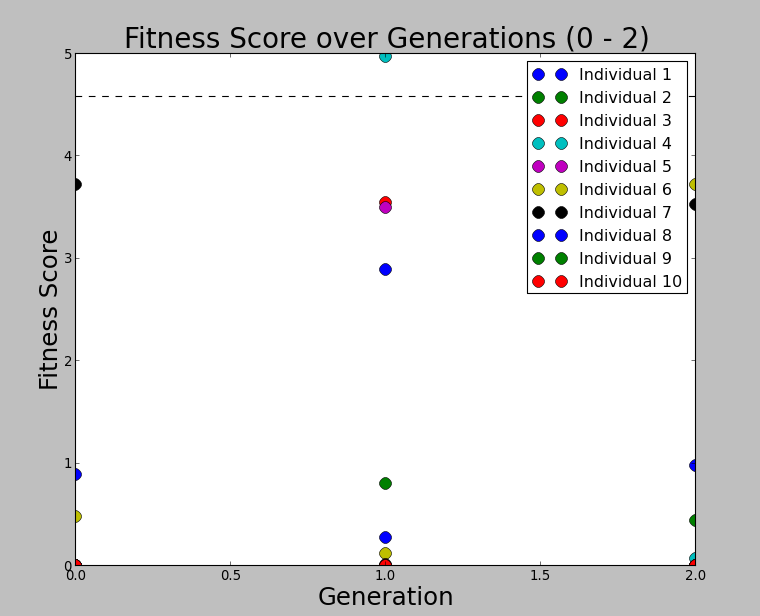 |
|
44
|
Tue Apr 7 15:48:54 2020 |
Julie Rolla | GENETIS Meeting Update | Meeting Attendance: Julie, Alex M., Alex P, Eliot, Leo, Evelyn, Mitchell, Ryan.
Today is the deadline for confirming our attendance at the virtual APS meeting. Alex M. will be confirming and we will be orienting ourselves so that we can have some results. Here is our to-do list for today:
- Create a method for automatically adding our plots to dropbox each day.
- The way we are going to do it is by adding the command: mail -s "Test Subject" someemailaddress@gmail.com < testScript
- We will create a random email to use for this that will only be receiving emails from this command.
- We are trying to find and set up a client that as soon as this random email address receives an email, it uploads it to the Dropbox here.
- This is still being worked on.
- Start developing a database of old antenna runs and parameters, and pull data from that for any repeat dimensions.
- This should speed up some of our run time.
- We want to create a database of old antenna dimensions and their associated UAN files. That way, if we repeat an antenna geometry very closely, instead of re-submitting a job to produce the gain patterns, we can pull from one that has already been created.
- This should limit:
- The number of jobs we have to submit.
- The number of GPU hours/minutes we have to request and wait for.
- These should probably still be run through AraSim, however, since the energy could change from run to run.
- Keep running and collecting data.
- Do we want to run and have data for 20ish generations with 10 individuals for APS?
- We have already made some progress on this so we could likely make more generations for APS if we keep going.
- Do we want to instead switch to doing something like 20 individuals even if we get fewer generations completed?
Notes apropos developing our database for antenna info. This is how we are going to do it, and what we need to develop in our code:
- Add all info to csv files.
- The csv files will have columns: length, radius, theta, uan file directory and name (ie /file/location/database#/).
- # will be the row that this matches the L, R, Theta within the csv file
- Inside /file/location/database#/ will be all the uan files for each frequency for these dimensions.
- We need an "if/else" statement in the bash script that tells the code to look in this csv file (read it in).
- IF the produced L, R, Theta match any of those that currently exist, save the 4th column (file location) to a variable (say we call it ExistingUan=/file/location/database#/).
- Then cd ExistingUan
- Make a loop that:
- does CP /file/location/database#/gen_individual_freq.uan BiconeEvolutionOSC/BiconeEvolution/current_antenna_evolution/XF_Loop/Evolutionary_Loop/Run_Outputs/$RunName/ (ie to the file name and location that XFintoAra.py reads. This will make sure that it has the data as if we actually completed the XF simulations for the antennas that had repeat sizes from our past runs (I mean past by runs we may have EVER done -- not past generations).
- We need to copy ALL of the frequency uan files for that individual into Run_Outputs/$RunName
- Else fill another line in that csv file with the L, R, Theta of this individual so we can keep it for later.
- mkdir the new directory /file/location/database#/
- Add the name of this new directory (ie database#) to the 4th column on the csv file next to the correlating L, R, Theta.
- Then submit the XF job for this individual.
- Once it finished the XFSolver job and produces the .uan files (for each frequency), do a loop that:
- cp individual_freq.uan /file/location/database#/gen_individual_freq.uan
- Note that I wrote to cp individual_freq.uan instead of gen_individual_freq.uan. Note that XF produces it as individual_freq.uan, and it is changed to gen_individual_freq.uan when we move it into the Run_Outputs/$RunName directory.
- So you can do it either (1) after it moves it to Run_Outputs/$RunName with the name gen_individual_freq.uan, or (2) before it moves the file with the name individual_freq.uan.
- We need to make a new directory that holds all of these database# directories and their uan files, and the csv file the "if/else" statement checks.
- We need to add this new directory to the .gitignore!
|
|
Draft
|
Mon Apr 13 14:43:54 2020 |
Julie Rolla | GENETIS Meeting Update | Note that Pitzer usage over the weekend was much better! Maybe weekends are our best time to run? Today (Monday) has been a little bit worse.
Over the past few days the following items have been accomplished:
- We got the jobs to stop canceling on OSC.
- Issue was the destination command for the error and output files for the GPU jobs inside the GPU job script; we fixed it by taking it out.
- This issue was causing jobs to fail. They are no longer failing, and the loop is working again.
- Set up a way to be able to automatically upload both the L, R, Theta plots and the Fitness Score plot to dropbox as we work.
- Set up an email that automatically uploads to dropbox under the folder GP_Antennas/Updates/DailyFitnessScoreImages when you send an attachment with that email.
- We added this command into the loop:
mail -s "Subject" dropbox.2dwp1o@zapiermail.com < FScorePlot2D.png
- It automatically has it upload an image when the loop finishes a generation. It's currently so that the file will be named whatever the subject of the email is so we can control that by whatever is after the -s command. It's currently set to not overwrite.
- Still need to add the Veff plot to dropbox.
- Made gitpush.sh and gitpushforce.sh
- Each time one of us pushes changes to GitHub, it makes a permssion lock on the directories. From now on, after looking at what files are changed (using git status. Remember to make sure to add any data files missed to the .gitignore)users should do:
- git add .
- git commit -m "add message" or git commit --amend --no-edit
- Then run: ./gitpush.sh if you made a full new commit, or use ./gitpushforce.sh if you amended this edit to the previous commit. They both exist in: /fs/project/PAS0654/BiconeEvolutionOSC
- These files run the git push or git push -f commands and then immediately run a chmod to change permissions after.
- Alex is starting the APS slides!
- He should be sharing them shortly. I told him to look at Suren's from last year for guidance.
- We have started working on adding the feature that pulls non-unique (ie repeat parameter) individuals from an antenna database.
- It's currently being developed on the Antenna_Database branch in git.
- Alex has started writing c++ code that reads in the csv file and appends unique items to it.
- Comments from Amy we need to remember:
- Doing "==" on doubles is bad!
- We want this "likeliness" to be between 1 and 10% (start with 10%).
- Remember: is this difference between L stored and new L a fraction of the wavelength?
|
|
47
|
Thu May 7 14:35:00 2020 |
Julie Rolla | GENETIS Meeting Update | The students have been meeting to work out the summer schedule. We are dividing into to groups:
(1) Paper writing: Julie, Alex M., Alex. P
- We need Amy to start an overleaf draft (she has the premium version that allows you to share with more than 1 person)
- In tomorrow's collaboration meeting (Now Fridays at 3pm) we are going to request discussion on an outline
(2) Adding wall time variable structure: Eliot, Evelyn, Leo (Alex P. will help oversee)
- In order to prepare group (2) Alex M. has been going over the edits he started and is discussing his code. We also are taking some time to catch them up on the current code -- ie how it runs, what all of the pieces involved do -- so that they can know how to test the code after edits are made, and where each essential piece may lie. We will be going over this for the next few days in good detail.
- Group (2) will then be coming up with a scheduled time each day that they will be coworking on zoom. This will work the same as if they were sitting in an office together. They'll announce this time to everyone once it is set.
Alex P, Alex M, and I are going to push to rapidly finish this antenna database so that the others can create a new branch to work on the wall time variable with. This will leave us very busy for the next few days. |
|
48
|
Mon May 11 17:56:36 2020 |
Julie Rolla | GENETIS Meeting Update | We met today for a long time and pushed to catch up. The following is what we have done:
(1) Worked for a bit on our current tasks. They will work on these current tasks before they start on their summer projects.
- Antenna database (Julie, Alex P., Alex M.)
- Worked on a paper outline (Julie, Alex M.)
- Worked on wall time variable (Eliot, Evelyn, Leo)
Note I also have to: (1) Fix merge conflict and make sure students are good about only editing the dev branch moving forward. (2) Get branches and GitHub set up for both the asymmetric bicone and the non-linear bicone.
(2) Went over the details of how the loop works as a group.
- Went over how each piece works.
- Went over how to run it.
- Went over best ways to test new edits.
(3) Went over summer tasks.
- Eliot: Add parameters to bicone (ie make bicone asymmetric)
- Julie & Alex M.: Paper, and helping others
- Alex P.: Frequency database for AraSim (to speed up AraSim)
- Evelyn & Leo: Make non-linear bicone (wiggly sides)
|
|
49
|
Mon May 18 15:13:13 2020 |
Julie Rolla | GENETIS Daily Update | Today's Summer 2020 daily update:
| Name |
Update for Today |
Plans for Tomorrow |
| Alex M. |
(See Alex P. for details on working on fixing loop issues)
Went over running the loop with Ryan. Worked with Ryan on trying to get the X11 forwarding for XF to work, but we couldn't get the license. Steven suggested that we try running from a Pitzer desktop, which I think is a good idea if the problem is with the X11 forwarding; if it's a license issue, then we need to figure out where the license is located. I thought this would have been written somewhere in our code, but I couldn't find it, so I may need to email OSC.
Worked more on the symmetric bicone part of the paper. I think I could afford to add detail to the results portion. I included the plots from the APS presentation, but we still need to finish a rerun with the same number of generations and individuals to see if the data makes sense (particularly, I want to see if there was a mistake made when continuing the run after it had finished the 10th generation because I'm skeptical about the fact that we got such large angles in generation 12).
|
I'll meet with Evelyn and Ryan tomorrow to discuss running the loop in more detail. I'll help Ryan use the Pitzer desktop, which will hopefully work. If all goes well, we can get them started on running the loop to check against the data from the run I mentioned in the paper.
I'm going to try writing in the section for Genetic Algorithms in the paper, since Kai said he wanted me to take the first attempt at it. I think for now I'd like to get comments on what I've written on the symmetric bicone portion before I clean it up, especially on whether or not I've given enough detail (and clearly enough).
|
| Alex P. |
Continued to test the database functionality. In the process of testing and debugging we also tested random seed functionality of the genetic algorithm as we used a fixed seed and successfully got repeat results across multiple runs, which allowed better testing as we could be certain to encounter the same scenario when testing and figuring out how to overcome an error.Altered some of the xmacros and xf calls to work with database and created the new macro skeleton for output.xmacro to use just with the database, in the process of looking through the xmacros we found some segments of the code to investigate further. Currently, we just use values 1 to NPOP of the XF simulation and rewrite the contents of 1 to NPOP each generation, but more simulation values continue to be generated even if unpopulated. Also looked more into this and started implementing a way to take out the excess directories while also planning out a way to have each generation use new values rather than overwriting so that we can have a full record of all the simulations across generations rather than just the most recent generations. |
Going to continue to test database, have a run starting gen 1 now and going to continue that tonight, hopefully will find useful results and if not then things to debug. Eliot and Leo asked for help tomorrow with C++ code as they have had some problems with pointers and I agreed to help them tomorrow. |
| Leo |
I, along with Eliot, worked on implementing the new parameter. We have been working on 2 methods, one being adding a 4th gene and the second being adding another chromosome. We are focusing our attention on the chromosome method because we feel it will lead its way nicely into our future work later this summer with adding more complicated parameters. We are running into some issues with pointers and vectors within the GA that we worked on fixing. |
Tomorrow we hope to fix the issues with the pointers and vectors, and hope to test it with multiple generations. |
| Eliot |
Currently working on developing GA further to properly accept 2 chromosomes. The first chromosome has some radius, length, theta and the second chromosome has the same radius and theta, but its own unique length. I currently have the code properly populating an initial pool. However, it can not quite evolve. The GA is free of syntax errors, but I am getting some type of pointer error. I am working to resolve this. I believe it is the only obstacle left on the GA side of things, but it may not be.
|
I will continue working on fixing the errors in the GA, and hopefully finish that tomorrow. If so, I will begin learning about the XF implementation.
|
| Evelyn |
Had class, so I couldn't meet with the group
|
Get caught up with the stuff from today |
| Ryan |
|
|
Julie: Since I won't be doing GENETIS work every day necessarily, I'll add myself down here with a blurb when I am working with the others. I will also be continuing my daily updates on Dropbox for non-GENETIS specifics. |
|
62
|
Wed Jun 3 15:20:04 2020 |
Julie Rolla | Existing Info for Current Projects | Paperclip Antenna (Ryan and Evelyn working on it):
Asymmetric Bicone (Leo and Eliot working on it):
AREA (Ben working on it):
- Github? We need to ask Steph where their past work exists.
- See AREA thesis attached
Symmetric Bicone(Alex M. and Alex P. working on it):
|
| Attachment 1: AREAthesis.pdf
|
|
132
|
Tue Apr 6 18:00:23 2021 |
Julie Rolla | GENETIS Google Drive with Talks/Posters, Grant writings, Papers | https://drive.google.com/drive/folders/1iDamk46R2_oOLHtvsOg4jNy05mCiB7Sn?usp=sharing |
|
141
|
Fri Feb 4 16:10:32 2022 |
Julie Rolla | Run Log Template | For PAEA Algorithm:
Part I: Complete as soon as the run starts
Run details: Please answer all of the questions below!
- Run Type
- Answer here whether or not it's AREA (Gain pattern evolution) or PAEA (Bicone evolution)
- Run Date
- Run Name
- Parameters evolved
- Why are we doing this run?
- Add answer here about what we are testing
- What is different about this run from the last?
- Add answer here with info on what we are doing differently from the last run
- Example: We are testing a new operator, we are changing the percentages of each selection method used, etc.
- Symmetric, asymmetric, linear, nonlinear (what order):
- Add answer here (say N/A if this is an AREA run)
- Number of individuals (NPOP):
- Number of neutrinos thrown in AraSim (NNT):
- Operatiors used (% of each):
- Selection methods used (% of each):
- Are we using the database?
- Add answer here. This can be found in the main bash script within the variables section. (Answer N/A for AREA run)
Please upload the text file with all run details before closing this!
Part II: Complete as soon as the run ends
Results: Once this run completes, please upload the plot(s) to this post as an attachment, as well as a general explanation of the results.
- Summary and comments on results
- Add thoughts on what we should do next here!
- Example: "It seems like we are seeing minimal evolution. We should take a step back and try to see why we don't see improvement. Once we trouble shoot, we can start a new run to investigate."
- Example 2: "Run looks good! Our best individual is in generation #12. Attached are the CAD drawings of that individual."
**Upload all plots, run parameter text files (file that has run settings saved), CAD models of best indivduals, etc**
For AREA Algorithm:
Part I: Complete as soon as the run starts
Run details: Please answer all of the questions below!
- Run Type
- Answer here whether or not it's AREA (Gain pattern evolution) or PAEA (Bicone evolution)
- Run Date
- Run Name
- Parameters evolved
- Why are we doing this run?
- Add answer here about what we are testing
- What is different about this run from the last?
- Add answer here with info on what we are doing differently from the last run
- Example: We are testing a new operator, we are changing the percentages of each selection method used, etc.
- Single frequency run or run with broadband frequency dependence:
- Number of individuals (NPOP):
- Number of neutrinos thrown in AraSim (NNT):
- Operatiors used (% of each):
- Selection methods used (% of each):
- Any other things to note?
Please upload the text file with all run details before closing this!
Part II: Complete as soon as the run ends
Results: Once this run completes, please upload the plot(s) to this post as an attachment, as well as a general explanation of the results.
- Summary and comments on results
- Add thoughts on what we should do next here!
- Example: "It seems like we are seeing minimal evolution. We should take a step back and try to see why we don't see improvement. Once we trouble shoot, we can start a new run to investigate."
- Example 2: "Run looks good! Our best individual is in generation #12. Attached are the CAD drawings of that individual."
**Upload all plots, run parameter text files (file that has run settings saved), gain patterns of the two best and two worst individuals, etc**
|
|
Draft
|
Thu Mar 26 15:56:22 2026 |
Julie Rolla | GENETIS Planning Meeting |
| Quote: |
|
Attendance: Julie Rolla, Alex M.
Today Alex and I met to discuss how to move forward given the COVID-19 restrictions. We have resent out a message polling people's schedules to create online working sessions. Here is what we are planning:
| Group name |
Tasks |
Participants |
Times per week to meet |
| Loop Group |
Running the loop, updating software, getting plots |
Julie, Alex M., Alex P. |
2 |
| Lecture |
Attend Leo's lectures |
Full group |
1 |
| Training (Python, c++, and Bash projects) |
Completing the training modules (Alex M. and Julie will be answering questions) |
Mitchell, Ryan, Evelyn, Eliot, Julie, Alex M. |
2 |
Once we collect times for each group, we will have separate meetings for all of these entities. This way it's easier for us to meet without all having different items to discuss/work on. All of these will be zoom meetings moving forward. Meeting info will be announced shortly!
Tasks for "the Loop Group":
- Make wall time a variable for XF sim.
- Test current software edits.
- Such as item #1 above
- Make sure the bottleneck function is working.
- Right now it seems to be working; however, we keep hitting a wall time error. If we can make the wall time a variable then we can be sure the bottleneck function is working, and the wall time is truly the error.
- Get Ruby working on XF
- when I type:
/usr/local/xfdtd/7.8.1.4/remcom/bin/xfdtd I get:
Info: Using latest available version (7.8.1.4)
Info: Running /usr/local/xfdtd/7.8.1.4/remcom/XFdtd_7.8.1.4/bin/xfdtd
Error: Unable to find executable to run.  This command must exist
- Get Alex's account of Ruby working.
- He received an email and is still unable to log in. He is touching base with them again.
Tasks for "the Training Group":
- Julie and Alex need to finish the C++ project!
|
|
|
Draft
|
Fri Apr 17 17:04:21 2026 |
Julie Rolla | GENETIS Google Drive with Talks/Posters, Grant writings, Papers |
|
|
Draft
|
Sun Apr 19 15:27:42 2026 |
Julie Rolla | Week 11/12/19 Update |
| Quote: |
|
Attendance for today's session: Cade, Julie, Alex M, Alex P, Mitchell, Scott.
Monday was a holiday, and we will be replaceing that meeting later this week. Today we worked on the following tasks:
Tasks:
- Check continuity of loop
- Alex M will try another run tonight, and has already requested a virtual desktop.
- Install Arasim to /fs/projects/PAS0654/BiconeEvolutionOCS to be edited and messed with
- Cade is testing whether or not this is running within the loop. He had gotten a few errors, and it is not completing. It's submitting the job with the new bash script, but it is not actually running.
- Found an error. The bash script was not grabbing the correct AraSim directory. More updates to come.
- Clean bash script
- Mitchell and Alex M are putting all current functions hard-coded in into their own .sh scrips that are now being called in the main bash script.
- Update Manual
Right now Elliot and Leo have decided to focus on working with Keith. They will not be contributing to this project for the remainder of the semester. Students have been posting individual updates here: https://www.dropbox.com/home/GP_Antennas/Updates
I've also attached the meeting minutes from the call last week, in order to keep track of updates.
|
|
|
Draft
|
Mon Apr 20 00:59:46 2026 |
Julie Rolla | GENETIS Working Meeting |
| Quote: |
|
Today's Tasks
Julie: Write bash practice assignment, assist others when they have questions, work on Git lecture. (Will finish bash assignments early next week)
Evelyn, Mitchell, Eliot: Make progress on the "Learn the Command Line" course on Code Academy. (Should be done by the end of the week?)
Leo: Start gathering information for the "physics of antennas" lecture series! Note: Remember that Leo wants to be an educator, and would like us to find opportunities to work on "teaching" items. Most of the students don't have any background on how antennas work. He started learning about them and is going to do a lecture series (likely the first 20 minutes of every meeting) starting in a few weeks! (Should start series by hopefully 2/21)
Alex M: Clean up unused code. Fix hard-coded directories (likely finished & tested by end of day 2/11)
Alex P: Fix hard-coded variables (likely finished & tested by end of day 2/11)
I've tacked on our to-do list in the meantime so we can keep carrying the items still pending along with us. As we complete them, I will drop them off the list!
TO-DO List
The following is our coding to-do list:
-
Get our Ara sim error fixed (Alex, Julie)
-
It seems that if AraSim jobs are left to run while the user is away, it doesn't properly write one or more of the flags, and makes the loop get stuck at AraSim. We must then re-run from that state by manually editing the Save State text file.
-
We are going to try to get XF to run at the command line so that we can submit it as a job. This would alleviate us using an interactive job. We *hope* this would fix the error since the user wouldn't be "gone" while utilizing a GPU in an interactive job.
-
Alex emailed XF to ask a few questions! Stay tuned!
-
Make Hardcoded directories variables.
-
Xmacros (use sed command)
-
All over bash script functions.
-
AraSim job files (sed command?)
-
Make the following variables in the bash script:
In xmacros/simulationPECmacroskeleton_prototype.txt (use sed command):
Grid spacing=0.1
Frequency= factor of n higher
This factor of "n" higher in frequency has to be the same as the Multiplier_factor in the roulette algorithm AND the same as GeoFactor in fitnessFunction_ARA_amy.cpp.
In roulette_algirithm.cpp
Length = 50cm/Multiplier_factor;
STD= 15cm/Multiplier_factor
Radius = 1.5cm/Multiplier_factor;
STD= 0.75cm/Multiplier_factor
Also the "Multiplier_factor" line 89.
This "Multiplier_factor"has to be the same as the GeoFactor in fitnessFunction_ARA_amy.cpp AND the same as the factor higher in frequency in the xmacro.
NOTE:THIS MUST BE RECOMPILED AFTER CHANGING.
In fitnessFunction_ARA_amy.cpp:
GeoFactor=2
This GeoFactor has to be the same as the Multiplier_factor in the roulette algorithm AND the same as the factor higher in frequency in the xmacro
NOTE: THIS MUST BE RECOMPILED AFTER CHANGING.
-
Get rid of all code we are not using anymore.
-
Currently using: XF_loop_AraSeed.sh
-
Look at what items are being called in here, and remove old versions such as XF_loop_Prototype.sh, XF_loop_Functionized.sh, and the related scripts.
-
These can temporarily moved to on "old code" directory and we can delete once we finalize the loop.
-
Turn tournament on in the GA.
-
Parallelize the AraActualBicone job.
-
The AraSim run in Gen 0 that gets Veff for the ARA actual bicone input file is not currently being seeded.
|
|
|
Draft
|
Mon Apr 20 01:57:35 2026 |
Julie Rolla | ONBOARDING: Tutorial Projects, Reading, Setup, etc. for New Students |
| Quote: |
|
For each new student joining the group, we ask them to onboard by completing each of the following items in the order given:
(1) Go to osc.edu and request an account
(2) Complete the following tutorials and reading. Note that the order of these does not matter, however, I would suggest "how to use Git" comes last, as it is the lease important for you to start. Finally, I advise you work on a tutorial concurrently with reading the pages assigned below from my Dissertation.
- OSC tutorials
- Because this project uses a lot of computation power, we run on the Ohio Super Computing Center's clusters. Please utilize these tutorials to learn more.
- Read Julie's Dissertation pages 1-9, 12-20 (starting at section 1.5.2), 28-37 (starting at section 2.3)
- Feel free to read chapter 3, as it has the history of this project and goes into details of our most up-to-date endeavors. This is optional and not mandatory.
- Complete the introduction to Bash project
- Complete the introduction to Python Project
- How to use Git (optional)
- Make sure to get an XFdtd license on OSC
(3) Finally, review the full manual and complete the bullets below. The full manual is Appendix A of Julie's Dissertation.
- Appendix A of my dissertation is our manual and acts as the holy grail of our research. Anything you need can be found here (from where our info exists on the web, to how to run the code).
- Once you have read this through entirely, we advise you log on to OSC and explore the code for PAEA in PAS1960. Once you have done so, complete this homework by making a copy of this google doc and filling it out on your own.
Once these are completed, the students are ready to start helping. This is all of the coding information and basic background information on evolutionary algorithms students must know to be proficient in assisting.
Other useful materials we have may include:
- Our old GENETIS manual
- This is somewhat out of date; however, it does have information on the general working on the loop.
- Julie's candidacy paper
- Complete the writing a genetic algorithm in C++ project
- This is still a work in progress! I'll complete it shortly!
- Read chapter 3 of this book (more if you have time) by Eiben and Smith, "Introduction to Evolutionary Computation" for a quick introduction. The book should be available electronically from a university library. Let us know if you can't find it there.
- Get to know XFdtd
- XFdtd manual is also attached; however, the link above (in 5) is more useful for coding a .xmacro.
Important notes:
MAC USERS: Using a GUI when connecting to OSC via SSH from your terminal.
You will need to set up X11 forwarding. Otherwise, when you go to plot via SSH, they will not display (they don't forward from OSC to your machine). If you are unable to run GUI's on OSC through your computer's terminal, follow these instructions:
- In your own system's terminal, type: sudo vi /etc/ssh/sshd_config
- Search for the following line: X11Forwarding no
- Change it to: X11 Forwarding yes. Save the file and exit.
- In your own system's terminal, type: sudo systemctl restart sshd
- For a Mac, download and install XQuartz.
- Connect to OSC using ssh -XY username@hostname.
- You can test that this works by typing 'xeye' or 'xclock' in the terminal when logged into OSC.
Now you should be able to use OSC's GUIs.
PC USERS:
As a PC user, there are a few things you need to do:
(1) Enable the Windows Subsystem for Linux on your device (https://developerinsider.co/stepwise-guide-to-enable-windows-10-subsystem-for-linux/#:~:text=To%20enable%20the%20Windows%20Subsystem,list%20here%20and%20click%20OK.)
(2) Get Bash on Ubuntu installed on your machine. You are going to need to have Bash on Ubuntu installed prior to starting these trainings; otherwise Bash commands will not be recognized.
(3) Get X11 forwarding working. Otherwise, when you go to plot via SSH, they will not display (they don't forward from OSC to your machine).
- Follow these steps here.
- Change your config file. To do so, in terminal (with Bash on Ubuntu open)
- type: sudo vi /etc/ssh/sshd_config
- Then change '#X11Forwarding no' to '#X11Forwarding yes' and save it.
- Make sure Putty and Xming are running every time before you ssh in. Use Xlaunch application to run Xming and press yes to everyrthing.
- Xming should now be running as a background task.
- Open PuTTY and open the pre-saved like you saved in PuTTY. (This will open a Bash terminal that asks for your OSC login password.)
|
|
|
195
|
Wed Feb 15 16:33:17 2023 |
Jacob Weiler | pueoSim Input Files | Input File Format for pueoSim (Also ICEMC)
Frequency Range: From 200 MHz to 1500 MHz incrementing by 10 MHz steps
There are 8 different files that are required for pueoSim. They are:
vv_0: Max Gain at each Frequency, Vertical Polarization
hh_0: Max Gain at each Frequency, Horizontal Polarization
vh_0: Max Gain at each Frequency, Vertical to Horizontal Polarization
hv_0: Max Gain at each Frequency, Horizontal to Vertical Polarization
vv_el: Gain at Theta Angles [5, 10, 20, 30, 45, 90] for each Frequency, Vertical Polarization
vv_az: Gain at Phi Angles [5, 10, 20, 30, 45, 90] for each Frequency, Vertical Polarization
hh_el: Gain at Theta Angles [5, 10, 20, 30, 45, 90] for each Frequency, Horizontal Polarization
hh_az: Gain at Phi Angles [5, 10, 20, 30, 45, 90] for each Frequency, Horizontal Polarization
Currently XF doesn't output all the information we need to create all these files. The only files able to be made from current XF outputs are vv_0, vv_el, and vv_az. Once we have the correct XF Outputs, it shouldn't be too much of a hassle to fix the current translation code.
Format for each of the files are the same. One column is Frequency (Hz) and the other is Gain. Attached are example files vv_0 and vv_el to visually see the format, though the frequency range is the current ARA range and not the final PUEO range as I am using ARA data to make these files. The files are named vv_0 (no .txt or .csv or any extension) and vv_el
Link to Google Doc with this information: https://docs.google.com/document/d/1iRUF6hIEyQfMK0LL21caRuHPgXYP30ZdkSkFv_-Y8R0/edit |
| Attachment 1: vv_0_1
|
8.33e+07 2.11822
1.00e+08 0.9436538
1.17e+08 1.205556
1.33e+08 2.149637
1.50e+08 2.729287
1.67e+08 2.619639
1.83e+08 2.532374
2.00e+08 2.289813
2.17e+08 2.406259
2.33e+08 2.442176
2.50e+08 2.628373
2.67e+08 2.359219
2.83e+08 1.761219
3.00e+08 1.502431
3.17e+08 2.106109
3.33e+08 2.71283
3.50e+08 3.247887
3.67e+08 3.524175
3.83e+08 3.615199
4.00e+08 3.448137
4.17e+08 3.003371
4.33e+08 2.217343
4.50e+08 0.9601937
4.67e+08 -0.757537
4.83e+08 -3.06678
5.00e+08 -5.635237
5.17e+08 -8.2271
5.33e+08 -9.618924
5.50e+08 -9.791239
5.67e+08 -9.201792
5.83e+08 -9.086395
6.00e+08 -9.560636
6.17e+08 -10.94548
6.33e+08 -13.11583
6.50e+08 -16.3255
6.67e+08 -22.45401
6.83e+08 -34.91041
7.00e+08 -18.52293
7.17e+08 -12.31584
7.33e+08 -8.076791
7.50e+08 -5.287256
7.67e+08 -3.399354
7.83e+08 -2.394224
8.00e+08 -2.031315
8.17e+08 -2.07204
8.33e+08 -2.531995
8.50e+08 -3.185455
8.67e+08 -4.223504
8.83e+08 -5.275337
9.00e+08 -6.274862
9.17e+08 -6.532893
9.33e+08 -6.242696
9.50e+08 -5.514515
9.67e+08 -4.831669
9.83e+08 -4.240883
1.00e+09 -3.779134
1.02e+09 -3.558248
1.03e+09 -3.38254
1.05e+09 -3.543484
1.07e+09 -3.611961
|
| Attachment 2: vv_el_1
|
8.33e+07 -19.61153
1.00e+08 -21.05896
1.17e+08 -21.14054
1.33e+08 -20.63561
1.50e+08 -20.56293
1.67e+08 -21.11712
1.83e+08 -21.6924
2.00e+08 -22.23107
2.17e+08 -22.38623
2.33e+08 -22.01034
2.50e+08 -20.95566
2.67e+08 -19.49215
2.83e+08 -19.23056
3.00e+08 -21.02166
3.17e+08 -24.84512
3.33e+08 -30.42641
3.50e+08 -30.39998
3.67e+08 -24.79053
3.83e+08 -20.92692
4.00e+08 -18.28975
4.17e+08 -16.42205
4.33e+08 -15.10437
4.50e+08 -14.27861
4.67e+08 -13.84517
4.83e+08 -13.72481
5.00e+08 -13.71555
5.17e+08 -13.67698
5.33e+08 -13.47088
5.50e+08 -13.12691
5.67e+08 -12.80078
5.83e+08 -12.76288
6.00e+08 -13.29937
6.17e+08 -14.53883
6.33e+08 -16.51551
6.50e+08 -19.31712
6.67e+08 -23.38054
6.83e+08 -28.77149
7.00e+08 -26.26056
7.17e+08 -20.68733
7.33e+08 -16.92428
7.50e+08 -14.40974
7.67e+08 -12.83548
7.83e+08 -11.95044
8.00e+08 -11.46287
8.17e+08 -11.11874
8.33e+08 -10.75576
8.50e+08 -10.35075
8.67e+08 -9.963577
8.83e+08 -9.712427
9.00e+08 -9.691508
9.17e+08 -9.958833
9.33e+08 -10.48243
9.50e+08 -11.25391
9.67e+08 -12.16331
9.83e+08 -13.22009
1.00e+09 -14.23114
1.02e+09 -15.10789
1.03e+09 -15.45052
1.05e+09 -15.20106
1.07e+09 -14.44125
8.33e+07 -13.61057
1.00e+08 -15.05177
1.17e+08 -15.12521
1.33e+08 -14.60951
1.50e+08 -14.52322
1.67e+08 -15.06334
1.83e+08 -15.62302
2.00e+08 -16.1491
2.17e+08 -16.29245
2.33e+08 -15.91477
2.50e+08 -14.8618
2.67e+08 -13.39692
2.83e+08 -13.1095
3.00e+08 -14.84329
3.17e+08 -18.54948
3.33e+08 -24.02788
3.50e+08 -24.85216
3.67e+08 -19.17134
3.83e+08 -15.1775
4.00e+08 -12.46181
4.17e+08 -10.53846
4.33e+08 -9.176889
4.50e+08 -8.313917
4.67e+08 -7.849362
4.83e+08 -7.705056
5.00e+08 -7.681289
5.17e+08 -7.638247
5.33e+08 -7.434054
5.50e+08 -7.090922
5.67e+08 -6.756147
5.83e+08 -6.694556
6.00e+08 -7.188318
6.17e+08 -8.361327
6.33e+08 -10.23697
6.50e+08 -12.87492
6.67e+08 -16.64803
6.83e+08 -21.92072
7.00e+08 -21.02616
7.17e+08 -15.29548
7.33e+08 -11.32251
7.50e+08 -8.680712
7.67e+08 -7.026238
7.83e+08 -6.092156
8.00e+08 -5.577537
8.17e+08 -5.222755
8.33e+08 -4.855792
8.50e+08 -4.445815
8.67e+08 -4.04485
8.83e+08 -3.769133
9.00e+08 -3.712655
9.17e+08 -3.934655
9.33e+08 -4.405427
9.50e+08 -5.116381
9.67e+08 -5.962245
9.83e+08 -6.955142
1.00e+09 -7.921253
1.02e+09 -8.79726
1.03e+09 -9.21963
1.05e+09 -9.101768
1.07e+09 -8.46457
8.33e+07 -7.672357
1.00e+08 -9.089356
1.17e+08 -9.131313
1.33e+08 -8.574198
1.50e+08 -8.436004
1.67e+08 -8.923278
1.83e+08 -9.424584
2.00e+08 -9.903976
2.17e+08 -10.00275
2.33e+08 -9.618365
2.50e+08 -8.573076
2.67e+08 -7.108304
2.83e+08 -6.730207
3.00e+08 -8.258189
3.17e+08 -11.54483
3.33e+08 -16.48101
3.50e+08 -20.44362
3.67e+08 -14.99668
3.83e+08 -10.39325
4.00e+08 -7.322492
4.17e+08 -5.15867
4.33e+08 -3.614434
4.50e+08 -2.600771
4.67e+08 -2.012469
4.83e+08 -1.773685
5.00e+08 -1.692136
5.17e+08 -1.631185
5.33e+08 -1.436829
5.50e+08 -1.104481
5.67e+08 -0.7477778
5.83e+08 -0.6082266
6.00e+08 -0.9526983
6.17e+08 -1.891183
6.33e+08 -3.416407
6.50e+08 -5.508213
6.67e+08 -8.350483
6.83e+08 -12.36274
7.00e+08 -15.94441
7.17e+08 -11.94184
7.33e+08 -7.215725
7.50e+08 -4.031596
7.67e+08 -2.033106
7.83e+08 -0.8896422
8.00e+08 -0.2599349
8.17e+08 0.1364451
8.33e+08 0.508579
8.50e+08 0.9189453
8.67e+08 1.351561
8.83e+08 1.703014
9.00e+08 1.881713
9.17e+08 1.823472
9.33e+08 1.546895
9.50e+08 1.061567
9.67e+08 0.4561304
9.83e+08 -0.2820854
1.00e+09 -1.030102
1.02e+09 -1.782719
1.03e+09 -2.307445
1.05e+09 -2.516682
1.07e+09 -2.306051
8.33e+07 -4.297208
1.00e+08 -5.677257
1.17e+08 -5.671377
1.33e+08 -5.051709
1.50e+08 -4.836023
1.67e+08 -5.245572
1.83e+08 -5.661229
2.00e+08 -6.072461
2.17e+08 -6.104968
2.33e+08 -5.710936
2.50e+08 -4.682109
2.67e+08 -3.235083
2.83e+08 -2.745363
3.00e+08 -3.999428
3.17e+08 -6.728222
3.33e+08 -10.71871
3.50e+08 -16.85379
3.67e+08 -15.67102
3.83e+08 -9.610837
4.00e+08 -5.713407
4.17e+08 -3.051436
4.33e+08 -1.161082
4.50e+08 0.1202912
4.67e+08 0.9189369
4.83e+08 1.315152
5.00e+08 1.493735
5.17e+08 1.58528
5.33e+08 1.756137
5.50e+08 2.045786
5.67e+08 2.395989
5.83e+08 2.609925
6.00e+08 2.448707
6.17e+08 1.814713
6.33e+08 0.7368893
6.50e+08 -0.702895
6.67e+08 -2.543868
6.83e+08 -4.926394
7.00e+08 -7.929486
7.17e+08 -9.722289
7.33e+08 -6.876765
7.50e+08 -3.230588
7.67e+08 -0.6956752
7.83e+08 0.8078526
8.00e+08 1.641694
8.17e+08 2.100993
8.33e+08 2.439688
8.50e+08 2.768471
8.67e+08 3.145787
8.83e+08 3.516955
9.00e+08 3.809434
9.17e+08 3.95456
9.33e+08 3.942741
9.50e+08 3.779913
9.67e+08 3.52297
9.83e+08 3.16981
1.00e+09 2.79626
1.02e+09 2.387999
1.03e+09 2.060452
1.05e+09 1.836171
1.07e+09 1.800864
8.33e+07 -1.144795
1.00e+08 -2.455938
1.17e+08 -2.361629
1.33e+08 -1.627502
1.50e+08 -1.273074
1.67e+08 -1.547562
1.83e+08 -1.814825
2.00e+08 -2.110694
2.17e+08 -2.028768
2.33e+08 -1.626653
2.50e+08 -0.6542816
2.67e+08 0.689521
2.83e+08 1.297091
3.00e+08 0.4526482
3.17e+08 -1.408842
3.33e+08 -3.855139
3.50e+08 -7.45269
3.67e+08 -13.8242
3.83e+08 -21.86369
4.00e+08 -10.18875
4.17e+08 -4.926253
4.33e+08 -1.717269
4.50e+08 0.408406
4.67e+08 1.793992
4.83e+08 2.602153
5.00e+08 3.033494
5.17e+08 3.210672
5.33e+08 3.304456
5.50e+08 3.387133
5.67e+08 3.514676
5.83e+08 3.634609
6.00e+08 3.636984
6.17e+08 3.453297
6.33e+08 3.09098
6.50e+08 2.620621
6.67e+08 2.051623
6.83e+08 1.398647
7.00e+08 0.6288801
7.17e+08 -0.2089145
7.33e+08 -0.8729058
7.50e+08 -0.8983268
7.67e+08 -0.1494044
7.83e+08 0.8073187
8.00e+08 1.548733
8.17e+08 1.943862
8.33e+08 2.050232
8.50e+08 1.890077
8.67e+08 1.512847
8.83e+08 0.9992631
9.00e+08 0.4794029
9.17e+08 0.180576
9.33e+08 0.1580454
9.50e+08 0.4193046
9.67e+08 0.7895336
9.83e+08 1.223261
1.00e+09 1.625476
1.02e+09 2.006417
1.03e+09 2.338812
1.05e+09 2.613677
1.07e+09 2.839776
... 61 more lines ...
|
|